By default there is no interaction between one form field and another. However, with the addition of Javascript, you can use the selection of a lookup list option, or the setting of a check box, to display or hide fields.
An example of this can be seen here: Selection changes options form
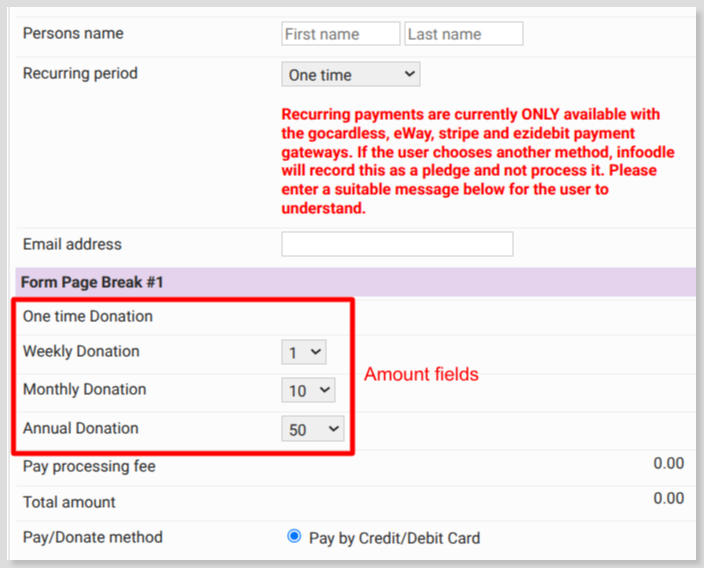
- where the recurring period selection is used to show the associated payment amount field (as buttons), and hide the other options.
- note that each amount field has its own settings - amount per button, account code, campaign, etc.
Form settings
Based on the example above, here are the fields that make up the form:
Associated with each Amount field is a unique CSS class (select Show design options to see this field):
- 'donation-1'
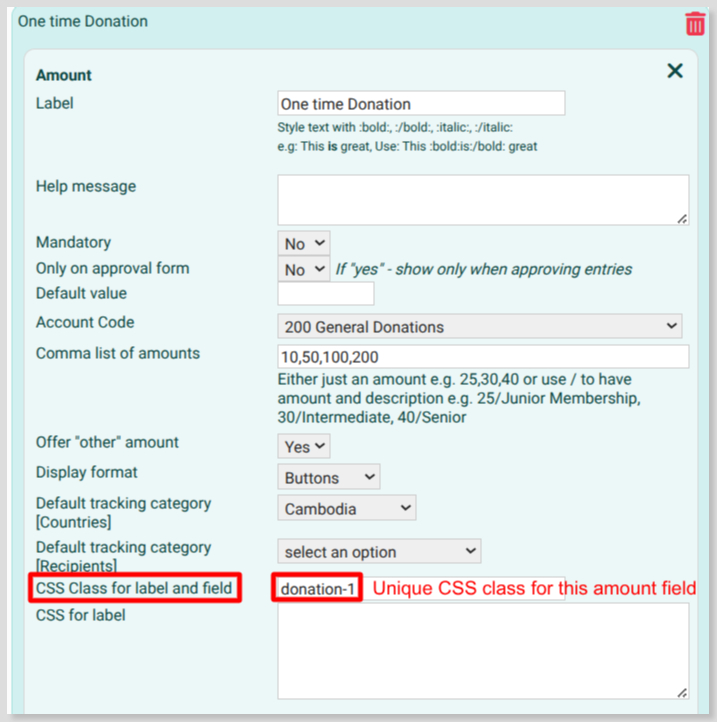
For each Amount field associate an appropriate CSS class - donation-2, donation-3, donation-4, etc.
In addition to this there needs to be another CSS class added to the field that's being used to change the display of Amount fields. In the case of the example form above, the Recurring Period is being used and the following was added:

With these in place add the following to the Form Settings - Appearance - Additional CSS code field:
</style>
<script>

    //the following provides the ability to display and hide multiple amount elements

   function showAmountField(selectedValue) {
        $(".donation-1, .donation-2,.donation-3,.donation-4").hide();

        // One-off
        if (selectedValue == "ONE") {
            $(".donation-1").show();
        }

        // Once per week
        if (selectedValue == "WK") {
            $(".donation-2").show();
        }

        // Once per month
        if (selectedValue == "MTH") {
            $(".donation-3").show();
        }

        // Annual
        if (selectedValue == "AN") {
            $(".donation-4").show();
        }
   }

     // this section sets the amount element to display when the form loads and responds to the change of the recurring dropdown selection - with the CSS Class for label and field set as recuring-period-div

    function userPageLoaded() {
        // $(".donation-1").show();
        $(".hide-element").hide();

        $(".recuring-period-div select").on("change", function () {
            const selectedValue = $(this).val();
            showAmountField(selectedValue);
            reCalcTotals();
        });

        $(".formsection-next").on("click", function(){
            setTimeout(function(){
                showAmountField($(".recuring-period-div select").val());
            }, 400);
        });
    }
</script>

<style>

.amtItemOther {visibility: hidden} /* hides the amount item - other label */
.amtOtherValue {visibility: hidden} /* hides the amount item - other value input field */
/* .currsymbol {display: none}    UK sites only - hides pound symbol */
.ppf .ppf_amount {float: left} /* pay processing fee amount */
.data .entry_holder .total_amount {float: left} /* displays the total amount on the left inline with the start of entry fields */
The JavaScript is what's providing the amount show/hide functionality with the CSS at the bottom:
- hiding the amount Other label and field
- hiding the UK currency symbol (if required)
- alignment of the Pay processing and Total Amount fields to be inline with the start of the Amount fields
If using a field other than Recurring Period you will need to revise the script to match the available options.