Gift Aid settings are where you tell infoodle who your charity is, how HMRC knows you, and who is allowed to send your claims to HMRC. HMRC checks these details against its own records every time you send a claim, so they need to match what HMRC holds for you.
There are two tabs to fill in: Charitable Organisation and Authorised official. You fill each one in once, when you first set Gift Aid up, and then come back to it only if something changes, such as a new treasurer taking over or the day you are ready to send your first real claim.
Before you start
Role Permissions
- Access to Finance area: lets you into the Finance section at all.
- Manage, Read and report on transactions: needed to work with Gift Aid claims.
- Manage finance configurations: needed to open and save the Gift Aid settings screen.
You need all three. If you have only some of them, Settings may still appear in the menu but the page will send you back to your dashboard.
Giving someone all three also lets them open the Authorised official tab and read your HMRC password, which is shown there as ordinary text. Take that into account when you decide who gets Manage finance configurations.
For an explanation of what each role permission does, see Finance Permissions.
- You will need Gift Aid switched on for your site. An administrator turns it on under Administration → Packages & Views, on the Gift Aid for UK Charities row.
- You will need your HMRC Gift Aid number and your Authorised Official's sign-in details. These come from HMRC's Charities Online service, not from infoodle. If you have never registered, do that with HMRC first.
- You will also need your charity registration number and the name of the regulator you are registered with. These come from your own records.
- Note, users who are members of a cluster cannot open the Gift Aid settings screen, whatever other permissions they hold. They can still see the claims list and the claim review screens.
Open the Gift Aid settings screen
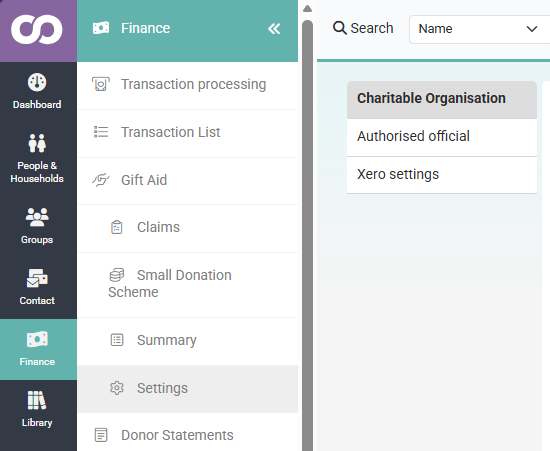
- Click or hover on Finance on the main menu bar on the left.
- Click Gift Aid.
- Click Settings.
The screen opens on the Charitable Organisation tab. The second tab, Authorised official, sits just below it on the left.
Fill in the Charitable Organisation tab
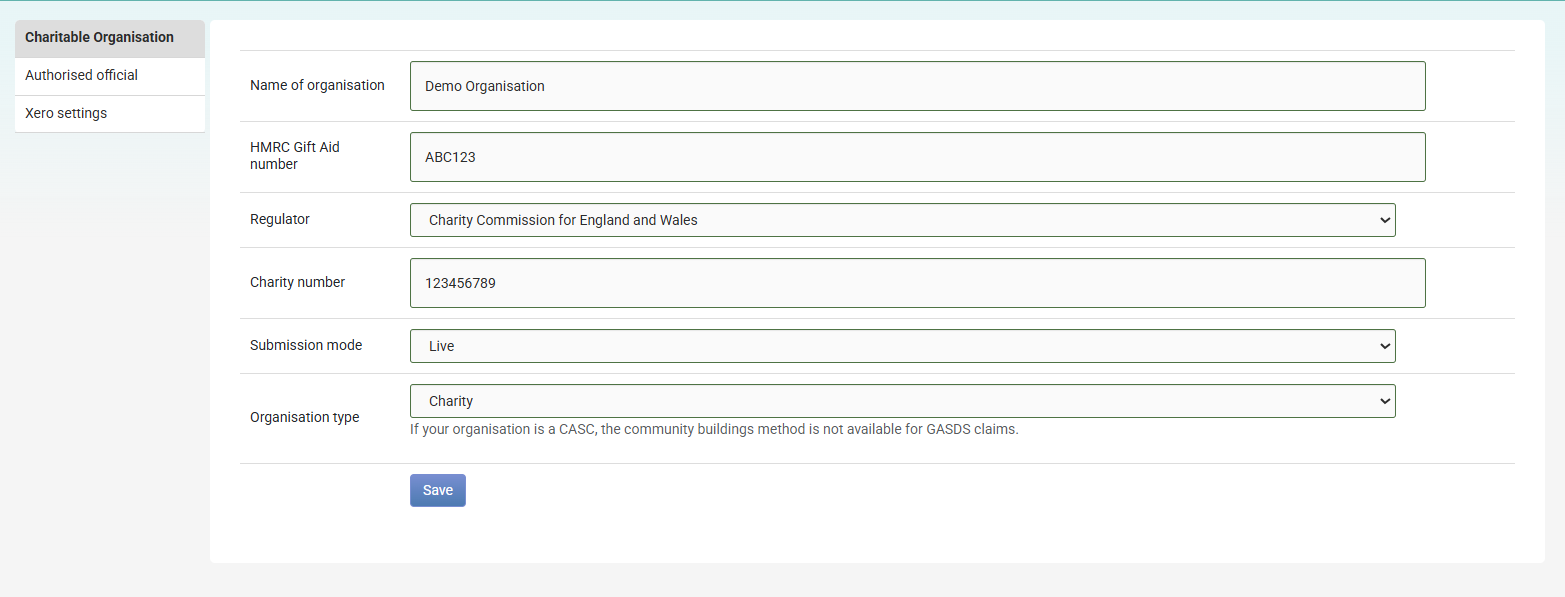
This tab describes your charity. It is the part of the claim that tells HMRC who is asking for the money back.
- In Name of organisation, type your charity's name exactly as HMRC has it.
- In HMRC Gift Aid number, type the reference HMRC gave you when you registered for Gift Aid.
- In Regulator, choose the regulator you are registered with. The list covers the three UK charity regulators: Charity Commission for England and Wales, Charity Commission for Northern Ireland and Office of the Scottish Charity Regulator.
- In Charity number, type your registration number with that regulator. This is a different number from your HMRC Gift Aid number.
- In Submission mode, choose Live or Test. Read Choosing Test or Live below before you change this.
- In Organisation type, choose Charity or Community Amateur Sports Club (CASC).
- Click Save.
infoodle shows Data saved successfully at the top of the screen. The message clears itself after a few seconds.
Every box on this tab has to have something in it. If you leave one empty, infoodle shows An error occurred saving the data, please check all values are completed correctly at the top of the screen. The message does not name the box that was empty, so check each one on the tab.
When a save is refused, infoodle redraws both tabs from what was last saved, so everything you typed on that attempt is gone. This includes the password on the Authorised official tab. Fill the whole tab in again, then save.
Choosing Test or Live
Submission mode decides which of HMRC's services your claims are sent to.
| Setting | What happens when you file a claim |
|---|---|
| Live | The claim goes to HMRC's live service, signed in with the id and password you entered on the Authorised official tab. This is a real claim for a real repayment. |
| Test | The claim goes to HMRC's test service. Nothing is claimed and no money is repaid. infoodle signs in with HMRC's own test user ID and password instead of the ones you entered, though the title, name, phone and postcode you entered are still sent. |
A new site starts on Test.
Important: A test claim is not a safe rehearsal. infoodle marks it as Filed to HMRC and removes those donations from future claims — even though nothing was actually claimed. To recover them you must reset the claim, which is itself a one-way step. See Resetting a Claim.
Because your credentials are never used in Test mode, a successful test claim does not confirm they are correct — your first Live claim is the real proof.
The File Gift Aid screen does not show the current mode. Check Finance → Gift Aid → Settings → Charitable Organisation tab before filing your first real claim.
Switch to Live on the day you are ready to file for real. The change takes effect immediately on Save — there is no confirmation and no audit log — so agree the switch with whoever signs off your claims.
Charity or CASC
Organisation type affects the Gift Aid Small Donations Scheme (GASDS) only. The practical difference: a CASC cannot use the community buildings method for GASDS. infoodle will warn you if you attempt to do so.
More info on the GASDS (Gift Aid Small Donations Scheme).
Fill in the Authorised official tab
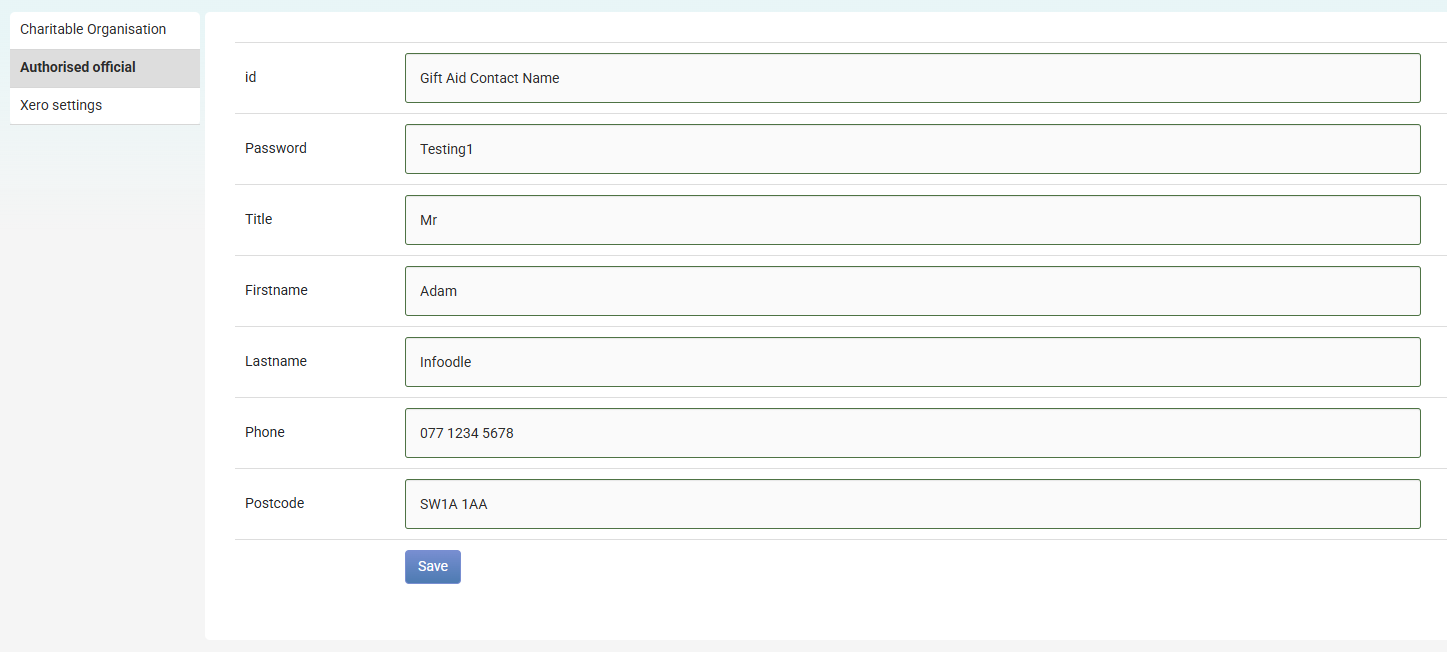
Your Authorised Official is the person HMRC has on record as allowed to submit claims for your organisation. They are the one who registered for Charities Online, and every detail on this tab has to match what HMRC holds for them.
- Open the Authorised official tab.
- In id, type the user ID that person uses to sign in to HMRC's Charities Online service.
- In Password, type the password that goes with that user ID.
- In Title, type their title, for example, Mr, Mrs, Dr.
- In Firstname, type their first name.
- In Lastname, type their surname.
- In Phone, type their phone number.
- In Postcode, type their postcode.
- Click Save.
Saving this tab returns you to the Charitable Organisation tab, whether the save worked or not. Open the Authorised official tab again if you want to check what was stored.
The Password box shows your HMRC password as ordinary text, on the screen and in the page behind it. Anyone holding all three of the role permissions listed in Before you start can open this tab and read it. infoodle also keeps no record of when the id and password were last changed, or by whom.
This tab has its own Save button, separate from the one on the Charitable Organisation tab. Saving one tab does not save the other, so if you change something on both, click Save on each.
Two settings that are shared with your receipts
Two boxes on the Charitable Organisation tab are the same values you can see elsewhere in infoodle, so changing them here changes them everywhere.
| Box on this screen | Where else it appears |
|---|---|
| Name of organisation | Administration → System, as Name of organisation issuing tax receipts. It also fills the {receipt organisation} placeholder on receipt and statement templates. |
| HMRC Gift Aid number | Administration > System, as Charity number. It also fills the {charity number} placeholder on receipt and statement templates. |
The sharing works in both directions. If an administrator edits Charity number under Administration → System, they are also changing the reference infoodle sends to HMRC on your next claim, and they may not know Gift Aid uses it.
The Charity number box on the Gift Aid settings screen is not one of these. It holds your regulator's registration number and is used only for Gift Aid claims.
Common questions
Which number goes in HMRC Gift Aid number, and which goes in Charity number?
HMRC Gift Aid number is the reference HMRC issued you when you registered for Gift Aid. Charity number is your registration number with the Charity Commission or the Office of the Scottish Charity Regulator. HMRC wants both, and they are different numbers.
Do I have to fill in every box?
Yes, on both tabs. infoodle will not save a tab with an empty box, and it clears the whole tab when it refuses, so fill everything in before you click Save.
Can I file a claim without the Authorised official tab filled in?
Not a live one. The Authorised Official's sign-in details are what HMRC uses to accept the claim, so they have to be there before you switch Submission mode to Live.
Our treasurer has changed. What do I update?
Register the new person with HMRC as your Authorised Official first, then come back to the Authorised official tab and replace the id, password, name, phone and postcode with theirs. infoodle stores one Authorised Official only, so the new details replace the previous person's rather than sitting alongside them.
I have a third tab called Xero settings. What is that?
That tab appears when your site is connected to Xero. It tells infoodle what to put on the invoice it raises in Xero once you have filed a claim. Both boxes are required:
- Xero contact name: the contact infoodle will look for in Xero, and create if it is not already there, to raise the invoice against.
- Account code: the account code for the invoice line that records the money returned by HMRC.
Where do I change these settings from?
The organisation name and the HMRC Gift Aid number can also be edited under Administration > System, because they are shared with your receipts. Everything else on this screen is changed from Finance > Gift Aid > Settings.
Next steps
With both tabs saved, you are ready to record who has given you a Gift Aid declaration. See Gift Aid Approval.