In a household, you can mark an adult as a guardian — someone who has responsibility for children or dependents within the same household. The Guardian field in a household record is a simple Yes/No flag that helps you keep track of household structure and responsibility relationships.
Where to Set the Guardian Field
The Guardian field appears when you add or edit a person in a household:
- Go to the profile page of a person you want to set as a guardian
- Click the Information tab
- Then click Edit next to the person's name
- Here you will see the Guardian dropdown field where you can select yes or no:
- Yes — if this person is a guardian or caregiver in the household
- No — if this person is not a guardian (e.g., a child or dependent)
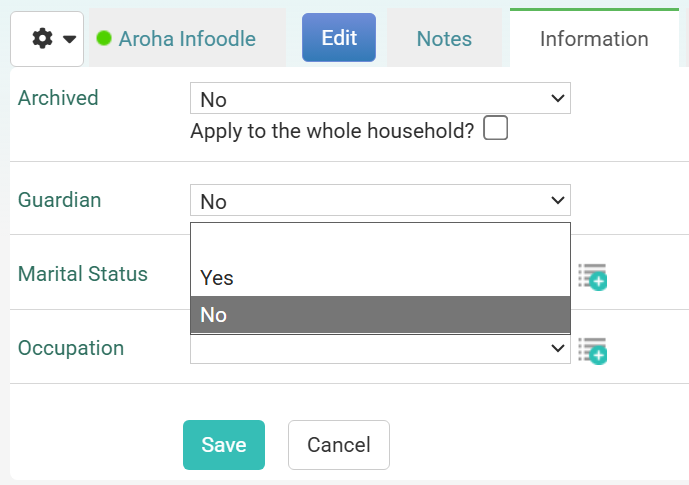
- Click Save
Does the Guardian Field Change Automatically?
Does the Guardian Field Change Automatically?
No. The Guardian field is set manually and does not automatically change based on age or household composition.
However, here's how it relates to age:
- If a person's date of birth shows they are over 18, infoodle classifies them as an adult
- If you mark them as Guardian = Yes, they are treated as an adult caregiver in the household, regardless of their age
- If a person is under 18 (based on date of birth), you would typically not mark them as Guardian (Guardian = No) to indicate they are a dependent, unless there are exceptional circumstances
- You must manually set the Guardian field — it won't automatically adjust when you change someone's date of birth or add them to a household with children.
Why Set the Guardian Field?
The Guardian field is used for:
- Household structure tracking — Documenting who is responsible for dependents
- Combining household members — Only adults and guardians can be combined into household-level records (e.g., "Mr and Mrs Smith")
- Reporting and analysis — Some reports may filter by guardian status to identify households with children or dependents
- Your internal records — Keeping track of household composition for pastoral care, safeguarding, or other purposes
Tips
- Guardians are optional — You don't need to set this field if it's not relevant to your work
- Only adults can be guardians — If someone's date of birth makes them a minor (under 18), you can still mark them as Guardian = Yes, but this is unusual and should only be done in exceptional circumstances
- Not the same as permissions — Setting Guardian = Yes does not grant the person any special access to infoodle or to other household members' information
- Affects combining — Only people marked as Guardian = Yes or adults (age 18+) can be combined into a single household-level contact record
- Manual process — Always review and update the Guardian field manually when household composition changes
Related Articles