If you are having issues with the output of personalisations please check the details at the end of [this page - here]
These personalisations are only available for when generating Income Statements.
Most of the personalisations described in the Donor Statements can be used in income statements too. Go to this page for an explanation and what's available.
Two of the shared tags are worth pointing out, because they are convenient on an income statement and easy to miss in the donor statement list.
In the template editor's tag list, {enddate} sits in the Statements section, which appears for users who have the Manage, Read and report on transactions permission. {organisation name} sits in the Personalisation section, which everyone editing a template can see. Both tags resolve when the statement is generated, whether or not the person who wrote the template could see them in the list.
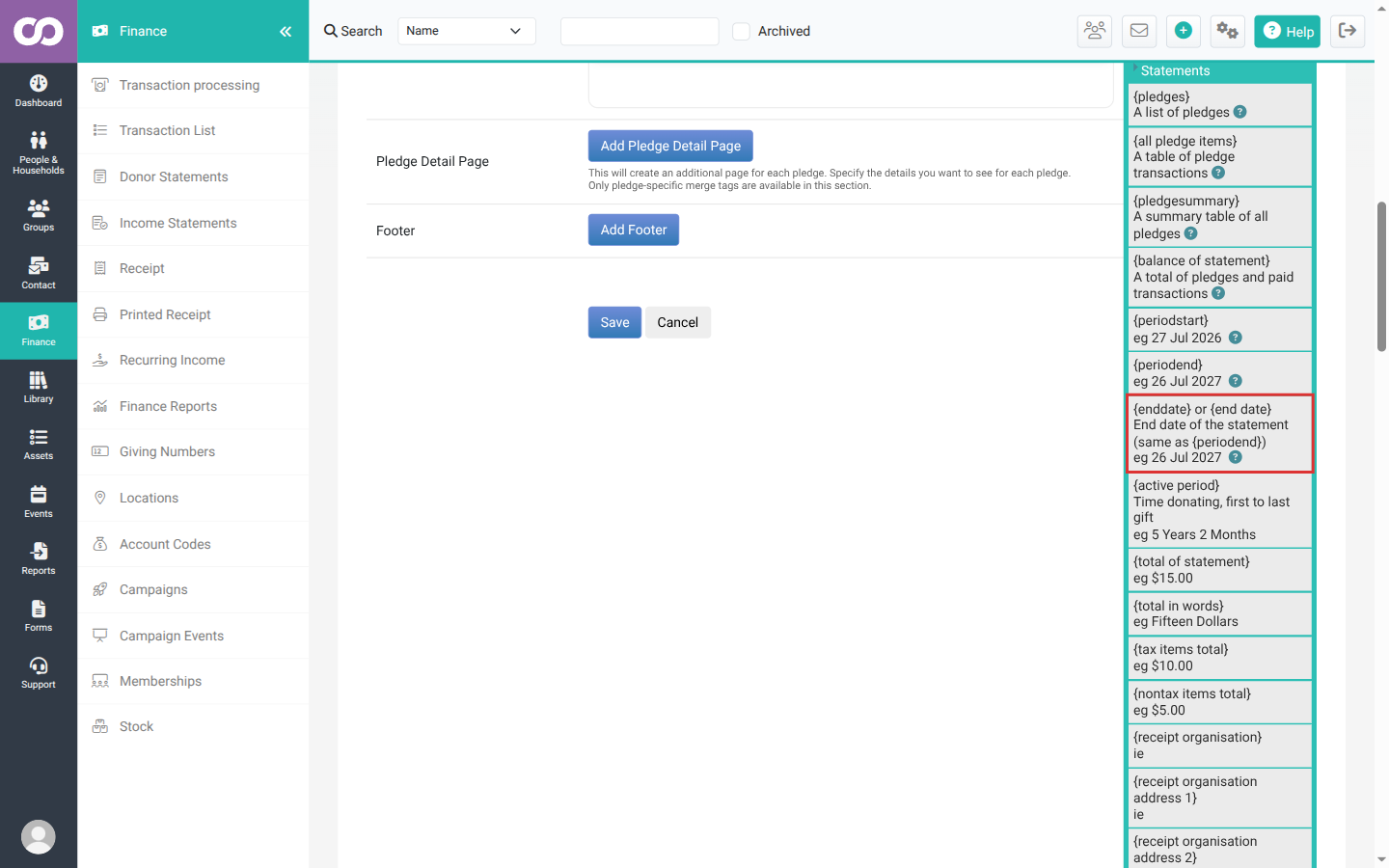
{enddate} or {end date}
The end date of the statement period. It gives exactly the same date as {periodend}, so use whichever reads better in your template. This is the end of the period you are generating for, not the Transactions up to cutoff you can set when you generate.
{organisation name}
The name of the household or organisation the statement is addressed to. It gives the same value as {household name}, so an organisation contact reads naturally without you having to use a tag named after households.
{pledgesummary} does not work on an income statement. The tag list offers it in the same Statements section as {enddate}, because income statements and donor statements share the same statement templates, but only a donor statement resolves it. On an income statement nothing replaces the tag, so the text {pledgesummary} prints on the generated statement exactly as you typed it. Put a pledge summary on a donor statement instead: see Donor Statement Personalisations.
{incometagdecode}
When you are using Tracking Category for recognising income, this shows the infoodle name for the code i.e. the infoodle contact or campaign it is connected to. Generally would be used as a title.
{incomecampaign}
When you are using Campaigns for recognising income, this shows the campaign name.
This is the campaign's External name, the donor-facing one, so an income statement reads the way your donors see the campaign rather than using an internal code. External name is required, and campaigns that existed before the field was added were given their current name, so every campaign has one to show. A campaign whose External name is blank shows as blank on the statement. It does not fall back to the internal Name. See Adding a Campaign for the two names.
{incometransactionlist}
This produces a list of all the transactions recognised for this income recipient that match the criteria. There are a range of fields you can include. If you don't include any then those identified are shown
| tag | meaning | shown when nothing selected? |
|---|---|---|
| date | Date of the transaction | Yes |
| amount | Amount of the transaction | Yes |
| donorname | Name of the individual donor | Yes |
| donoraddress | Address of this donor | Yes |
| donoremail | Email address of the donor | Yes |
| fee:2% | If you reduce the total available by a fee, you can add this here, changing the number of the percentage. An additional fee line and nett is shown if it's included. |
Note: if the donor has been identified as someone who wants to be Anonymous (in their finance settings), then the word Anonymous will appear in the first one of donorname, donoraddress, donoremail, leaving the remaining ones blank.
Example:
{incometransactionlist date amount fee:2%}
{incometransactionhistory}
This produces a monthly breakdown of people who have donated and/or pledged to this recipient over the previous 12 months along with some stats if required.
| tag | meaning | shown when nothing selected? |
|---|---|---|
| donorname | Name of the individual donor | Yes |
| months:12 | The number of previous months to show | Yes |
| monthtotals | The total received over the period | Yes |
| monthaverage | The average donation received over the period | Yes |
| monthpledge | The monthly equivalent of any pledges e.g. an annual pledge will be shown here divided by 12 | Yes |
| eachpledge | The amount of a specific pledge | Yes |
| pledgefrequency | The frequency of the pledge | Yes |
Example:
{incometransactionhistory donorname months:12 monthtotals monthaverage monthpledge eachpledge pledgefrequency}
Formatting Issues
Note regarding the formatting of Personalisations
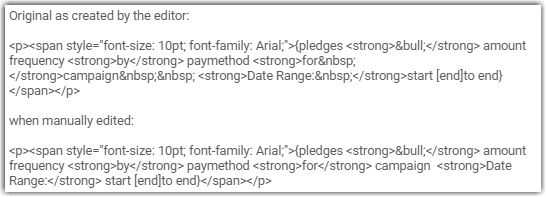
On occasions it is possible that after Personalisations are added and then edited and formatted (for example: bold, italic, adding spaces) that when the statement is generated, the required details are not being displayed. This is rare because infoodle has a merge tag editor to ensure the coding is correct and does not contain additional content.
For example:
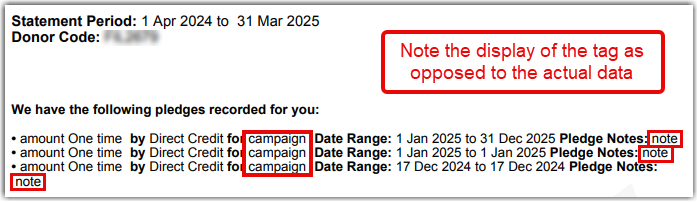
The Solution
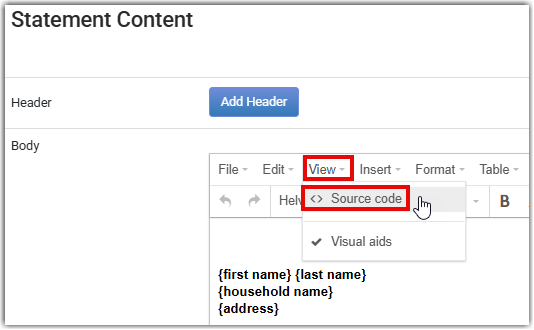
When you have finished editing the Statement and personalisations were edited you will need to edit the underlying HTML. To do this:
-
select from the menu, View, then Source Code
-
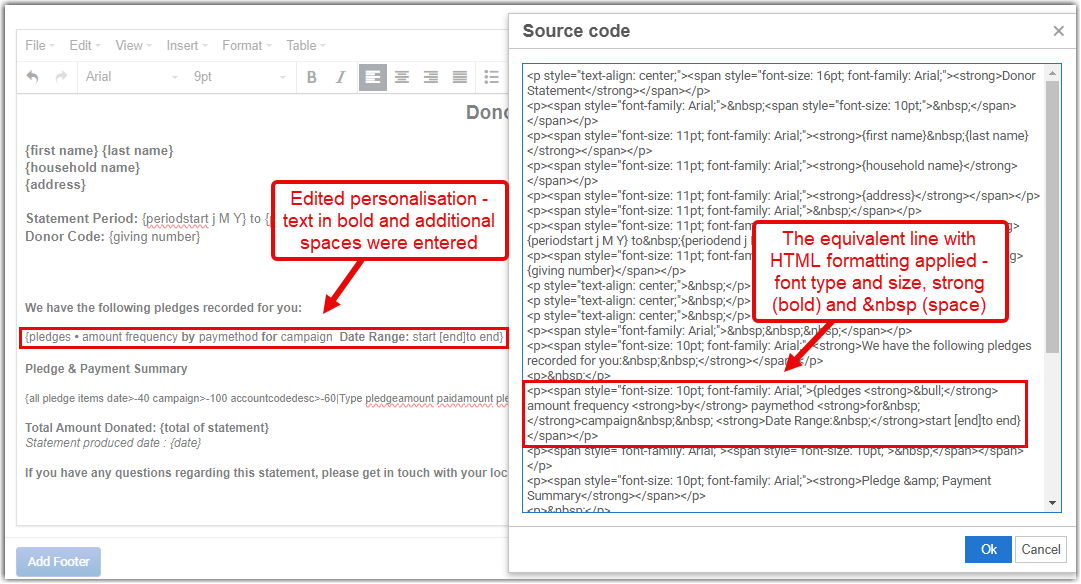
you'll be presented with a screen that looks similar to:
-
remove any   ; and replace them with actual keyboard spaces, and
-
put a space between any other HTML, e.g. < bold >, and the preceding or following infoodle personalisation tags.
For example:
If you have any questions about this please send an email to us at support@infoodle.com.