You do not choose which donations go into a Gift Aid claim. Simply set the claim period and infoodle does the rest. It assesses every eligible donation and places it into one of two lists: Claimable or Not claimable. Donations on the Not claimable list include a reason for exclusion.
Why can't I find a donation on either list?
Some donations are excluded before the claimable checks are applied, so they may not appear on either list. Understanding these exclusions is important when reconciling a claim against your giving records.
This article explains how infoodle evaluates donations and how to investigate why a particular donation is, or is not, included in your claim.
Before you start
Role Permissions
- Read and Report on Transactions: lets you open the claims list and read a claim.
- Manage, Read and report on transactions: lets you move between the Errors, Claimable and Not claimable tabs, and open the claim a donation went into from the donor's record.
For an explanation of what each finance permission covers, see Finance Permissions.
You will also need Gift Aid turned on for your site. You can check this by clicking the administration cog in the top right hand corner, then going to Packages & Views.
You will need at least one claim to look at. You can find your claims by going to Finance → Gift Aid → Claims.
Open the two lists
- Click or hover on Finance on the main menu bar on the left.
- Click Gift Aid.
- Click Claims.
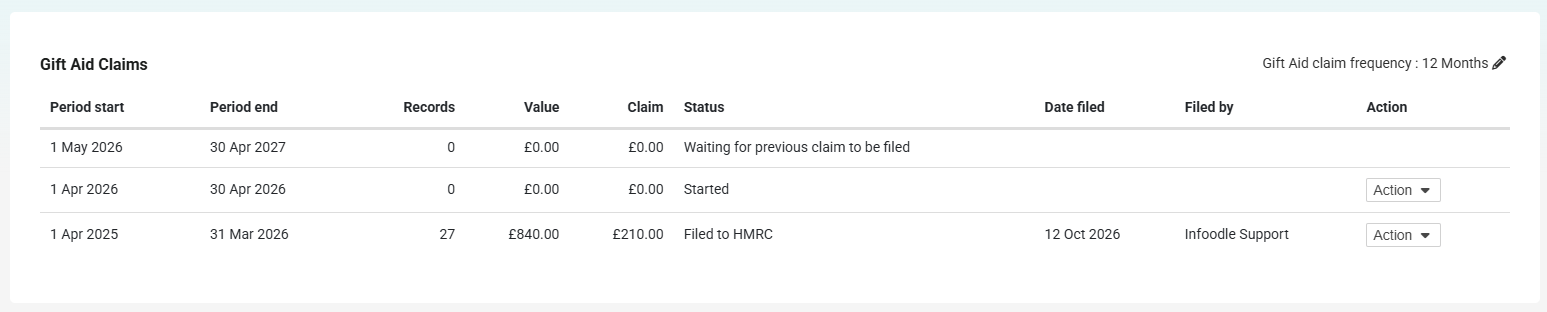
- Find the claim you want to look at.
- Open the Action menu on that row.
- Click Review.
The newest claim on the list reads Waiting for previous claim to be filed and has no Action menu at all. File the claim above it first, or pick a claim further down the list.
The Three Claim Tabs
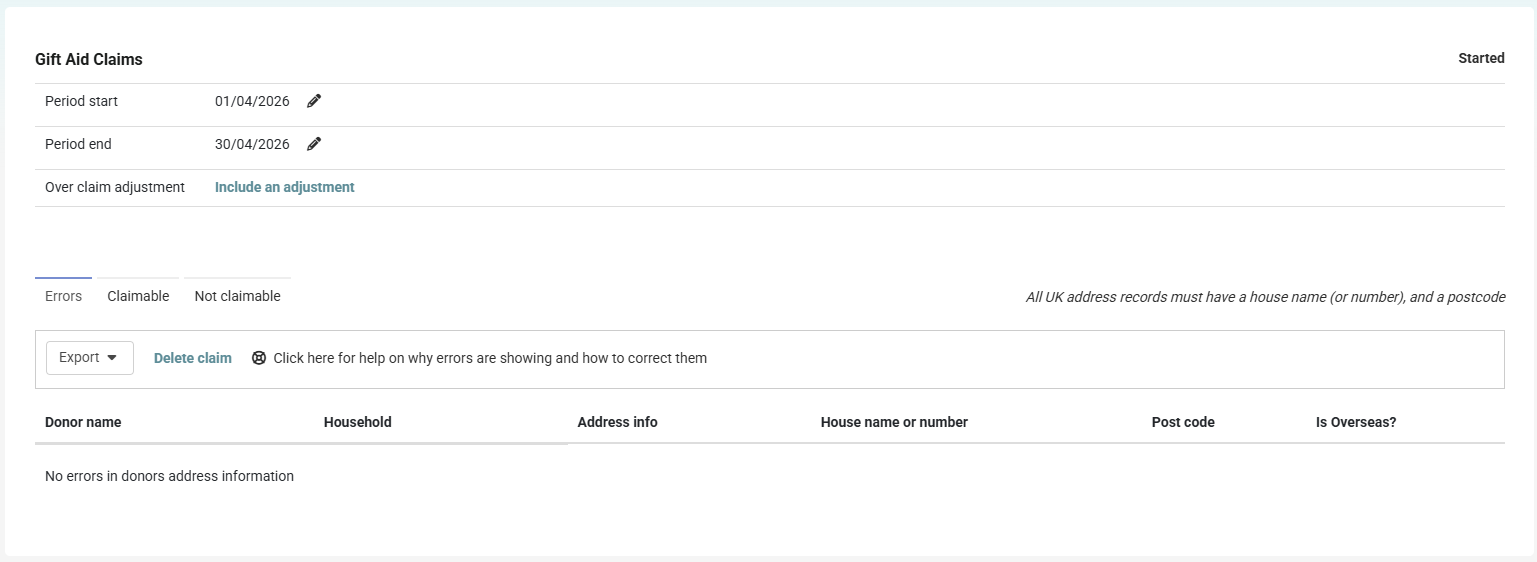
Errors
Donors whose name or address will not pass HMRC's checks, one row per donor however many of their donations are affected. Their donations stay on the Claimable list, and you cannot file the claim until these are fixed.
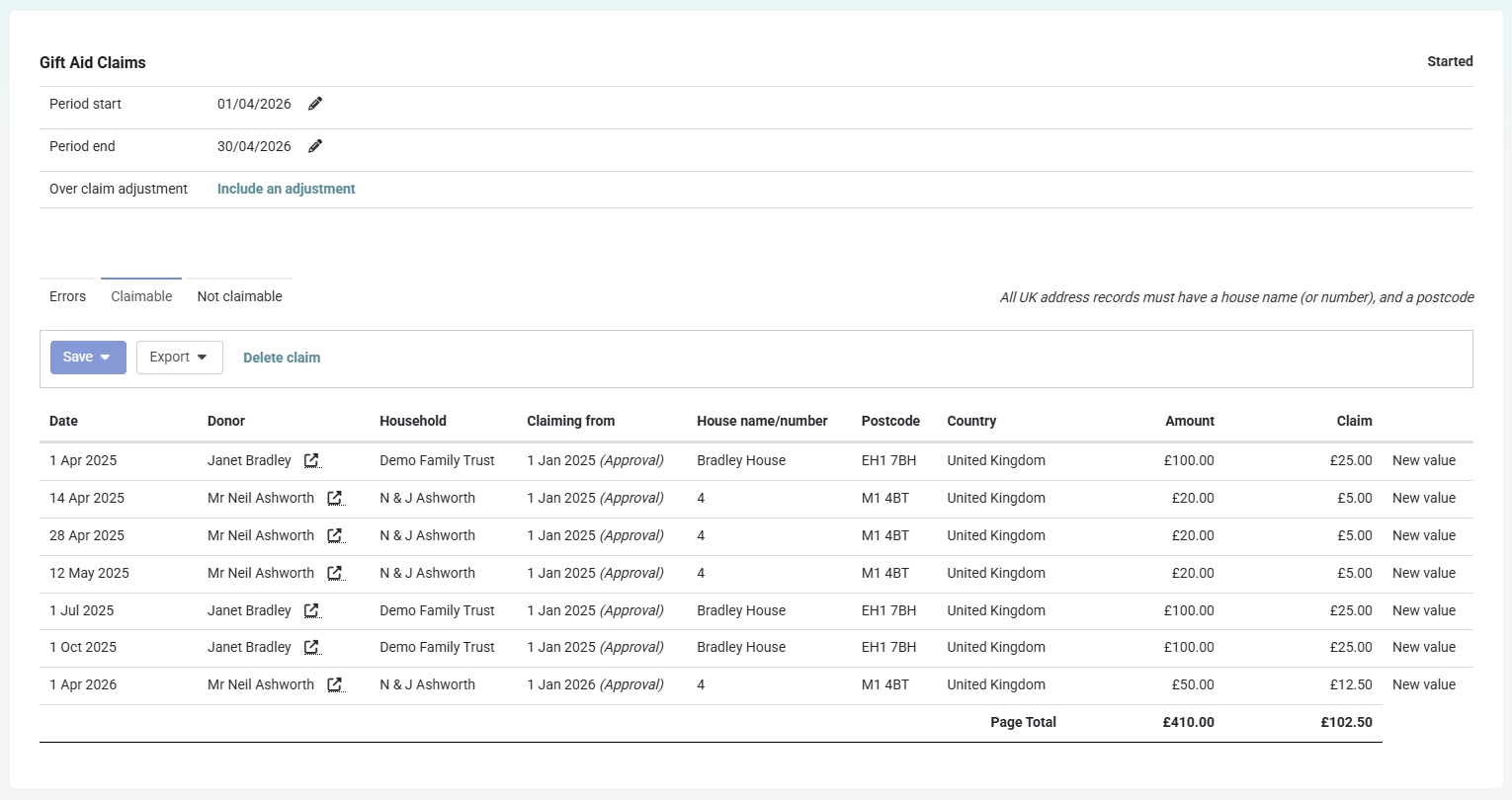
Claimable
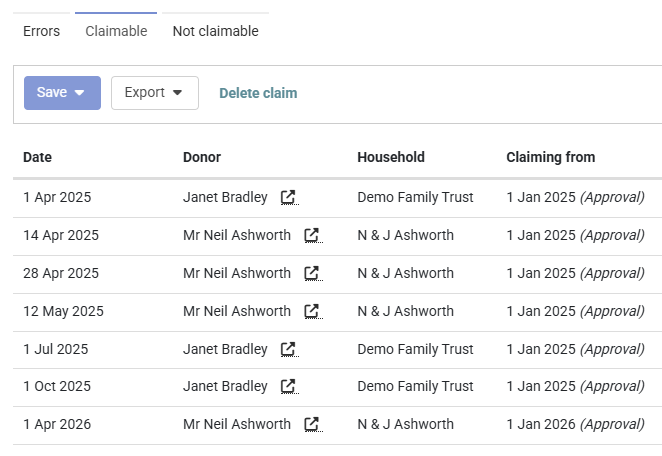
Every donation going into this claim, with the amount you can reclaim next to it. That amount is 25% of the donation.
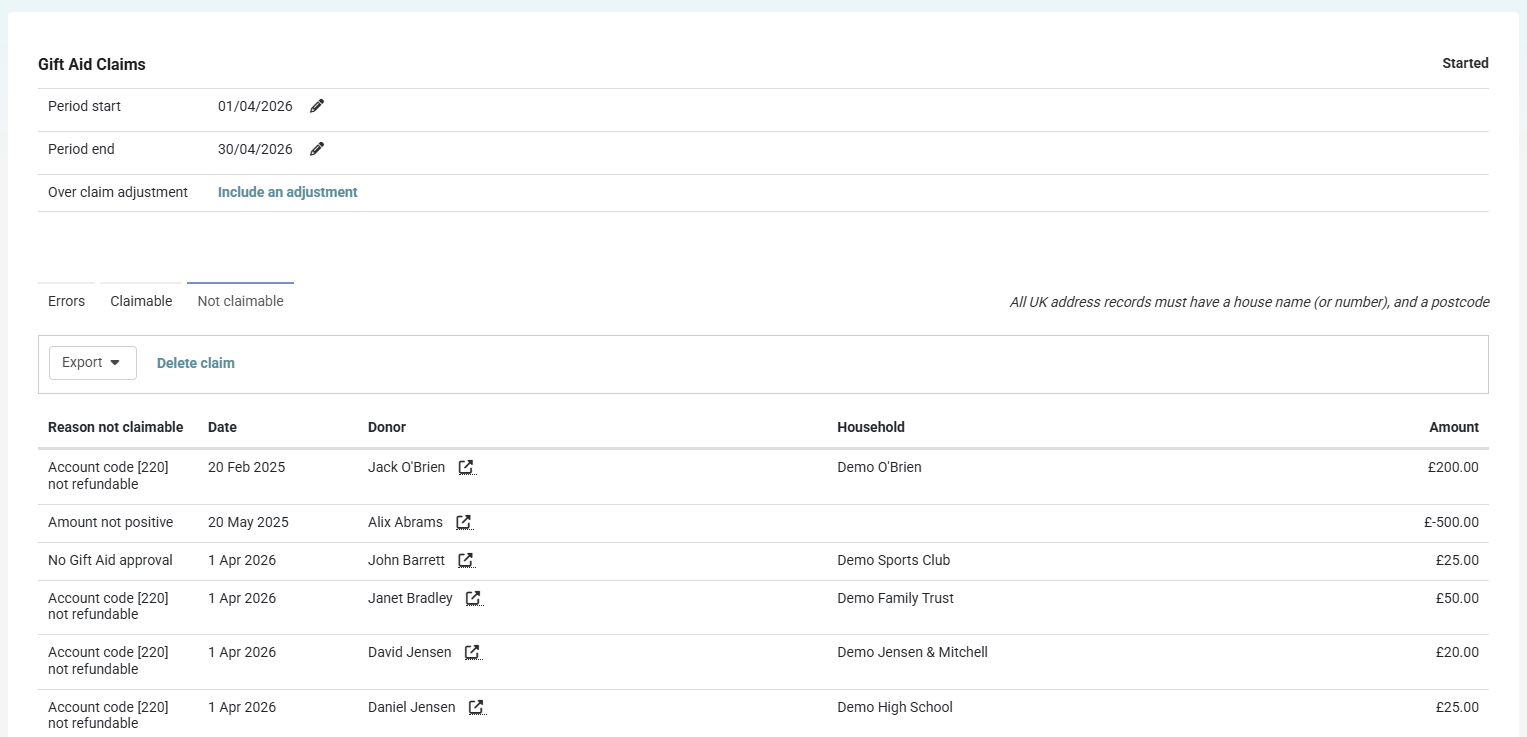
Not claimable
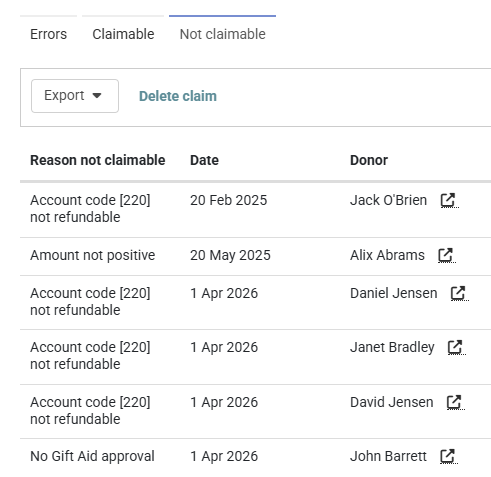
Every donation infoodle looked at and left out, with a reason.
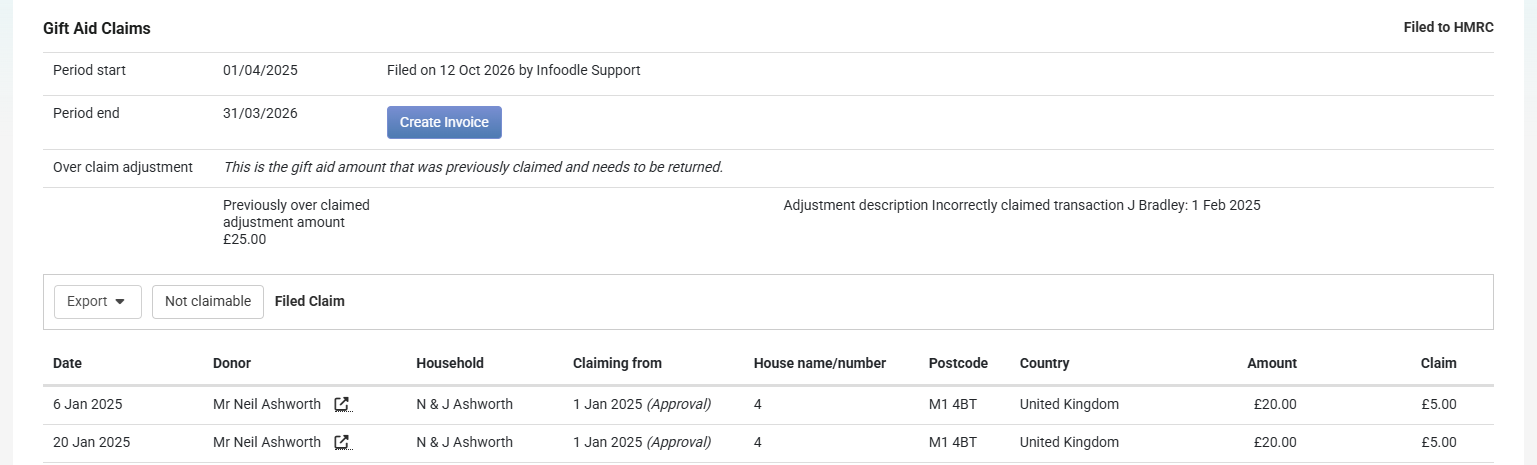
A claim you have already filed opens differently. The three tabs are not there. Instead you get a Not claimable button and a Filed Claim label. Click Not claimable to read the excluded list for that claim. A filed claim also shows the four financial year window as it stood when that claim closed, not as it stands today, so its Not claimable list is not the list you would get if you built the same claim now.
What infoodle checks
A donation must pass all of these checks to be claimable:
- A Gift Aid declaration covers the donation date.
- The account code is marked Tax reclaimable.
- The donation is not an in-kind gift.
- The amount is greater than zero.
- The donation falls on or after the declaration's historic date (if one is set).
Any donation that fails a check appears in Not claimable with a reason.
Only the first failed check is shown. If multiple issues exist, you will see the first one in the list above until it is resolved.
Some donations do not appear on either list because they:
- Fall outside HMRC's four-year claim window.
- Have already been included in another claim.
Read Donations that drop out of both lists below before you conclude that a donation you cannot find was claimed.
The claim reaches back further than its period
The claim period sets the latest donation date included in a claim. It does not set the earliest date.
A claim includes all eligible donations that have never been claimed before, up to the claim end date, and back to HMRC's fixed four-year limit.
This means a claim for July could legitimately include a donation made years earlier if it only became claimable later, for example when a Gift Aid declaration was added.
The same rule applies to both the Claimable and Not claimable lists.
HMRC time limit: Claims can only include donations from the current tax year and the previous four tax years. This limit is fixed and cannot be extended by changing a donor's Gift Aid approval.
The Claiming from column
On the Claimable tab, the Claiming from column tells you, for each donation, how far back infoodle was willing to look for that donor, and what set the limit:
| What you see | What set the limit |
|---|---|
| A date followed by (Approval) | The start date on that donor's Gift Aid approval. |
| A date followed by (Historic) | The historic date on that donor's approval, because it is later than the approval start date. |
| A date followed by (4 Years) | The four financial year limit, because the donor's approval reaches back further than that. |
Whichever of the three is the latest date wins. This is the quickest way to see why one donor's older donations came in and another's did not.
Reasons on the Not claimable list
| Reason shown | What it means | What to do |
|---|---|---|
| No Gift Aid approval | infoodle could not find an approval for that donor covering the date of that donation. | Check the donor's Gift Aid tab. See the section below, this reason covers more than it looks like it does. |
| Account code [code] not refundable | The donation uses an account code that is not marked Tax reclaimable. | Either the account code setting is wrong, or the donation genuinely is not a gift. Fees and ticket sales are not Gift Aid donations. |
| In kind donation | The donation was recorded as an in-kind gift rather than money. | Nothing. HMRC's Gift Aid scheme only covers gifts of money. |
| Amount not positive | The amount is zero or negative, usually a refund or a correction. | Nothing. You cannot reclaim tax on a negative amount. |
| Gift Aid approval starts [date] | The donor's approval covers the date, but the historic date on it is later than the donation. | If the donor's declaration really does go back further, correct the historic date on the approval. |
Changing an account code setting or a date on an approval changes every claim you have not yet filed, not only the one on screen. Both lists are worked out fresh from your current settings each time a claim is opened. Marking an account code Tax reclaimable pulls in every past donation on that code, back to the four financial year floor.
Both lists can be saved out. Click Export, then to CSV or to Excel, if you want to work through a long list away from the screen.
Why a donor with an approval can still show "No Gift Aid approval"
No Gift Aid approval does not mean the donor has never given you a declaration. It means there is no approval covering the date of that donation.
infoodle looks up the donor's approval using the date of the donation, not today's date. If the donation falls outside the approval, there is nothing to find, and you get the same wording as a donor who never signed anything at all.
That covers three quite different situations:
- The donor has never given you a Gift Aid declaration.
- The donor's approval has an end date, and the donation came after it.
- The donor's approval has a start date, and the donation came before it.
The wording does not tell you which of the three you are looking at. Open the donor's record and read the dates on their Gift Aid approval before you conclude anything.
A single donor can appear on both lists at once. A donor whose approval ran from January 2024 to June 2025 will have their April 2025 donation sitting on the Claimable tab, and their August 2025 donation sitting on the Not claimable tab reading No Gift Aid approval.
Why the Summary count does not match
The two figures on Finance → Gift Aid → Summary count different groups of people. Donors with Gift Aid counts people who hold an approval and have given at least one money donation on a Tax reclaimable account code. Total Gift Aid donors with current approvals counts everyone whose approval covers today, whether they have given anything or not.
A gap between the two is normal and can run either way. A donor whose approval expired last year drops out of the second figure while their older donations stay perfectly claimable. Neither figure tells you what is in your claim, because a claim asks whether the approval covers the date of each donation, not today.
Donations that drop out of both lists
Some donations are on neither tab. They are not on Claimable, they are not on Not claimable, and nothing on screen explains where they went. infoodle applies these limits before it works out reasons, so there is no reason for it to print.
There are four causes, and they do not all mean the same thing.
A donation being invisible is not proof that you reclaimed the tax on it. Two of the four causes below mean the tax has not been reclaimed, and one of those cannot be put right afterwards. Work out which cause applies before you close the question.
| Why the donation is missing | How to check | Has the tax been reclaimed? |
|---|---|---|
| It is in a claim you have already filed with HMRC. | Open the donor's record and read the Gift Aid claimed column, which links to the claim it went into. | Yes. |
| It is in another claim you have open but have not filed. | Go to Finance → Gift Aid → Claims and review your unfiled claims. | Not yet. It is reclaimed when you file that claim. |
| It is older than the four financial year floor. | Compare the date of the donation against 6 April four financial years back. | No, and it cannot be now. The window has closed on that donation. |
| It went into a Small Donation Scheme claim. | Go to Finance → Gift Aid → Small Donation Scheme and review that claim. | Yes, but under the Small Donation Scheme rather than as a Gift Aid repayment. |
This works one donation at a time, not one donor at a time. A donor can have a June donation already filed and invisible, and a July donation sitting on the Claimable tab of your next claim.
The quickest way to tell the four apart is the Gift Aid claimed column on the donor's own record. See Check a single donation on the donor's record below.
Check a single donation on the donor's record
When you want to know about one particular donation, you do not have to hunt through a claim. Every donation on a donor's record carries its own answer.
- Open the donor's record.
- Scroll to the Finance panel.
- Open the Activity tab.
- Set Transactions For Year to Any time.
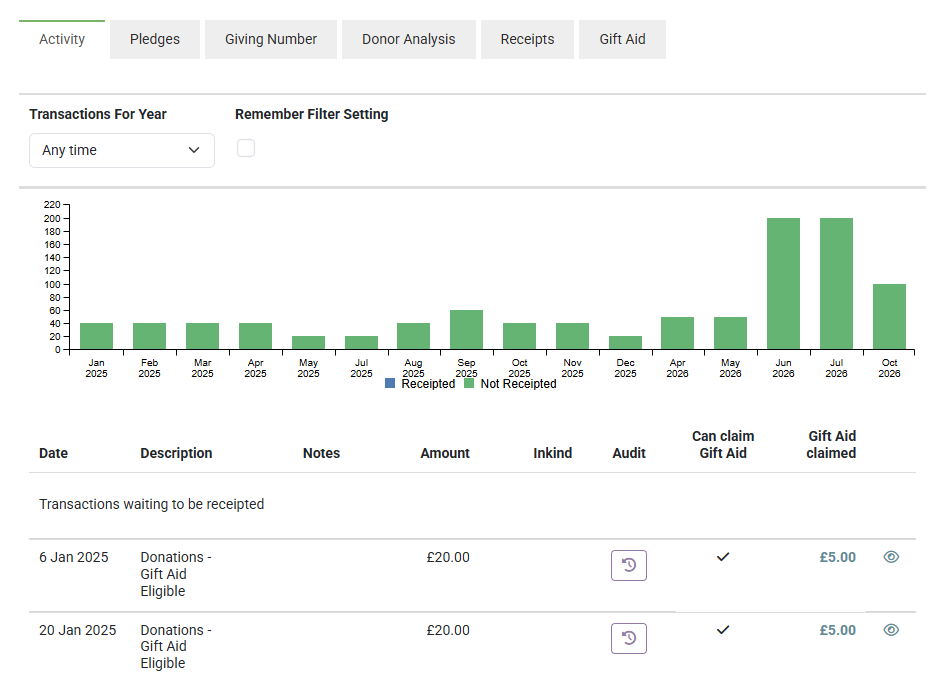
- Read the Can claim Gift Aid column towards the right of the transaction list.
- Read the Gift Aid claimed column, immediately to its right.
- Click the amount in the Gift Aid claimed column to open the claim that donation went into.
What the two columns tell you:
- Can claim Gift Aid: a tick means the donation passes the approval and account code checks. A dash means it does not.
- Gift Aid claimed: an amount means the donation went into a claim you have filed. Click the amount to open that claim.
This is the fastest way to see a donor's approval dates working. A donor whose approval started in October will show dashes on their August and September donations and ticks from October onwards, all in one column.
The Can claim Gift Aid column answers the approval and account code questions only. It does not check the four financial year floor, in-kind gifts, zero and negative amounts, or whether the donation is already on a claim. An in-kind gift from an approved donor on a Tax reclaimable code shows a tick and is still not claimable.
£0.00 in the Gift Aid claimed column means "not filed yet", not "never claimed". A donation sitting on a claim you have not filed reads £0.00 with no link until you file it. A donation claimed under the Small Donation Scheme shows an amount but no link, because that claim is not a Gift Aid repayment claim.
You can jump straight to a donor from either list. Click the arrow icon next to their name on the Claimable or Not claimable tab.
Common questions
Why is a donation from two years ago in my July claim?
Because a claim collects everything unclaimed going back four financial years, not just the donations inside the period you set. The period only sets the closing date.
Why does this donor say "No Gift Aid approval" when I can see their approval on screen?
Their approval does not cover the date of that donation. Check the start date, the end date and the historic date on the approval against the date of the gift.
Why do the same donations keep appearing on the Not claimable list every month?
Nothing has changed about them. They stay there until you fix the reason, or until the four financial year window rolls past them. Once the window has passed them they stop appearing on either list, and you can no longer claim on them.
A donation is missing from both lists. Where has it gone?
Something stopped infoodle looking at it, and there are four possibilities: it is in a claim you have already filed, or in another claim you have open, or it is older than the four financial year floor, or it went into a Small Donation Scheme claim. Do not assume the first one. Open the donor's record and read the Gift Aid claimed column, which tells you whether the tax was actually reclaimed and which claim it went into. See Donations that drop out of both lists.
I fixed an approval. Do I have to rebuild the claim?
No. Both lists are worked out fresh each time you open the claim. Reload the review screen and the donation moves across. The last column on the Claimable tab marks it New, or New value if the amount has changed since the claim was last saved.
The claim total is higher than the donations given during the period. Is that wrong?
No. The claim includes older unclaimed donations as well. Read the Date column on the Claimable tab and you will see where the extra amount comes from.
Next steps
Once you are happy with what is on the Claimable tab, clear anything sitting on the Errors tab, then file the claim. See Filing to HMRC.