What this article covers
This article is a reference catalogue of the exact error text infoodle shows when an email fails to send, matched against what causes it and what to do about it. Match the wording here against what you see on screen: infoodle either translates your email provider's response into a plain-English reason, or shows the provider's own wording unchanged when it cannot recognise it.
For how to open the Sending Errors list, what its columns mean, and how to clear or deactivate a failed address, see Failed Emails. This article does not repeat that workflow: it is the lookup table for the messages themselves.
Before you start
Role Permissions
- Contact people by email
For a full list of role permissions and what they mean, see People role permissions.
Where you will see these messages
Error column, Sending Errors list: Contact, Email, Sending Errors. This is the main place these messages appear.
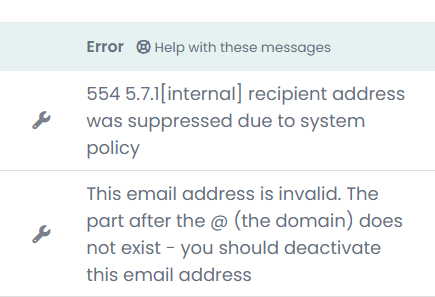
Delivery response column, per-send report: open a sent email's Report, then the Sent to tab. The Status column shows a short label (Delivered, Failed, Not sent), and the Delivery response column shows the same reason text as the Error column above, for that individual recipient.
Reason strings infoodle translates for you
For most common bounce types, infoodle reads your email provider's response and replaces it with one of the plain-English reasons below. The left column is the exact text shown in the Error column and the Delivery response column: match it word for word against what you see on screen.
| Reason shown (verbatim) | What actually happened | What to do |
|---|---|---|
| A previous email sent to this address failed. It has therefore been blocked and did not receive this email. | The address is already on your email provider's suppression list from an earlier hard bounce, spam complaint, or unsubscribe. Your provider refuses the send before it leaves infoodle, so this message can appear even the first time you notice it. | Open the wrench icon next to the address and check the Suppression List tab. Only unblock the address once you have confirmed with the recipient that they want your email. |
| This email address is invalid. The part after the @ (the domain) does not exist - you should deactivate this email address | The domain in the address cannot be found. Usually a typo in the domain, or a domain that no longer exists. | Check the spelling with the recipient. If the domain is correct and still fails, deactivate the address. |
| This email address is invalid. The email address does not exist - you should deactivate this email address | The domain is fine, but the mailbox itself does not exist on that domain's mail server. Usually a typo in the part before the @, or someone who has left the organisation. | Check the spelling with the recipient, or ask for a current address. Deactivate if the address is confirmed gone. |
| The recipients email account is full! Ask them to delete some emails or deactivate this email address | The recipient's mailbox is over its storage quota and cannot accept new mail right now. | Ask the recipient to clear space in their mailbox. infoodle does not retry this send automatically, so send again once they have done so. |
| The recipients thinks this email was spam | The recipient's mail provider, or the recipient themselves, marked a message from you as spam. | Ask the recipient to check their spam folder and mark your address as not spam. Investigate before unblocking, since repeated spam complaints affect delivery to your other contacts too. |
| The recipients email server is not set up correctly - please contact them to review | The recipient's own mail server rejected the connection because of how it is configured (for example, refusing mail it should be relaying). This is a problem on the recipient's side, not something infoodle or your site can fix. | Ask the recipient to raise it with whoever manages their mail server. |
| The recipients email account is disabled - you should deactivate this email address. | The mailbox exists but the recipient's provider has disabled the account. | Deactivate the address. |
| A general errors has occurred on the recipients server, if it keeps happening - deactivate this address | Your email provider received a response from the recipient's server that it could not classify into any of the categories above. | If this is a one-off, no action is needed. If the same address keeps producing this message, treat it as undeliverable and deactivate it. |
| The recipient clicked unsubscribe | The recipient used an unsubscribe link in an earlier email from you. | Nothing to fix: this reflects the recipient's choice, not a technical problem. |
| No email addresses to send to | Every recipient on the send was already unsubscribed or suppressed before infoodle attempted to send, so there was no one left to send to. | Review the recipient list. This is not an error with any one address; it means the whole list had nobody left to email. |
| Fatal error building content - contact support | infoodle could not assemble the email content, for example because a personalisation field in the template had nothing to put there. This is a problem with the email itself, not the recipient's address. | Contact infoodle support. This message points to a setup problem with the email, not a bad address. |
Messages your email provider sends through unchanged
Not every provider response fits one of the reasons above. When infoodle cannot match the response to a known reason, it shows the provider's own wording exactly as received, so support can still search for the specific message and diagnose it.
One example traced directly to infoodle's source code, and one that illustrates the general pattern:
- SMTP connect() failed, which infoodle deliberately leaves untranslated because it is a connection-level failure rather than a bounce type. It means infoodle's email provider could not open a connection to the recipient's mail server at all.
- A standard SMTP rejection response, for example, 550 Requested action not taken: mailbox unavailable, follows the same pattern: infoodle shows whatever wording your email provider returns, unchanged. Treat this kind of message as a mailbox problem: check with the recipient, and deactivate the address if it happens repeatedly.
You may also see a message in the form invalid recipients[N] address.email: the address, where the address is the exact malformed address from your recipient list. This means your email provider rejected that one address as badly formed (for example, missing an @ sign) while the rest of the batch sent normally. Correct or remove the address from the person's record.
If a whole batch could not be sent at all, for example because of a temporary problem between infoodle and your email provider, every recipient in that batch shows the same raw response, sometimes as short as Error code:500. This is different from a per-recipient bounce: it means infoodle could not hand the message to your provider in the first place, and the next scheduled or manual send will try again.
If the Error column shows text that does not match anything in the table above, treat the address as undeliverable until you understand the message, and search Contact, Support if you are not sure what it means.
Messages that mean the email was never sent
These three messages are different from the ones above: they mean infoodle recognised the recipient had opted out before attempting delivery, so no send was attempted at all.
| Reason shown (verbatim) | What it means |
|---|---|
| Unsubscribed from all emails | The recipient is on your site's all-stop list. No infoodle email goes to this address until someone removes them from that list. |
| Currently Paused from receiving emails | The recipient has paused this mail type for a period (one week, two weeks, or one month) from the Global Settings tab of the Check address dialog. Sends resume automatically once the pause ends. |
| Unsubscribed from this mail type | The recipient unsubscribed from this specific mail type (for example, Newsletters) but is still subscribed to others. |
Common questions
Does infoodle automatically retry a failed send?
No. infoodle records the failure and shows it in the Sending Errors list; it does not automatically resend to that address. If the failure was temporary (a full mailbox, a server that was briefly down), send again once you believe the problem has cleared. Your email provider may itself retry a message that is delayed rather than outright rejected, but that retry happens on the provider's side before infoodle ever records a failure.
Why do I see slightly different wording for what looks like the same problem?
Different mail providers word their rejections differently, and infoodle groups similar wording under one reason. If you see wording that is close to, but not exactly, one of the rows in the tables above, check whether it falls under "Messages your email provider sends through unchanged": infoodle only rewords a message when it recognises the underlying pattern.
Where can I check whether an address is currently blocked?
Click the wrench icon next to the address, either from the Sending Errors list or from the person's profile, and open the Suppression List tab. See Failed Emails for the full walkthrough of that dialog.
Next steps
Use this catalogue alongside the Failed Emails workflow: look up the exact wording here to understand the cause, then act on the row from the Sending Errors list.
Related articles