A membership's record lists every Xero invoice raised for its payments, and where each one stands. For which memberships are invoiced, see Invoice each membership payment in Xero.
Before you start
Role Permissions
You need one of these to see a membership record:
- Manage, Read and report on transactions
- Manage finance configurations
- Read and Report on Transactions
To find out what each role permission allows, see People role permissions.
Find the Xero invoices card
- Click or hover on Finance on the main menu bar on the left, then click Membership Products.
- Click the three dots on the product's row, then click Members.
- Click the member's row to open their membership record.
- Scroll down to the Xero invoices card, above Payments.
Or open it from the person's Memberships tab: click View.
The card lists each invoice: Reference, Xero number, Amount, Due and State. A dash in Xero number means it has not reached Xero.
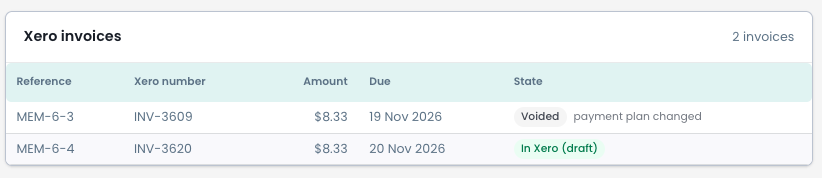
What each state means
| State | What it means |
|---|---|
| Waiting to send | Going to Xero shortly. |
| In Xero | Xero has it. infoodle never marks it paid. |
| In Xero (draft) | A draft for you to approve in Xero. |
| Paid | Paid in infoodle, so kept despite a plan change. |
| Not sent: already paid | Paid before it was sent. |
| Waiting to void | The plan changed. infoodle voids it shortly unless it's paid first. |
| Voided | Shown with the reason, such as membership cancelled. |
| Deleted (draft) | A draft in Xero, so deleted rather than voided. |
| Not voided: part paid | Part paid in infoodle, so kept. |
| Not voided: paid in Xero | Xero refused: it has a payment or credit there. |
| Needs checking | Handed to a person. See below. |
Needs checking
infoodle has handed the invoice to a person. It isn't sent, voided or followed in Xero until someone sorts it out and chooses Try again. It happens when:
- Xero already has its reference at another total or under another contact.
- The product had no Xero account code for its fee.
- The lines don't add up to the payment.
- An earlier invoice for the same payment was not voided.
- Sending or voiding it has failed for 24 hours.
- infoodle can't tell whether Xero received it.
The office is alerted each time. While one that reached Xero needs checking, the member can't pay online. See Paying an invoiced membership.
Sort one out
Only people with Manage finance configurations see the reason and Try again.
- Read the reason in the State column.
- Put it right in Xero, for example void the other invoice. If the fee had no code, choose one on the product's Xero tab.
- Click Try again under the reason, then Try again to confirm.
Within a few minutes:
- If its void had failed, it is voided again.
- If it was replaced while it waited (membership cancelled, plan changed, or the amount owed changed), it is voided, not sent. A changed amount is invoiced again for what is owed.
- Otherwise it is sent again with the product's current Xero codes, unless the fee still has none.
- If paid meanwhile, it is closed. If it still can't be sent, it needs checking again and the office is alerted.
A plan change leaves one that needs checking as it is, alerting the office if it may be in Xero.
See them all
From the left hand menu - choose
- Finance
- Membership Reports
- Invoices needing checking
- lists them oldest first:
The fields shown include:
Member, Membership, Invoice, Amount, Due, Why and Needs checking since. Why needs Manage finance configurations.
History lines
The History card adds a line when an invoice reaches Xero ("Invoice INV-0042 raised") or is voided, deleted, kept or marked needs checking. Without Manage finance configurations, a needs checking line reads "Someone who manages memberships can see why."
Office alerts
These go to the people and groups on the product's Failure Notifications tab, if any. Each subject starts "Membership invoice" and the reference, for example "Membership invoice MEM-41-3: Part paid".
| Subject ends | Sent when |
|---|---|
| : Needs checking | It needs checking. With no fee code, the message says to choose one, then Try again |
| : Part paid | Kept because part paid |
| : Has a payment in Xero | Xero refuses a void |
| : Not voided | A plan change couldn't mark it to void, or left it because it needs checking |
| : Not invoiced again | Its replacement after an amount change couldn't be raised |
| was voided in Xero | Voided or deleted in Xero by hand |
| paid in Xero: check it is recorded in infoodle | Xero shows money infoodle doesn't |
| : money received after it was voided | Money is reconciled for an invoice voided by Cancel payment plan, and no new plan asks for it |