The Invoice this membership tick box decides whether one membership gets a Xero invoice for each payment infoodle asks for. For what the invoices are and which payments they cover, see Invoice each membership payment in Xero.
Before you start
Role Permissions
- Manage finance configurations
To find out what each role permission allows, see People role permissions.
The tick box only appears when Xero is switched on for your site. To turn invoicing on, the product also needs a Xero account code for the membership fee on its Xero tab.
Turn invoicing on or off
- Click or hover on Finance on the main menu bar on the left, then click Membership Products.
- Open the membership product.
- Click View members.
- Click the member to open their membership record. Invoice each payment in Xero shows the current setting.
- Click Edit.
- Tick Invoice this membership to turn invoicing on, or untick it to turn it off.
- Click Save.
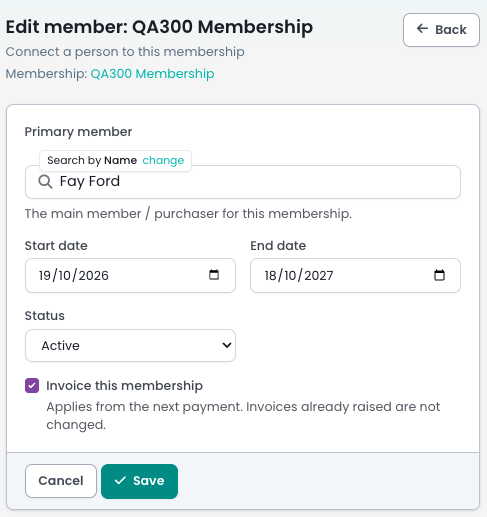
If the product has no Xero account code for its fee, ticking the box is refused with: "This membership type has no Xero account code for its fee, so no invoice could be raised. Choose one on its Xero tab first." Unticking is always allowed.
The membership's History card records each change, with who made it: "Invoice this membership turned on" or "turned off". A membership created with invoicing on has no such line.
What changes when you save
Ticking or unticking the box doesn't raise or void anything by itself.
- Turned on part-way through a period: only payments still to come are invoiced. For example, on $100.00 paid monthly, turned on after payment 6, payments 7 to 12 are invoiced. An instalment already due and unpaid is invoiced by the next daily membership run.
- Turned off: no further invoices are raised. Invoices already raised are not changed, and one not yet sent to Xero is still sent.
For what each invoice contains, see What's on a membership payment invoice.
Common questions
I ticked the box on Add member. Why was the first payment not invoiced?
infoodle doesn't ask for a payment in the period you add by hand, so nothing is invoiced for it. The setting carries on to its renewals, and their payments are invoiced.
Does the change reach a renewal that has already been opened?
No. A renewal takes the setting the membership had when the renewal was opened. If the next period's renewal already exists, open that renewal's record and change it there too.
Can a bulk run turn invoicing back on?
Not on the membership you changed. But a bulk run with Push to Xero ticked creates the next period's membership with invoicing on. To stop it, untick the box on the new membership after the run.
I turned invoicing off. Why can't the member pay online?
An unpaid invoice already raised still holds back online payment. To let the member pay another way, void it in Xero: the next daily membership run sees the void and releases payment, and with invoicing off no new invoice is raised. See Paying an invoiced membership and When a membership invoice is voided.
What if the product has no Xero account code for its fee?
While any membership of the type is invoiced for each payment, the product can't be saved without a Xero account code for the membership fee. The save is refused with a message saying how many memberships are invoiced: choose a code, or untick Invoice this membership on them first.
If a payment is still asked for while the fee has no Xero account code, its invoice isn't sent to Xero. It shows as Needs checking on the membership's Xero invoices card, and the people on the product's Failure Notifications tab are emailed. Choose the code on the product's Xero tab, then choose Try again on the invoice to send it. See Check a membership's Xero invoices.
Next steps
To see the invoices a membership has raised and where each one stands, see Check a membership's Xero invoices.