A membership payment's Xero invoice is built from the membership's own breakdown, so each part matches the membership in infoodle. For which memberships are invoiced and when, see Invoice each membership payment in Xero.

Reference
The invoice's Reference in Xero is MEM- and the membership's number. Xero adds its own invoice number.
- First payment: MEM-8-7.
- Later payments: MEM-8-8 and so on, numbered by the payment's place in the period.
- Added with invoicing already on: the first payment is asked for when the member joins, so invoices start at MEM-8-7 See Turn Xero invoicing on or off for a membership.
- Invoicing turned on part-way through: the first invoice takes that payment's number, for example MEM-8-8 after payment 6.
- After a change of plan: numbers are never reused, so a payment asked for again after a void takes the next free number.
A renewal has its own membership number, so its references start again.
Dates
- Invoice date: the day infoodle asks the member for the payment.
- Due date: the instalment's due date. A renewal paid in one payment is due on the renewal's start date, or on the invoice date if the start date has already passed.
A bulk run's first invoice uses the dates set on the run. See Set up a bulk run.
Who the invoice is for
The invoice goes to the membership holder's Xero contact, which infoodle creates in Xero first if needed.
Lines
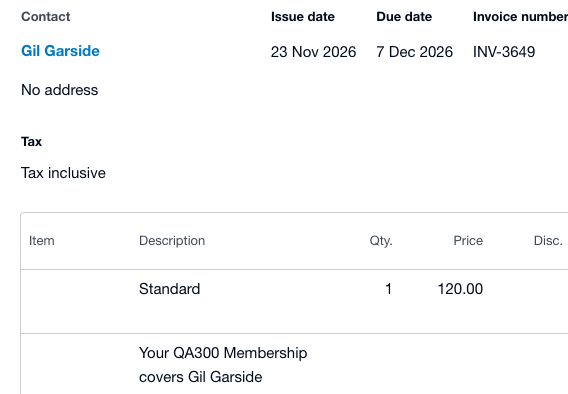
Each breakdown line with an amount becomes an invoice line, labelled with the rate rule's label (for example, Standard or Adult), the add-on's name or the discount's name, or the product's name if it has none. A discount has a minus amount.
Rate rules and discounts are coded to the Xero account code for the membership fee. Each add-on goes to its own code, set on the add-on on the Discounts & Add-ons tab, or to the fee's code if it has none.
A household or organisation priced per person gets one line per person (Adult, Adult, Child), with nobody named.
The last line names who the membership covers, with no amount: "Your Family Membership covers Alice Archer, Ben Brooks and Cara Cole". After 20 names, the rest are counted, for example "and 30 others".
Changes to the product's Xero tab apply only to invoices raised afterwards.
Payments in instalments
Each instalment invoice shares the instalment across the lines in proportion to their amounts. The final one takes what is left on each line, so every line totals exactly its amount over the period.
For example, a fee of $100.00 on account code 200 and an add-on of $75.00 on code 210, paid monthly. infoodle asks for 11 payments of $14.58 and a final payment of $14.62:
| Invoice | Fee line (200) | Add-on line (210) | Total |
|---|---|---|---|
| MEM-41 to MEM-41-11, each | $8.33 | $6.25 | $14.58 |
| MEM-41-12 | $8.37 | $6.25 | $14.62 |
| Over the year | $100.00 | $75.00 | $175.00 |
This assumes every payment was invoiced. If invoicing started part-way, each line still totals its amount, but the final split can be a cent different.
Tax
Amounts are sent including tax. Each line's tax rate comes from its code in infoodle's Account Codes: the Xero account's rate once the code is checked against Xero, otherwise the code's GST Applicable setting. In Xero, Amounts are shows Tax Inclusive, or No Tax when no line has tax.
Invoice status in Xero
Each invoice is created in Xero as approved, so it shows as Awaiting Payment.
Tracking
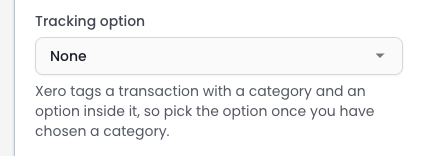
If the product has a Tracking category (optional) and a Tracking option on its Xero tab, every line with an amount is tagged with that option.
Common questions
Why is the last invoice a few cents different?
infoodle puts the cents left over by rounding onto the final instalment, so the period's invoices add up to exactly the agreed amount.
Why does the last invoice have different line amounts from the others?
If the agreed amount or payment plan changed during the period, what is left on each line may not match the final payment, so the final invoice shares it across what is still owed on each line.
Next steps
To see each invoice's reference, Xero number and state, see Check a membership's Xero invoices.