The first part of a new bulk run, 1. Who, decides which membership the run is for and which people it looks at. infoodle then groups those people into memberships. For how to open a new run, see What a bulk membership run does.
Choose the membership and the people
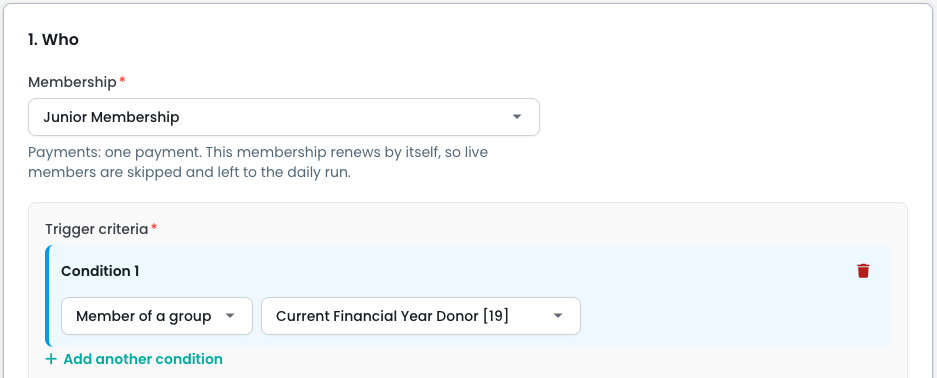
- Choose the product in Membership. The text under it says how the product is paid and whether past members are renewed by this run.
- Under Trigger criteria, click Add another condition.
- Choose the kind of condition, then fill in its details:
- Age: Under, Over or Between, from each person's date of birth today. People with no date of birth are not matched.
- Member of a group: the group's current members.
- Existing member of: people covered by a membership of that product that hasn't lapsed, including unpaid ones. Tick Including lapsed to add lapsed members too.
- Custom field: a field from People, matched with Equals or Contains.
- Add more conditions if you need them. A person must match every condition.
Including lapsed has no time limit: it brings back everyone who ever lapsed from the product. Anyone whose last membership ended more than a period before the run's start is invoiced as New, so check the New rows in the preview.
Age conditions use each person's age today, but rates and coverage use their age at the start of the period. Segments from a saved report aren't offered: add the report's people to a group, then use Member of a group.
How people become memberships
The people your conditions match are grouped by household, using the households recorded in People.
- Household products: one membership per household, held by its primary contact. A product that covers the whole household covers everyone eligible in it, even people your conditions didn't match. One that covers only some of the household covers just the matched people it allows.
- Individual products: one membership per person.
- Organisation products: the organisation's record holds the membership and covers itself plus the matched people in it.
- Someone not in a household: a household of one.
People in different households get separate memberships, even if they are related.
Who is skipped
The preview lists everyone left out, with the reason. The common ones are:
- Archived or deceased.
- Someone it would cover already has this membership for the period. The whole household is skipped.
- Their current membership runs past the start of the run's period.
- Their last membership is not yet paid, or has a failed payment.
- The membership renews by itself, and the daily run will renew it.
- Not part of an organisation, on an organisation product.
- Outside the product's minimum and maximum members, or no rate matches them.
- You don't have access to their record. These are counted but not listed.
Common questions
Can I add one person by hand?
Use a group with only that person in it. On a household product the run still covers and prices their whole household.
Next steps
Next, Set up a bulk run.