Understanding How infoodle Sends Your Emails
A plain-English guide to the To, From, and Reply To addresses
When you send an email from infoodle — whether it's a quick Basic Email or a full newsletter — there are three different addresses working behind the scenes. Understanding what each one does will help you make sense of how your emails look to recipients, and where their replies end up.
In short:
- To — who receives the email
- From — what the recipient sees as the sender
- Reply To — where a reply lands when someone hits "Reply"
These three settings work independently of each other. Let's go through each one.
1. Who it goes to (To)
This is the simplest part. The To address is just the recipient's email address, taken from their contact record in infoodle. If someone doesn't have an active email address on file — or their email has been turned off — infoodle will automatically skip them rather than send them anything.
2. Who it's from (From)
The From address is what the recipient sees in their inbox as the sender of the email — for example, "My Local Community office@mylocalcommunity.org".
infoodle decides this address one of two ways, depending on whether your sending domain has been verified:
- If your domain is verified: the email is sent using your own email address, e.g.
jane@mylocalcommunity.org. This is the best option for deliverability — it looks the most trustworthy to email providers like Gmail and Outlook, and to your recipients. - If your domain is not verified: infoodle automatically sends the email using an
@email.infoodle.comaddress instead. Your name still displays correctly to the recipient — it's only the underlying email address that changes.
Why does this happen? Email providers are very strict about which server is "allowed" to send email using a particular domain name, as a way of blocking spam and impersonation. If infoodle tried to send from jane@mylocalcommunity.org without your domain's permission, it would be blocked by the email providers. Verifying your domain tells email providers that infoodle is allowed to send on your behalf.
A note on personal email addresses: if you use a general provider like Gmail, Yahoo, or Hotmail, that domain can't be verified, because you don't own or control it — infoodle.com's own sending domain will be used as a fallback in that case.
Getting your domain verified is free, usually takes effect within a few minutes to 48 hours, and typically just needs a small technical change (often called SPF/DKIM) made by whoever manages your website or domain settings. See Verifying Email Domains for help on this.
3. Where replies go (Reply To)
The Reply To address is completely separate from the From address. It controls what happens when a recipient clicks "Reply" — it doesn't have to match the From address at all.
You have two options, chosen when you set up the sending of each email:
- My infoodle inbox — replies come into your infoodle Inbox, where anyone with access to the original email can see and respond to them. Each reply is also automatically recorded against that person's History on their profile. This is the best way to keep a track of all email communication with the contact in a shared space, not locked away in an email account.
- My email account — replies go straight to your own personal or work inbox, outside of infoodle entirely. This suits more personal, one-to-one style communication, but replies won't automatically appear in the contact's History.
Why can't a reply be captured automatically and look exactly like my own address?
This is a fair question, and it's not specific to infoodle — it comes up with pretty much any system that offers automatic reply capture.
For a reply to be matched to the right contact and logged automatically, the system needs somewhere it can actually receive and read that incoming message. There are only two ways to achieve this:
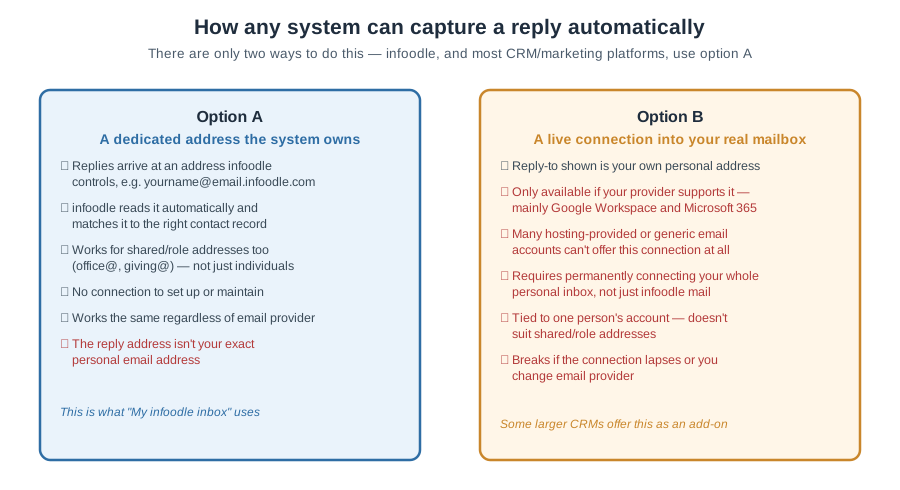
- Option A — a dedicated address the system owns. This is what "My infoodle inbox" uses. Because infoodle owns and reads that address, it can reliably match replies to the right contact — whether the original email was sent by one staff member or a shared address like office@ or giving@.
- Option B — a live, ongoing connection into your actual personal mailbox. Some larger CRM platforms offer this by permanently connecting to an individual's Gmail or Outlook account and watching it for matching replies. It keeps your literal address in Reply To, but it comes with real constraints: it's only available if your email provider supports this kind of connection — in practice that means Google Workspace or Microsoft 365, since most other providers (including many hosting-provided or generic email accounts) don't offer it at all. Even where it is available, it means granting a third party continuous read access to your whole inbox (not just infoodle-related mail), it generally only works for one person's account rather than a shared team address, and it stops working the moment that connection lapses or someone changes email provider.
infoodle uses Option A, mainly because it works reliably for shared team addresses as well as individuals, and doesn't require staff to connect their entire personal mailbox to a third-party system. It also means it works the same way no matter what email provider you're on — many of infoodle's charity and church clients use email that comes bundled with their website hosting rather than Google Workspace or Microsoft 365, and Option B typically isn't even available to those accounts.
This trade-off isn't unique to infoodle — it's simply how automatic reply capture works. Several well-known email marketing platforms replace the Reply To address with a long, system-generated string of characters when their reply-tracking feature is switched on, for exactly this reason. infoodle's approach keeps that address human-readable and consistent — yourname_uniquecode@email.infoodle.com — rather than a one-off tracking code.
If keeping your exact own address in Reply To matters more than automatic capture, choose "My email account" instead. Replies will come straight to you, exactly as sent — they just won't be automatically logged against the contact's History.
Putting it all together
Because the From address and the Reply To address are chosen independently, there are four possible combinations. Here's what a recipient would experience in each case:
| Your domain is... | Reply To set to... | Recipient sees email from | Recipient sees Reply To | Replies land in |
|---|---|---|---|---|
| Verified | My infoodle inbox | jane@mylocalcommunity.org |
jane_123123123@email.infoodle.com |
Your infoodle Inbox |
| Verified | My email account | jane@mylocalcommunity.org |
jane@mylocalcommunity.org |
Your personal inbox |
| Not verified | My infoodle inbox | jane_123123123@email.infoodle.com |
jane_123123123@email.infoodle.com |
Your infoodle Inbox |
| Not verified | My email account | jane_123123123@email.infoodle.com |
jane@mylocalcommunity.org |
Your personal inbox |
Notice that even when the From address changes, the Reply To address always works exactly the way you've set it — recipients can reply the same way regardless of which "From" scenario applies.
Quick answers to common questions
Why does my email look like it's from "@email.infoodle.com" instead of my own address?
Your domain isn't verified yet. This doesn't stop your email from sending or being replied to — it just means the From address uses infoodle's domain instead of your own to ensure it can be sent. Verifying your domain will fix this.
If I use the infoodle fallback address, will people still be able to reply to me directly?
Yes. The From address and Reply To address are independent — even if the From address shows @email.infoodle.com, your Reply To setting still applies exactly as you've chosen it.
My emails are going to recipients' spam folders — why?
This is almost always improved by verifying your domain, since unverified sending is used by different customers, its more likely to be treated as suspicious by email providers.
Can I change which inbox replies go to after I've sent an email?
The Reply To address is set when the email is created, so it applies to that email and can't be changed. For future emails, simply choose your preferred option again.
Why isn't the Reply To address my own exact email address, even though I've verified my domain?
Domain verification only affects the From address (see Part 2) — it's a separate setting from Reply To. If you've chosen "My infoodle inbox" for Reply To, replies go to an infoodle-owned address so they can be automatically captured and logged against the contact. See "Why can't a reply be captured automatically and look exactly like my own address?" above for why this is how reply capture works in general, and choose "My email account" if you'd rather Reply To always be your literal address.
Related help articles
- Verifying Email Domains
- Configuring your infoodle Email (Send From and Reply To settings)
- The infoodle Inbox
- Why Did My Email Fail?
- Using Basic Email