A pledge detail page is an extra page on a donor statement that covers a single pledge. Where the statement body reports on transactions, a pledge detail page reports on the commitment behind them: what the donor pledged, how often, how much has come in, how much is still to pay, and the schedule of individual payments. infoodle produces one of these pages for each pledge the statement run picked up and adds them after the donor's statement pages. The content comes from the Pledge Detail Page section of a statement template, so you decide exactly what goes on it.
Before you start
Role Permissions
- Manage, Read and report on transactions: lets you open the Finance area, edit statement templates and run statements.
For an explanation of each finance role permission, see Finance Permissions.
You will need a statement template with content in its Pledge Detail Page section. For how to add that section and what its editor looks like, see Donor Statement Templates.
A template whose Pledge Detail Page section is empty produces no extra pages at all, so statement templates you have not touched carry on exactly as they did.
Pledge detail pages belong to statement templates. Receipt templates have no Pledge Detail Page section, and none of the pledge merge tags below are available to them.
.png)
The pledge merge tags
Two kinds of tag go on a pledge detail page. Single value tags drop one piece of information into your text. Two table tags build a formatted block for you.
Every tag resolves against the one pledge that page is for. Amounts and counts are scoped to the statement's own date range, so Total Pledge on a twelve month statement is the total pledged over those twelve months rather than over the whole life of the pledge.
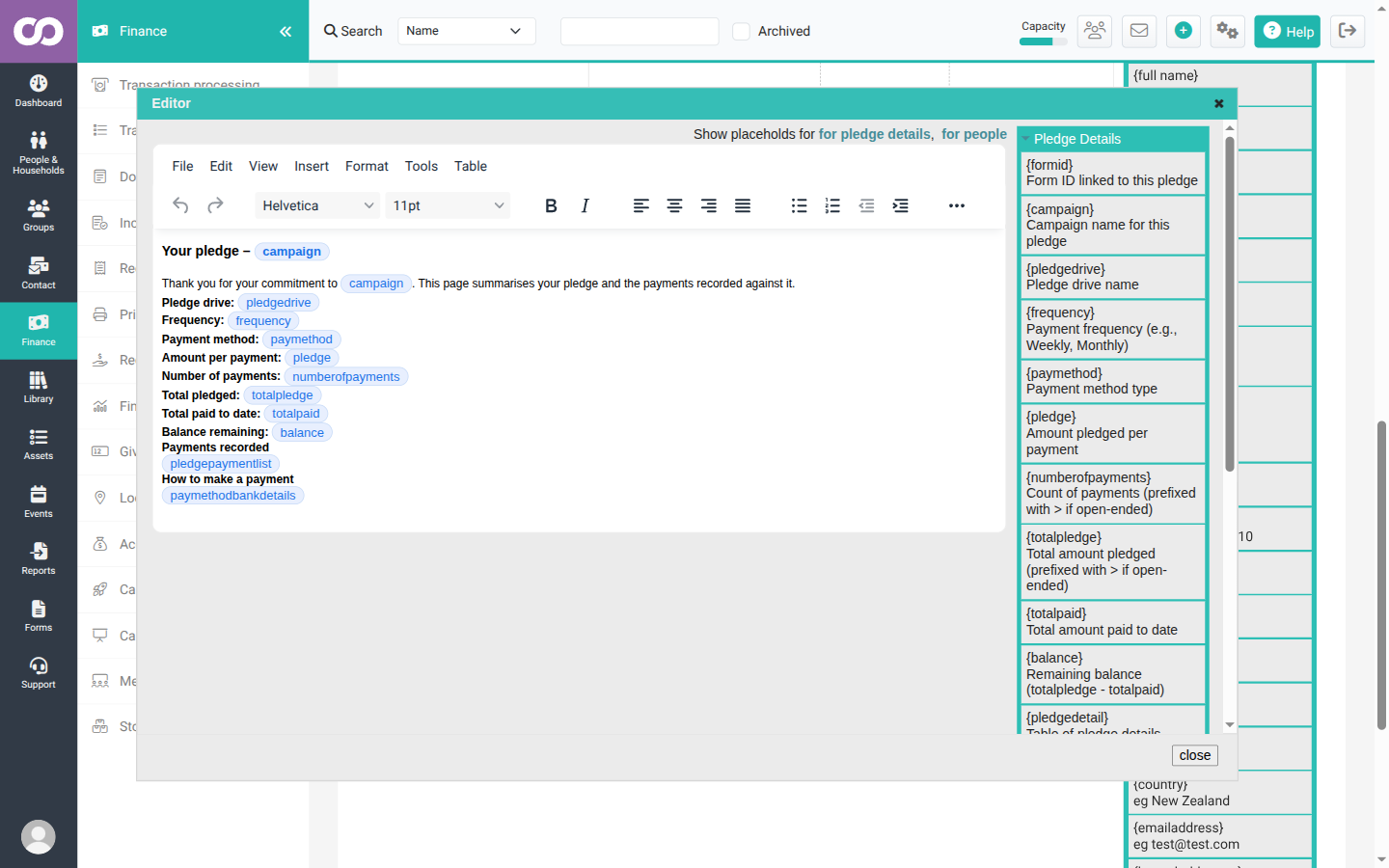
Single value tags
| Tag | What it puts on the page |
|---|---|
{campaign} |
The campaign's external name, which is the name donors see. A campaign with no external name of its own shows its internal name. |
{pledgedrive} |
The name of the pledge drive the pledge belongs to. |
{frequency} |
How often a payment is due, for example Once per month. |
{paymethod} |
The payment method type, for example DC or CHQ. |
{pledge} |
The amount pledged for each individual payment. |
{numberofpayments} |
How many payments fall inside the statement period. |
{totalpledge} |
The total pledged across those payments. |
{totalpaid} |
The total received against the pledge inside the statement period. |
{balance} |
Total pledged less total received, both figures taken over the statement period. |
{paymethodbankdetails} |
Details the donor can use to make a payment. |
{formid} |
The form entry the pledge was created from. A pledge that did not come from a form gives 0. |
On an open ended pledge, one with no final payment date, {numberofpayments} and {totalpledge} are prefixed with >. The figure is a running minimum rather than a final total, because more payments are still to be scheduled.
Payment method type or payment method name
{paymethod} gives you the payment method type: DC, CHQ, FRE and so on. The paymethod column of {pledgedetail} gives you the name the donor signed up with, for example Pay via Internet Banking or Pay by Cheque. On a page the donor reads, the column is usually the one you want.
What {paymethodbankdetails} shows
infoodle works down this list and uses the first line that fits the pledge:
| Situation | What appears on the page |
|---|---|
| The pledge is paid by credit card | Payment is processed automatically. infoodle does not look up bank details for a card. |
| The payment method has Bank details to display on statements filled in | Those details, with your line breaks kept. |
| That field is empty, but the payment method holds details of its own | Those details, taken from the payment method's other fields: Bank account details for an internet banking method, or Who to make the Cheque payable to and Where to send the Cheque for a cheque method. |
| The payment method has nothing recorded at all | N/A. |
Bank details to display on statements is an override rather than the only source. A payment method that already holds a bank account or cheque instructions will put those on the statement whether or not you fill the statement field in, and N/A appears only when the payment method carries nothing at all. Check what each payment method holds before you put this tag on a donor facing page. To set the details, see Payment Methods.
The tag works from the pledge's own payment method, so it fills in whether or not the pledge came from a form.
Personalisation tags
The pledge detail editor's Personalisation list adds a few contact tags that work on these pages:
{full name}: the donor's full name.{household name}: the household name, for example The Doe household.{organisation name}: the same value, worded for an organisation contact.{emailaddress}: the contact's email address.
The list also offers {email} and {phone}. Neither of those resolves on a pledge detail page. A tag that does not resolve prints on the page exactly as you typed it, braces and all. Use {emailaddress} for an email address, and write a phone number in as text.
The same holds for any other tag. A pledge detail page fills in the pledge tags, the personalisation tags above and the statement date tags, and leaves everything else as written. Generate one statement for one contact and look at the PDF before you run a full batch.
The pledge summary block
{pledgedetail} builds a block of labels and values, two label and value pairs to a row. Write it on its own and you get all ten items:
| Column keyword | Label on the page |
|---|---|
formid |
Pledge/Form ID |
campaign |
Campaign |
pledgedrive |
Pledge Drive |
frequency |
Frequency |
paymethod |
Payment Method |
numberofpayments |
Number of Expected Payments |
totalpledge |
Total Pledge |
totalpaid |
Total Paid |
balance |
Amount Left To Pay |
pledgedates |
Pledge Dates |
To choose which items appear, list the keywords inside the braces, separated by spaces:
{pledgedetail campaign frequency totalpledge totalpaid balance}
They appear in the order you list them. pledgedates gives the first and last pledge date inside the statement period, for example 15th April 2026 to 15th March 2027, or a single date when the pledge has one payment.
Because the items flow two pairs to a row, listing an odd number of keywords leaves the last row half filled, and the empty label cell keeps its background colour. List an even number of items and every row comes out complete.
The date on the Amount Left To Pay label
The Amount Left To Pay label carries the Transactions up to date from the statement run, for example Amount Left To Pay at 31 Mar 2027. That field is filled in for you with the end of the current financial year, so the dated label is what you will normally see.
The date is part of what the figure means. Total Paid and Amount Left To Pay are both as at that date, so a payment received after it is left out of Total Paid and is still counted in Amount Left To Pay. Bring the date back and both figures move: the amount shown as still owing rises by whatever has been received since.
The Transactions up to date and the statement period's end date are filled in separately, both from the end of the current financial year. Changing the period end does not move the cutoff. Run a statement from 1 April 2026 to 31 March 2028 with the cutoff still on 31 March 2027, and every payment received in that second year drops out of Total Paid, so Amount Left To Pay reads higher than the donor owes. Set both dates whenever you widen the period.
The payment schedule table
{pledgepaymentlist} builds a table with one row for every payment on the pledge inside the statement period, in date order. Written on its own it gives all six columns:
| Column keyword | Heading | Alignment |
|---|---|---|
id |
ID | Left |
pledgedate |
Pledge Date | Left |
pledgeamount |
Pledge Amount | Right |
paymentstatus |
Payment Status | Left |
paiddate |
Paid Date | Left |
paidamount |
Paid Amount | Right |
Choose columns the same way, and again they appear in the order you list them:
{pledgepaymentlist pledgedate pledgeamount paymentstatus}
The ID column numbers the rows from 1 within the table. It is a row counter for the donor's convenience, not a reference to anything they can look up.
Colouring the tables
Both table tags take two optional colour settings, written as keyword=value inside the braces alongside any column keywords:
- bgcolour: a six character hex colour for the label cells of
{pledgedetail}, or the heading row of{pledgepaymentlist}. - textcolour: a six character hex colour for the text in those same cells.
The value has to be exactly six hex characters. A three character shorthand is ignored and the table keeps its default colour. The # is optional, so bgcolour=004488 and bgcolour=#004488 both work. Either spelling of each keyword is accepted: bgcolour or bgcolor, and textcolour, textcolor or texcolour. Leave them out and the tables use infoodle's default teal with white text.
{pledgepaymentlist pledgedate paymentstatus paidamount bgcolour=004488 textcolour=FFCC00}
Payment status labels
The Payment Status column tells the donor what happened to each scheduled payment. infoodle works down this list and uses the first line that fits the row:
| Label | When it appears |
|---|---|
| Paid | A payment has been matched to the pledge date, whatever its size. |
| (blank) | The pledge date is still in the future. |
| (blank) | A payment has been received, but it falls after the Transactions up to date on the statement run. |
| Requested | The pledge date has passed and the payment is scheduled with the payment gateway. |
| Missed | The pledge date has passed and no payment information was recorded against it. |
| Cancelled | The donor stopped or suspended the payment, and the pledge date has passed. |
| Failed | A payment was attempted against the pledge date and did not go through. |
Because the list is worked through in that order, two things follow that are easy to get wrong:
- The future date check comes before anything to do with the payment's state. On a pledge the donor has cancelled, rows dated after today are blank, and Cancelled shows only on rows whose date has already passed.
- A held back payment leaves the row blank, not zero. Where a payment falls after the Transactions up to date, Payment Status, Paid Date and Paid Amount are all empty while Pledge Date and Pledge Amount still show. The row stays on the page.
Paid means a payment was matched to that pledge date, not that the full pledged amount arrived. A 150.00 pledge date matched to a 60.00 payment reads Paid, with Paid Amount 60.00. List paidamount alongside paymentstatus so the donor can see how much was received against each date. Total Paid and Amount Left To Pay add up the actual amounts, so those two figures are unaffected.
A suspended payment shows as Cancelled. There is no separate Suspended label on a statement.
The Transactions up to field on the Donor Statements page is filled in by default with the end of the current financial year. A cutoff on or after the last payment holds nothing back. Bringing that date back leaves later payment detail off the page, and it lowers Total Paid and raises Amount Left To Pay to match. See Generating Statements.
A worked example
Janet Bradley has two pledges: 50.00 a month to the New Community Centre Appeal campaign, and 150.00 every three months to Water for Life. Running her statement for 1 April 2026 to 31 March 2027 gives her two pledge detail pages.
This is the Pledge Detail Page content behind them:
Your pledge to {campaign}

Thank you for your support. This page sets out your pledge and the payments we have recorded against it.

{pledgedetail campaign frequency totalpledge totalpaid balance pledgedates}

Payments

{pledgepaymentlist pledgedate pledgeamount paymentstatus paiddate paidamount}

How to make a payment

{paymethodbankdetails}
Her first page comes out with Campaign New Community Centre Appeal, Frequency Once per month, Total Pledge 600.00, Total Paid 200.00, Amount Left To Pay at 31 Mar 2027 400.00 and Pledge Dates 15th April 2026 to 15th March 2027. The payment table has twelve rows. The first four are Paid with their dates and amounts, and the remaining eight are blank because those dates are still ahead. The bank details at the foot of the page are the internet banking details from the payment method on that pledge.
Her second page is for the Water for Life pledge: Frequency 3 Monthly, Total Pledge 600.00, Total Paid 150.00, Amount Left To Pay at 31 Mar 2027 450.00 and Pledge Dates 1st April 2026 to 1st January 2027. Its four rows read Paid, Failed, blank and blank. The bank details on this page are cheque details, because this pledge uses a different payment method from the first.
Two things in that example are worth noticing. Campaign shows New Community Centre Appeal rather than the internal campaign name staff use in reports, because donor facing output uses the campaign's external name. And each page carries the bank details for its own pledge, so a donor paying two pledges two different ways gets the right instructions on each page.
The same statement with an earlier cutoff
Run Janet's statement over the same twelve months with Transactions up to set to 31 May 2026, and her first page changes. Total Pledge stays at 600.00, because the pledge itself has not changed. Total Paid drops from 200.00 to 100.00, and the label now reads Amount Left To Pay at 31 May 2026 500.00.
All twelve rows are still on the page. The 15 April and 15 May rows read Paid with their amounts. The 15 June and 15 July rows have payments recorded against them, so their Pledge Date and Pledge Amount show while Payment Status, Paid Date and Paid Amount are blank. The remaining eight are future dated and blank as before.
The 500.00 is what Janet had left to pay as at 31 May 2026, which is what the date in the label says. Her two June and July payments have since come in.
Common questions
Where do the pledge detail pages appear in the statement?
After the donor's statement pages, as a block at the end. Each pledge gets its own page, so a donor with two pledges gets two, and each one starts on a fresh page rather than running on from the pledge before it.
The pages follow the statement run's own filters. A run narrowed to one campaign, pledge drive or account code produces pages only for the pledges that matched, so a donor with two pledges can receive a single page.
What happens if I leave the Pledge Detail Page section empty?
Nothing is added. Pledge detail pages are produced only when that section has content, so donors receive exactly the statement they did before.
Do my template's Header and Footer appear on the pledge pages?
The template's paper design prints on them, so your letterhead and branding carry through. The Header and Footer content does not repeat. Put anything you want on every pledge page, including its title and any space you want at the top, into the Pledge Detail Page content itself.
Can I use a person or household custom field tag on a pledge detail page?
No. Custom field tags are not filled in on these pages, even if you type them in by hand, and they print as you typed them. The pledge tags all work, and so do the personalisation tags for the donor's name and household or organisation name. For an email address, use {emailaddress}.
What is the difference between {pledgedetail} and {pledgesummary}?
{pledgedetail} covers the one pledge its page is for and belongs in the Pledge Detail Page section. {pledgesummary} covers all of a donor's pledges in a single table and belongs in the statement Body. Written on a pledge detail page, {pledgesummary} prints as the tag itself. See Donor Statement Personalisations.
Why is Payment Status blank on some rows?
Three situations leave it blank: the pledge date is still in the future, the payment came in after the Transactions up to date on the statement run, or the payment is in a state that has no statement label. In the second case the row still appears, with its pledge date and pledge amount filled in.
A pledge was cancelled, so why don't all the remaining rows say Cancelled?
Because the future date check comes first. Rows dated after today are blank whatever state the payment is in, so Cancelled shows only on rows whose date has already passed.
Does a donor with no pledges get a blank extra page?
No. Pages are produced only for pledges, so a donor with none gets just their statement.
Why does {formid} show 0?
{formid} reports the form entry a pledge was created from. A pledge entered directly rather than through a form has no form entry, so the value is 0. The formid column of {pledgedetail} leaves the value blank in the same situation.
Next steps
Once the pledge detail content gives you the page you want, generate a statement for a single donor and read the PDF through. Then run the batch: see Generating Statements.