Archiving hides a person from the day to day running of your infoodle without taking anything away from their record. Their notes, files, giving history and attendance history all stay exactly as they are, but they stop appearing in searches, group member lists, email recipient lists and, for most people, reports, and they stop counting towards the Active contacts figure that sets your pricing band. Archiving is a switch, not a removal, so you can un-archive a person at any time and everything comes straight back.
Use it for contacts you no longer work with, rather than deleting them. Deleting is different: it removes the record permanently and cannot be undone. See Archiving and deleting are not the same thing.
Before you start
Role Permissions
- Able to archive people: lets you change someone's archive status.
- Edit any person and household contact details: needed for people outside your own household. For people in your own household, Edit my household and contact details is enough.
- Can see archived people: needed to find, view and report on people once they are archived.
- Can delete people from the database: only needed if you also want the Delete option in the same window.
For an explanation of what each role permission does, see People Permissions.
You will also need to know these two things before you archive anyone:
- You cannot archive yourself. The Change Archive/Delete Status option is not offered on your own record.
- An archived person cannot log in to infoodle. Decide whether they still need access before you archive them, because archiving blocks their sign in straight away.
Archive a person
- Open the person's record.
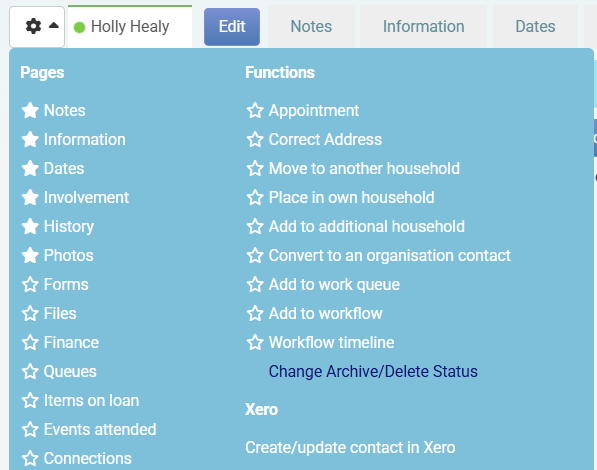
- Click the More profile functions cog at the top left of their profile.
- Under Functions, click Change Archive/Delete Status.
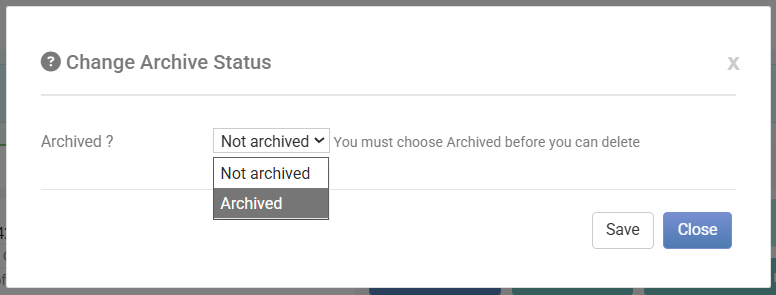
- In the Change Archive Status window, set Archived ? to Archived.
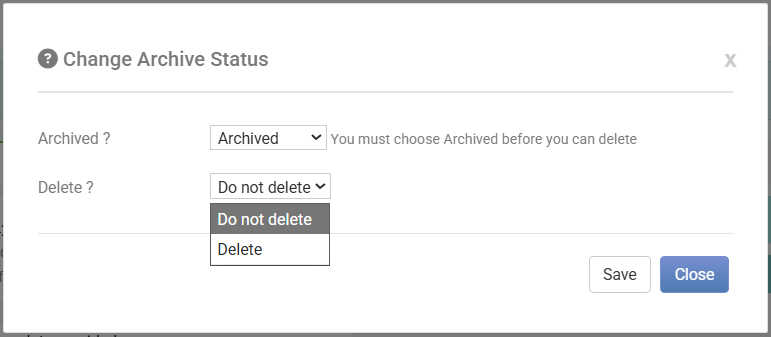
- If you have Can delete people from the database, a Delete ? option appears underneath. Leave it on Do not delete.
- Click Save.
The person's name now shows (Archived) after it wherever infoodle shows their name, including their own profile, your search results and the recently used list.

What archiving changes
| Where | What happens |
|---|---|
| Person search | The person is hidden. Tick Archived in the search box at the top of the screen to include archived people in your results. |
| Their name | Shown with (Archived) after it. |
| Groups | They stay in their groups, but they are left out of the group's # Active count and out of group member lists. |
| Choosing a group or a filtered group as your recipient source leaves archived people out of the list. | |
| Reports | Archived people are excluded unless you have Can see archived people. Add the Archived criterion to include or isolate them. |
| Household and directory | Archived household members are hidden from anyone without Can see archived people. |
| Rosters | They are no longer offered when a coordinator builds a roster. |
| To Do's | The To Do itself is unchanged, but the archived person is no longer named in the list of people it is assigned to. |
| Workflows | Workflows that run on a date, such as a date field, a group joined or left date, or a pledge date, skip archived people. |
| Login | They cannot log in, and they cannot use the forgot password link while they are archived. Their username and password are untouched, so un-archiving restores their access. |
| Active contacts | They drop out of the Active contacts figure in the Capacity indicator at the top of the screen, which is the number compared against your pricing band. |
What archiving leaves alone
- Their record, notes, files and photos.
- Their giving history, receipts and pledges.
- Their attendance history.
- Their group memberships, which are kept so they return to the right groups when you un-archive them.
- Their login username and password.
Archiving and deleting are not the same thing
Both options live in the same Change Archive Status window, and infoodle makes you archive someone before it will let you delete them. They do very different things.
| Archive | Delete | |
|---|---|---|
| What happens to the record | Hidden, kept in full | Removed from the database |
| Can you undo it | Yes, at any time | No |
| History and giving records | Kept | No longer reachable |
| Counts towards Active contacts | No | No |
| Role permission | Able to archive people | Can delete people from the database |
When you set Delete ? to Delete, infoodle shows this warning before you save: "This will remove the person from the database permenantly. e.g. They will not appear in any reports, workflows will not trigger, emails will not be sent. Please be sure you no longer need access to this persons data as there is no un-do."
If the person has financial transactions recorded against them, infoodle asks you to type OK to confirm the deletion, and warns that those transactions, receipts and claims will no longer be reachable.
Deleting cannot be reversed from within infoodle. Archive instead whenever you are not certain.
If you do not have Can delete people from the database, the window tells you "You do not have permission in your role to delete people" and no Delete ? option appears. Full steps are in Deleting a Person.
Other ways to archive people
-
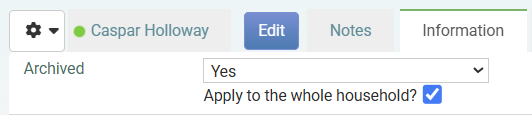
From the Information tab: Click Edit on the person's Information tab and set Archived to Yes. Tick Apply to the whole household? to archive everyone in that household in one go.
-
In bulk: Archive a whole list at once, either with a workflow triggered by adding people to a group, or with a data import that updates the Archived field. See Bulk Archiving.
Common questions
How do I un-archive someone?
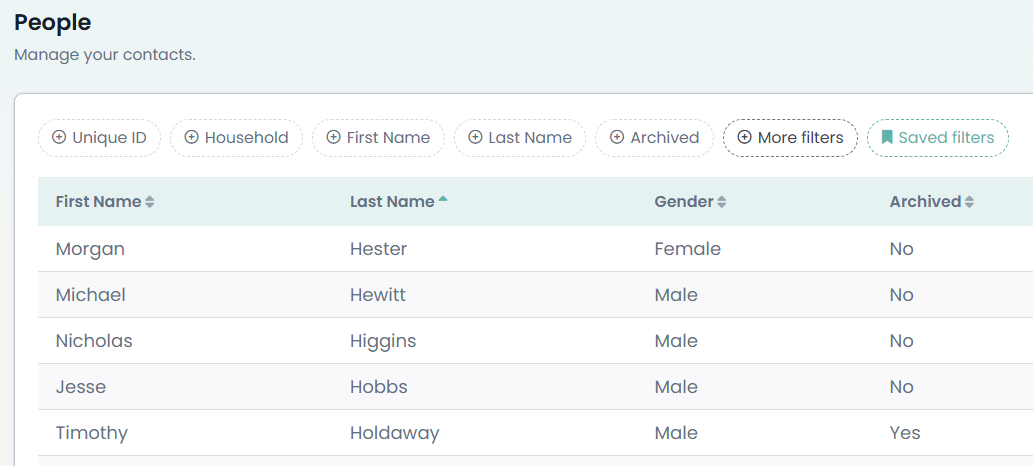
Find them by ticking Archived in the search box at the top of the screen. If you do not see that tick box, you need the Can see archived people permission. On the People list the same thing is a filter called Archived, set to No until you change it. Open their record, then use More profile functions > Change Archive/Delete Status and set Archived ? back to Not archived. Everything returns, including their group memberships and their login. Managing Archived Contacts covers this and searching and reporting on archived people in more detail.
What is the difference between archiving and deleting?
Archiving hides the person and can be undone. Deleting removes them and cannot be undone. See Archiving and deleting are not the same thing.
Is archiving recorded anywhere?
Yes. Every archive and un-archive made in infoodle is written to the person's audit trail with the date, who made the change, and the old and new values. Open it from More profile functions > Profile > Audit trail. You need to be able to edit that person's record to see their audit trail.
Can an archived person still log in?
No. Their username and password are left as they were, but infoodle refuses the login while they are archived, and the forgot password link will not work for them either. The sign in screen does not tell them that being archived is the reason, so let them know before you archive them. Un-archiving restores their access.
Does archiving remove them from their groups?
No. Their group memberships are kept. They are simply left out of the group's active member count, its member lists and any email you send to that group.
How many of my contacts are archived?
Go to Administration > Site statistics, then open Database Capacity in the side menu. Remember to click the administration cog in the top right hand corner to reach Administration. The table under the chart shows Total active, Total archived and Total.
Can I archive a whole household at once?
Yes. Use the Archived field on the Information tab and tick Apply to the whole household? before saving.
Next steps
Once people are archived, Managing Archived Contacts shows you how to search for them, include them in reports, and bring them back.