The Finance Tab on a person's profile page is used to show and manage the financial data associated with an individual contact record.
Depending on the packages your system has, and your role permissions, the following tabs are available.

Transaction Activity
Shows the transactions for this donor. Use Transactions For Year to filter to a different year, or choose Any time to see them all.
- Each of this contact's transaction rows has an eye icon at the right-hand end.
- Click it to see more detail for that one transaction, such as the payment method, the campaign and the receipting settings.
- The detail opens in a popup over the profile, so you keep your place in the list.
- Close the popup with the X in its top right corner, by pressing Escape, or by clicking outside it.
For everything the popup can show, see the Transaction Detail Popup (the Eye Icon) article.
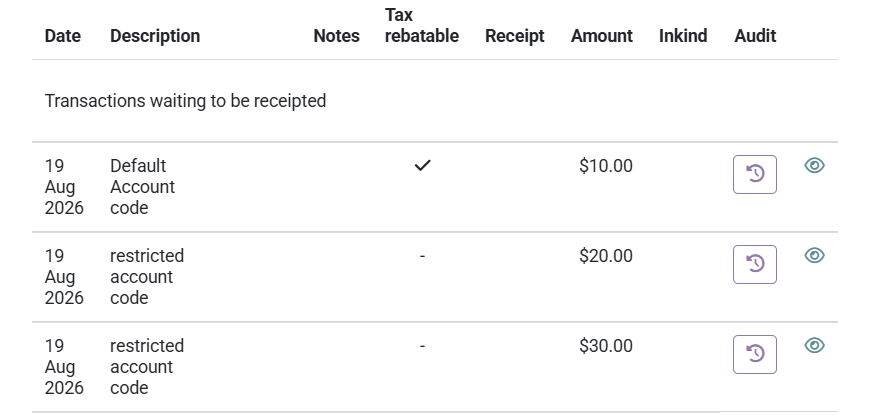
Some rows have no eye icon. Collective transaction rows cover several transactions at once, so there is no single transaction to show. A row is also left without one when you are not allowed to see that particular transaction. The income transactions further down the tab do not have the eye icon either.
Activity buttons

- Move to another contact allows you to move all of the transactions from this contact to another. You see this button if your role has the Manage, Read and report on transactions permission, see more on moving transactions.
- Export generates a PDF, Excel or CSV report of the transactions shown on the screen.
- Statement enables you to generate a statement for this contact which can be filtered by Date range, Account code and if used, Pledge drive.
Pledges
Shows the list of pledges associated with this contact and allows you to create and manage them.
See Pledges on Profile screen for more information.
Giving Number
Shows you the current giving number for this contact and whether it is shared with others.
Donor Analysis
Gives a visual representation of the giving, either by pledge or inferred from their giving history. See here for more information
Receipts
Provides a list of receipts that have been created for this donor. It also allows you to filter them by dates or status. Use this screen to see current or voided receipts.
Gift Aid
When the Gift Aid package is enabled, this provides a screen to show their gift aid approvals and enables you to add new ones.