The report menu is separated into different types of reports
Select Reports from the Navigation Menu.
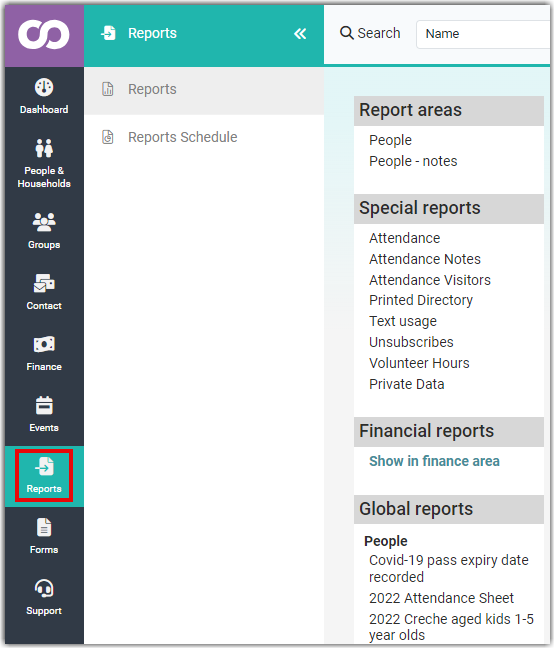
Report Areas
This is where you start from when creating a new report. The mechanisms for creating these reports are the same.
People
A list of people. You can output any number of fields related to the contact including custom fields. You can also output the financial details attached to that contact.
People - Notes
A list of people with the notes that match the criteria you specify. You can add a number of other custom fields etc. also.
NB: See the section below regarding permission and accessing this report.
Assets
If you have the Library package - this include assets, and you can report on them here.
Special Reports
This is a list of report that are for specific purposes. They usually have some prebuilt parameters that you can configure in order to identify the output you want e.g. an attendance report can be filtered by the event you are interested in.
| Report Name | Purpose |
|---|---|
| Attendance | List the attendance recorded via the check in system or group attendance screen for specific events and or groups during a period |
| Attendance - Notes | List of the notes attached to an event from the group attendance screen |
| Attendance - Visitors | List the visitor details who were attendees at events |
| Printed Directory | A report which outputs a formatted view of people, their data and photos in a booklet or other format for distribution |
| Text Usage | Report on the who sent text message |
| Unsubscribes | The list of people who have unsubscribed from emails |
| Volunteer Hours | A break down of the volunteer hours and the tasks they did |
| Private Data | A list of all data that have some element that is private and therefore not visible to Directory only users - or Printed Directory |
Financial Reports
This is a link taking you to the reports specifically built to assist with financial reporting.
Your Reports
This shows a list of reports that you have saved - but are only visible to you.
Group Reports
This shows a list of reports that have been saved by you or others - that are visible to you because you are Full Member or Administrator of the specified group.
Global Reports
This shows a list of reports that have been saved by you or others - that are visible to anyone who has access to reports.
People Note Report Permissions
The ability to create People - notes reports is tied to the Notes options in Role permissions.
If a user's role does not have the permission Can see general people notes they will not have access to the People - notes report functionality at all, even if they can access People reports.
Similarly, if a person can see and report on Notes, but is not in the associated group that a Note maybe assigned to, any Note report they run will not list those Notes.
This is because the Visibility Access restrictions apply when viewing Notes System-wide - you can only report on Notes that you are ordinarily able to see.
The one exception to Note visibility is if a user has added the Note themselves, and set it as Visible to a Group, they will always see that specific note even if they are not part of that group. This is a very specific case where the person that added the note, is always able to see the notes that they have added, so long as their role has that permission enabled.
For further information regarding Roles and Notes, see Roles - Viewing Notes on other Contacts