Once a Gift Aid claim has been filed with HMRC, the donations it contains are locked. If a donation needs correcting in a way that would affect the claim, you can remove it from the claim. The original claim remains unchanged as the permanent record submitted to HMRC, but the donation is marked as removed and the Gift Aid already paid on it is added as an adjustment to your next claim.
HMRC relies on good data management that records changes to claims and transactions. infoodle provides that source of truth for questions the HMRC ask.
This article is about taking a donation out of a claim you have already filed. For which donations go into a claim in the first place, see Transactions Included in a Gift Aid Claim.
Before you start
Role Permissions
- Manage, Read and report on transactions
- Access to Finance area
For an explanation of what each finance permission does, see Finance Permissions.
- Gift Aid must be turned on for your site.
- The claim must already be marked as filed to HMRC. Donations in an in-progress claim can be edited normally.
- The donation must not have been receipted — receipted donations in infoodle cannot be removed.
- You will need a later claim for the adjustment to be repaid through (that is claiming more than the total adjustment). If you don't have one yet, the adjustment waits until you do
What removing a transaction does
Removing a transaction from a filed claim:
- Keeps the transaction on the filed claim, marked as removed.
- Drops the Gift Aid claimed on it to £0.00.
- Adds that amount to your next claim as an adjustment to repay HMRC.
- Reduces the donor's Lifetime Gift Aid Claimed total by the removed amount.
- Locks the filed claim from being reset — it is now the record of a correction sent to HMRC.
A removal cannot be undone. There is no way to put a transaction back into a filed claim. Check the amount carefully before confirming.
The three ways a transaction gets removed
You don't always need to remove a transaction manually. It can happen automatically:
- You tick the remove option — you deliberately take the donation out of the claim.
- You make a change that disqualifies it — for example, moving the donation to someone with no Gift Aid approval covering its date, or changing it to a non-tax-reclaimable account code. infoodle removes it automatically.
- You move a person's giving to another contact — any donations the new person can't claim are removed from their filed claims.
Changes that do not remove a transaction from a claim
If you change the person or account code and the donation still qualifies, nothing is removed — the row is simply marked as edited.
Move a transaction manually
Step 1 — Open the transaction
- Open the donor's profile.
- Go to the Finance tab.
- Find the donation and open it via the eye icon
- Then click View transaction and the transaction details will open in a new tab
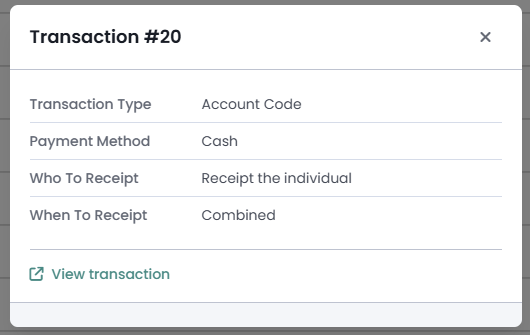
The transaction shows an Editing restricted notice because it is part of a filed claim. Only the person and account code can be changed; the transaction cannot be deleted.

Step 2 — Remove from the claim
-
Click Edit.

-
Find the Gift Aid claimed line.
-
Tick Remove from Gift Aid claim (on the right of the screen)

-
Click Save Transaction.
-
Read the confirmation — it names the amount that will be repaid.
-
Click Yes to remove.
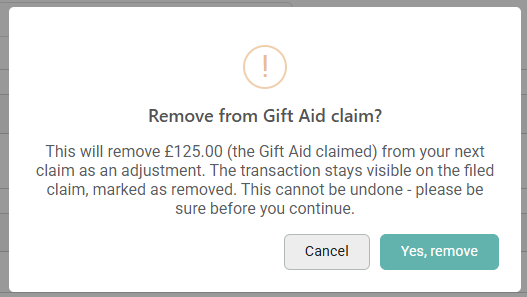
Remember, removing claims cannot be undone!
Moving a person's giving to another contact
Finance tab → Move to another contact moves all of a person's giving at once.
-
Open the donor's profile and go to the Finance tab.
-
Click Move to another contact.

-
Read the confirmation carefully — it tells you how many donations are in filed claims, how many will be removed, why they no longer qualify, and how much will be repaid.
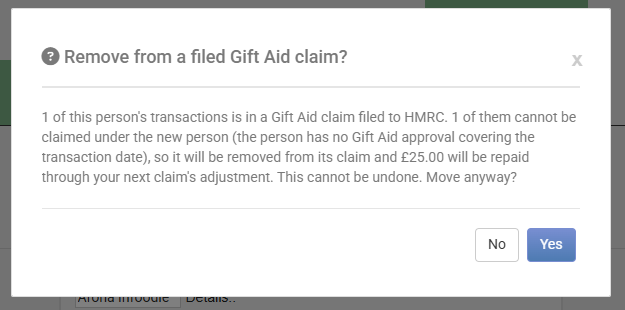
-
Click Confirm to proceed, or Close to stop and check the new person's Gift Aid approval first.
One confirmation can remove donations from multiple filed claims at once.
What you see on the filed claim afterwards
Open the previously filed claim that holds the transaction you have removed and find the removed donation in the transaction list. It now shows:
- A removed tag next to the donor's name. This shows the claim has been removed
- New claim pending — until the adjustment is attached to a later claim. This only shows if there is no later claim for infoodle to link it with.
- Removed from claim in the Changes column.
Once you finalise the new claim which is carrying the adjustment, the row shows a new claim link instead. The filed claim's own totals do not change — it keeps showing what you claimed at the time.
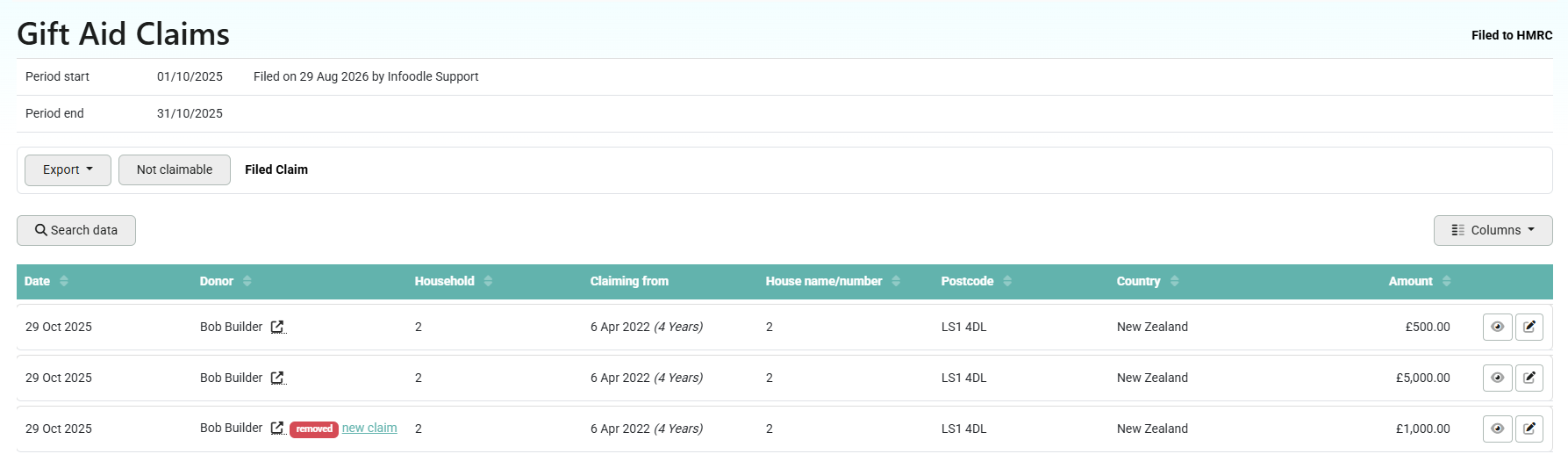
The adjustment on your next claim
-
Open the claim you are working on.
-
Find the Removed transactions block — it lists everything waiting to be adjusted, with each row showing the donor's name, postcode, and amount.

-
Click any row to open the transaction it came from.
Below the list you will see:
- Total for this claim — everything currently set to be repaid on this claim.
- Combined adjustment — that total plus any manual over-claim amount you've entered. This updates as you type.
You can add any other comments or adjustments. Note that there is a limit to the number of characters that HMRC will accept and therefore if there are alot of transactions this may be truncated. The detail of the claim activity is held in the claims themselves so this is a reference for you mostly.
To defer a removal to a later claim:
You may need to defer an adjustment because you need to be claiming more than the adjustment - HMRC do not accept payments from you (which would be the case for an adjustment more than the claim). In this case you can defer some of the adjustment to a different claim.
- Click Defer to a later claim on the row — it greys out and drops out of the total.
- To bring it back, click Include in this claim.
Deferring does not cancel the repayment. The amount is still owed to HMRC and stays on the list until included in a claim.
Common questions
Can I undo a removal?
No. There is deliberately no undo, because the repayment to HMRC has already been raised. A removed donation cannot be put back into its claim, and it cannot be claimed again on a later one. If a donation has been removed and you believe it should still be claimed, contact infoodle support.
Is the donation deleted?
No. The donation stays in the donor's giving history, and it stays on the claim you filed. Only the Gift Aid on it is returned.
Why is it still shown on the claim I filed?
Because that claim is the record of what you told HMRC. Changing it would leave you with a claim that no longer matches your submission.
I only changed the account code, so why was I asked to confirm a removal?
Because the new account code is not tax reclaimable, so the donation no longer qualifies for Gift Aid. The confirmation names the amount that will be repaid. Click Cancel if that is not what you meant, and pick a different account code.
I only changed who the donation belongs to, so why was I asked to confirm a removal?
Because the new person has no Gift Aid approval covering the date of the donation, so it no longer qualifies. Click Cancel, check that person's Gift Aid approval, and try again.
Can I still edit a transaction after it has been removed?
Yes. The person and the account code can still be changed. The claim is not affected again, and no second adjustment is raised.
What if I do not have another claim yet?
The adjustment waits. It attaches itself to the next claim you finalise.
Can I remove a receipted donation?
No. A donation that has been receipted stays locked. Other lines on the same transaction that have not been receipted can still be removed.
Next steps
Once the removals on your claim are the ones you want, carry on and file it. See Filing to HRMC.