HMRC only accepts a Gift Aid claim when every donor in it has a name and an address written the way HMRC expects. infoodle checks each donor before you file and lists any that do not pass on the Errors tab of the claim. The claim stays where it is until that tab is empty.
Before you start
Role Permissions
- Access to Finance area
- Manage, Read and report on transactions
- Edit any person and household contact details, so you can correct a donor's name
For an explanation of what each permission does, see People role permissions.
You will need a claim that has not been filed yet. infoodle does not re-check a claim once it has gone to HMRC.
The rules HMRC applies
Which rules apply to a donor depends on the country on their household address. United Kingdom, England, Scotland, Wales and Northern Ireland all count as UK, so the house name and postcode rules apply to all five.
| Field | What HMRC accepts | Works | Does not work |
|---|---|---|---|
| Firstname | Must be filled in. Letters A to Z only, plus apostrophes and hyphens. No spaces, no numbers and no full stops. | Anne-Marie, D'Arcy |
Anne Marie, Sarah2, J. |
| Lastname | Must be filled in. Letters A to Z, numbers 0 to 9, spaces, and these characters: , . ( ) / & ' - |
St John, Smith-Jones, O'Brien (Snr) |
blank, Müller, Smith_Jones |
| House name or number | Must be filled in for a UK address. | 10, Rose Cottage, Flat 2b |
blank |
| Post code | Must be filled in for a UK address, and must be a real UK postcode with the space in the middle. A BFPO address is the exception, see below. | SW1A 1AA, M1 1AA, DN55 1PT |
1234, SW1A1AA |
Accented letters are not accepted in either name, and they are the most common reason a name that looks perfectly ordinary is listed as an error. Müller has to be entered as Muller, Zoë as Zoe, and Ó Súilleabháin as O Suilleabhain.
The postcode is not case sensitive. infoodle puts it into capitals for you before it checks it and before it sends it. The space in the middle is not optional.
What each error tag means
The tag appears in red under the donor's name on the Errors tab.
| Tag | What it means |
|---|---|
[No firstname] |
The Firstname box on this person is empty. |
[No lastname] |
The Lastname box on this person is empty. |
[Firstname Bad format] |
The firstname contains something HMRC does not accept, most often an accent, a space, a number or a full stop. |
[Lastname Bad format] |
The lastname contains something HMRC does not accept, most often an accent. |
[BFPO number not recognised - please contact support so it can be added] |
The house name or number is a BFPO number that infoodle does not yet have a postcode for. |
Address problems do not get a tag. A donor whose house name or number is missing, or whose postcode is missing or in the wrong format, is simply listed, and you will see the empty or incorrect value in the House name or number and Post code boxes on their row.
Find the errors on your claim
- Click or hover on Finance on the main menu bar on the left.
- Click Gift Aid.
- Click Claims.
- Find your claim in the list.
- Click Action at the end of that row.
- Click Review.
- Open the Errors tab.
The Errors tab lists one row per donor that HMRC would reject. Every one of them has to be cleared.
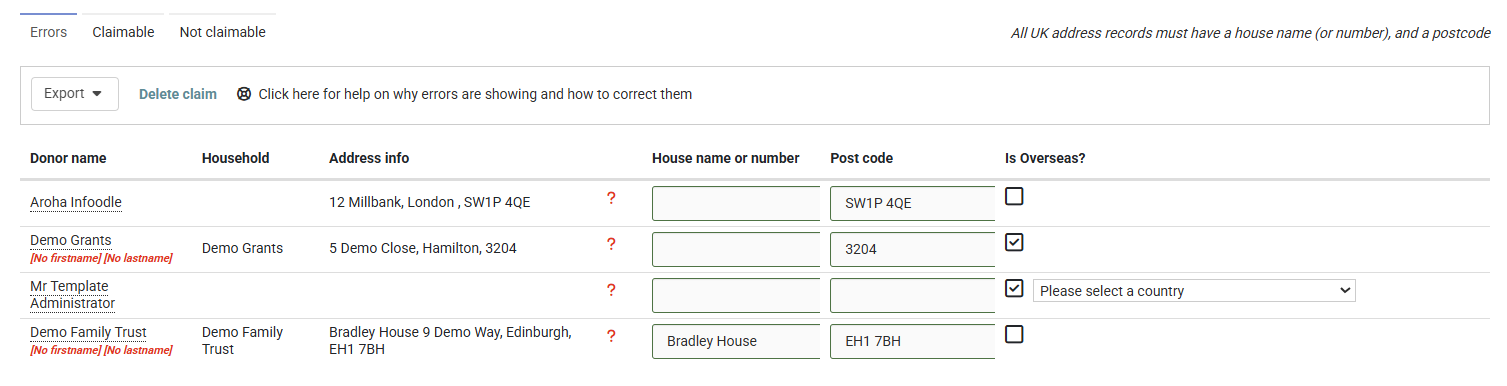
If you open the Claimable tab while errors are outstanding, a red message appears above the list. Click that message to jump straight back to the Errors tab.

Correct a name
Names are held on the person, so you correct them on the person's profile rather than on the claim.
- Note the donor's name from the Errors tab.
- Type their name into the search box at the top of the screen.
- Click their name in the results to open their profile.
- Click Edit next to their name at the top of the profile.
- Correct the Firstname box.
- Correct the Lastname box.
- Click Save.
- Go back to the claim's Errors tab.
- Refresh the page. The donor drops off the list.
Correct an address
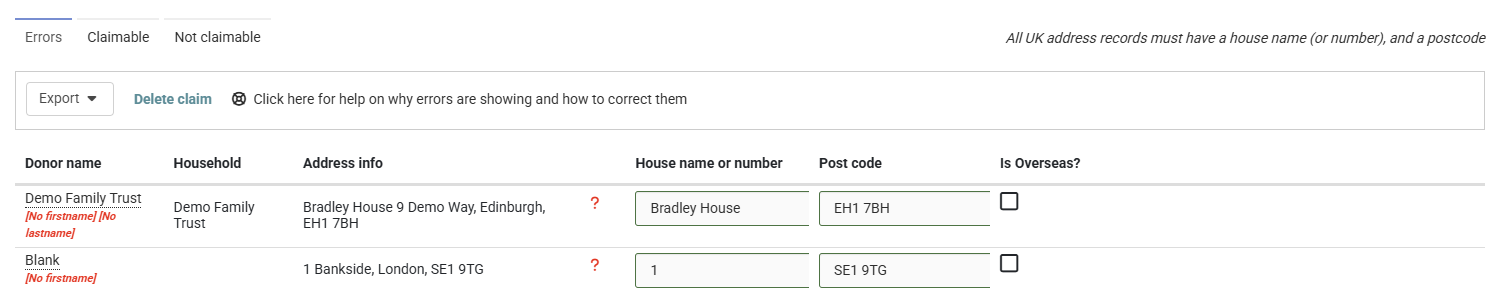
House name or number and postcode can be corrected on the Errors tab itself. Work through the list one donor at a time, refreshing after each one, so you can see that each correction has taken.
This grid has no Save button, no Cancel and no undo. infoodle writes what you type straight to the household's address a second after you stop typing, and the previous address is gone.
- Find the donor's row on the Errors tab.
- Click in the House name or number box.
- Type the house name or number.
- Click in the Post code box.
- Type the postcode, including the space in the middle.
- Stop typing and take your hands off the keyboard.
- Look at the narrow column just left of House name or number. A green tick appears there once infoodle has saved the row.
- Refresh the page.
- Check that the donor has dropped off the list.
- Move on to the next donor and repeat.
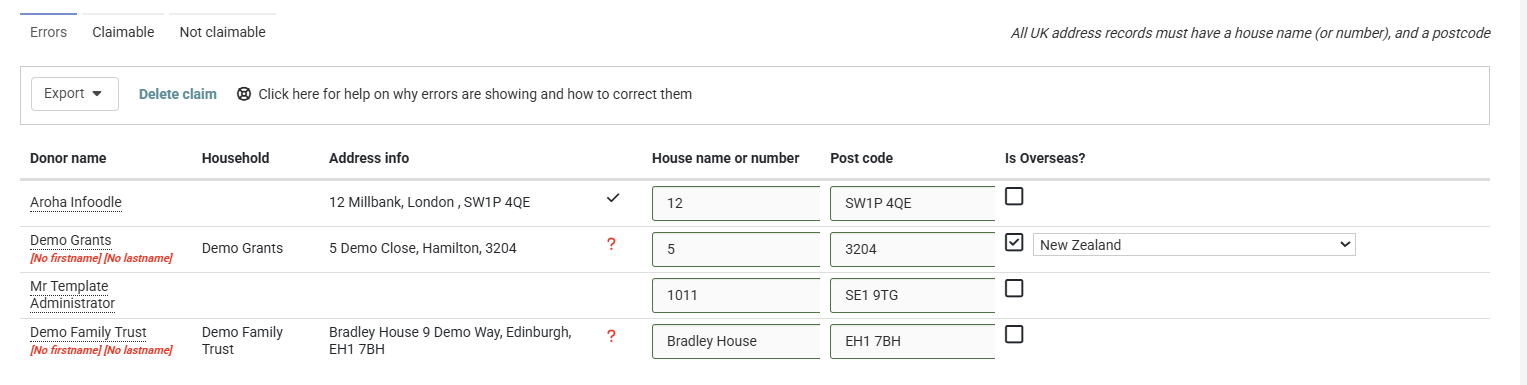
infoodle saves a row about a second after you stop typing. Both the house number and postcode must be entered before it will save, so rows with only a house number will remain unchanged.
When the page opens, every row shows a red question mark, even if the postcode is already correct. After you edit a row and wait a moment, the icon will update. If the question mark remains, the row has not saved.
If a row fails to save, refresh the page before continuing. Otherwise, no further changes on that screen will save.
If a row shows a green tick but still appears after a refresh, it passed the on-screen check but failed the full validation. Re-enter the postcode on its own, with no extra spaces or text. Postcodes beginning with three letters, such as GIR 0AA, cannot be corrected on this screen and should be referred to support.
The Errors tab writes to the household's main address, so the corrected house name or number and postcode apply to everyone in that household. The claim sends the address as it stands on the day you file, not the address the donor had on the day they gave.
Donors who live outside the UK
The Is Overseas? column shows a tick when the country on the donor's household address is set to anything other than United Kingdom. It follows that country, so it is not something you switch on or off yourself.
- Donors whose country is set to England, Scotland, Wales or Northern Ireland show a tick, but they still count as UK donors. The house name and postcode rules still apply to them, and HMRC still receives them as UK donors.
- If a donor on this list genuinely lives abroad, set their country instead of inventing a postcode for them. A UK donor with no postcode cannot be sent to HMRC at all, and a made-up postcode goes into your claim as fact.
- If the country box on their row is empty, a country list appears in the Is Overseas? column. Choose their country from it.
- To move a donor from the United Kingdom to another country, change the country on their household address.
Armed forces and BFPO addresses
A British Forces Post Office address counts as a UK address and has no ordinary postcode of its own.
- Open the donor's household address.
- Put
BFPOand the number in the house name or number, for exampleBFPO 8. - Leave the postcode as it is.
infoodle recognises that pattern, treats the donor as a UK donor, and looks up the real postcode assigned to that BFPO number when the claim is sent. If the number is one infoodle does not hold, the row shows [BFPO number not recognised - please contact support so it can be added], and support can add it for you.
Lengths infoodle trims for you
HMRC sets a maximum length for each field. infoodle shortens anything longer when it builds the claim, so these never show as errors.
| Field | Maximum sent to HMRC |
|---|---|
| Title | 4 characters |
| Firstname | 35 characters |
| Lastname | 35 characters |
| House name or number | 40 characters |
| Post code | 8 characters |
infoodle also strips anything that is not a letter, an apostrophe or a hyphen out of the title, so Mr. is sent as Mr. You do not need to tidy titles yourself.
Common questions
Why can I not file my claim?
A claim will not go to HMRC while the Errors tab has anything on it. Clear every row, then file.
The donor's name looks perfectly normal. Why is it an error?
Most often it is an accent: HMRC works in plain A to Z letters, so Zoë has to be entered as Zoe. The other common cause is that HMRC's rule for a first name is much tighter than its rule for a last name. A space is fine in a last name but not in a first name, so a double-barrelled first name has to be hyphenated: Anne-Marie, not Anne Marie.
I cannot find the donor's address. What now?
Do not invent a postcode. You have two honest options. Ask the donor for their address, correct it on the Errors tab, and the row clears. Or leave that donation for a later claim: bring the claim's period end date back to before the date of that donation, so it drops out of this claim and you can file the rest. Any other donations dated after the new end date wait for your next claim as well.
A donor has no last name at all. How did that happen?
infoodle's own person form will not save a person without a last name, labelled Surname when you add someone and Lastname when you edit them. So a record with a blank last name has almost always arrived through a data import. Correct the person on their profile, then check the rest of that import for the same gap. See Preparing import data.
One of the rows is an organisation, not a person.
Gift Aid is claimed on gifts from individuals, so an organisation record in a claim shows up here as a missing first and last name. Record the gift against the individual who made it, then refresh the Errors tab. If nobody can tell you who that was, bring the claim's period end date back to before the date of that donation so it drops out of this claim.
The message says there are errors but the Errors tab is empty.
A single claim holds up to 25,000 donations. If yours holds more, move the claim's period end date earlier so fewer donations fall into it, and claim the rest next time.
Next steps
Once the Errors tab is empty, the claim is ready to go. See Filing to HMRC.
Related articles:
Transactions Included in a Gift Aid Claim
Filing to HMRC
Gift Aid Approval