A pledge can be created manually directly on a person's profile (adding a pledge), from the import process or from a form entry.
When the transaction arrives in infoodle and needs reconciling, or you are manually adding a transaction then you have the opportunity to match the transaction with the pledge. If it's associated with a form you can follow the page on reconciling against forms.
When you are adding a transaction, infoodle will use the Date and Donor to see if there are matches.
When you are using the reconcile screen, infoodle will use the Date of the transaction, Donor and the Amount to identify if there are matches.
In both cases, infoodle searches 50 days back and 14 days forward for a matching pledge date.
For each pledge found, a list of possible matches is shown.
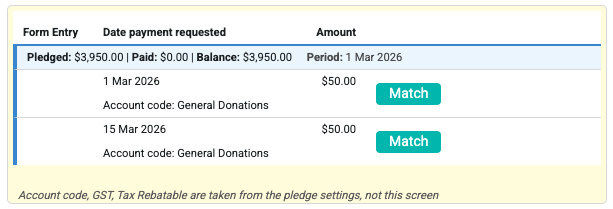
The top line shows the current status of the pledge:
Pledges The total amount of the pledge (or up to 3 years if it's open-ended).
Paid How much has so far been paid on this pledge.
Balance The remaining balance to be paid on this pledge.
Period The start date of the pledge (and end if provided).
This information is provided to assist you in identifying whether a transaction is applicable for this pledge.