When a membership is invoiced each payment, infoodle raises a Xero invoice each time it asks the member for a payment, not just the first. A bulk run membership paid in 12 monthly instalments gets 12 invoices, each one raised on the day that instalment is asked for.
Which memberships are invoiced
Before any membership can be invoiced, Xero must be switched on for your site and the membership product needs a Xero account code for its fee on its Xero tab. Without that code, Invoice this membership can't be ticked. See Turn Xero invoicing on or off for a membership.
A membership is invoiced each payment when Invoice this membership is ticked on it. That happens in one of three ways:
- A bulk run with Push to Xero ticked: every membership the run invoices, new or renewed, is ticked.
- A renewal: a renewal keeps the setting of the membership it renews. A bulk run renewal of an invoiced membership is invoiced even when the run doesn't push to Xero.
- Staff: anyone with the Manage finance configurations permission can tick Invoice this membership when they edit or add a membership. A membership ticked as it is added is invoiced from the payment after the one its join email asks for.
Every other membership, including members who join online, starts without it.
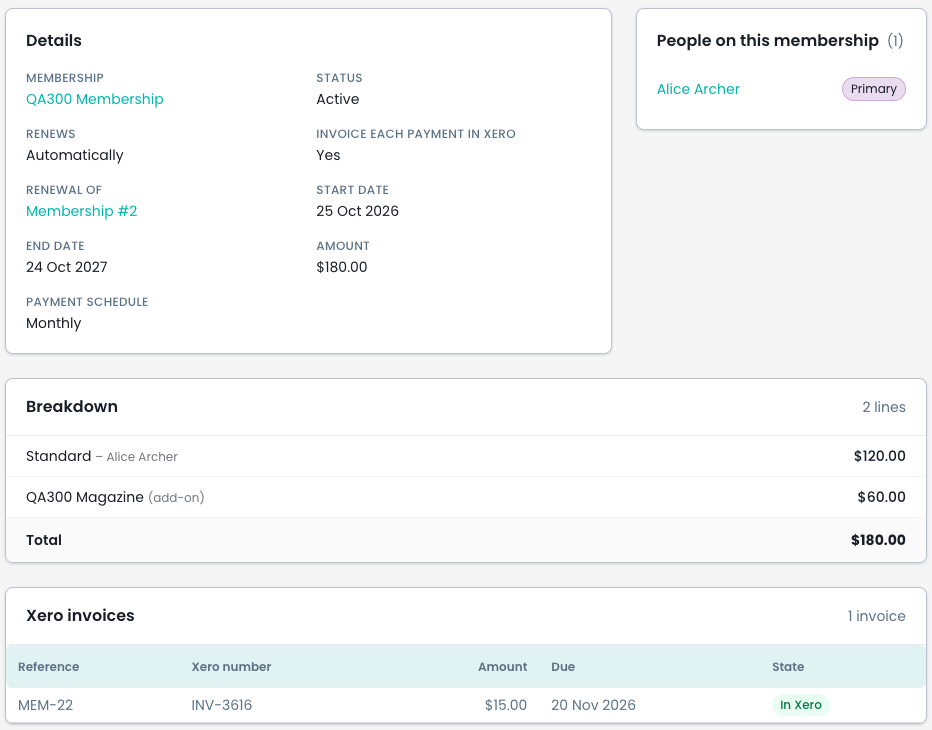
You can see whether a membership is invoiced on its record: Invoice each payment in Xero reads Yes or No in the Details card.
When each invoice is raised
infoodle raises the invoice at the moment it asks for the payment:
- A bulk run's first payment: by the run itself, as it works through each membership. For a membership paid in instalments, this invoice is for the first instalment only.
- Each later instalment paid by hand: on the day infoodle asks the member for it, in the daily membership run.
- A renewal paid by hand in one payment: when infoodle sends the renewal payment request.
The invoice is raised even when the email for that payment is switched off, or the bulk run had Send emails unticked. A reminder for the same payment never raises a second invoice. infoodle then sends the invoices to Xero a few at a time, shortly after they are raised.
To see what each invoice contains, see What's on a membership payment invoice.
What isn't invoiced
- Card and Direct Debit payments: payments collected by card or Direct Debit never raise an invoice. A renewal on a card the member never agreed to have charged is asked for by hand, so it is invoiced.
- Pay now and Set up instalments in the portal: a payment a member makes online never raises an invoice. While an invoice is unpaid, the portal turns these away and asks the member to pay that invoice by its payment instructions. See Paying an invoiced membership.
- Archived holders: no invoice is raised while the holder is archived. Once they are unarchived, the next request raises it.
- Sites without Xero: nothing is raised unless Xero is switched on for your site.
The membership product's Xero tab carries a reminder: "Memberships flagged to be invoiced get a Xero invoice for each payment request. Card and Direct Debit payments are not invoiced." There is no setting on the product to turn this on or off. The setting belongs to each membership.

Common questions
What happens to an unpaid invoice if the membership changes?
infoodle voids it when the payment plan changes, for example when the membership is cancelled. See When a membership invoice is voided.
Next steps
infoodle never marks an invoice paid. Record each payment in infoodle, or the member is chased for it. See Paying an invoiced membership.
To see the invoices a membership has raised and where each one stands, see Check a membership's Xero invoices.