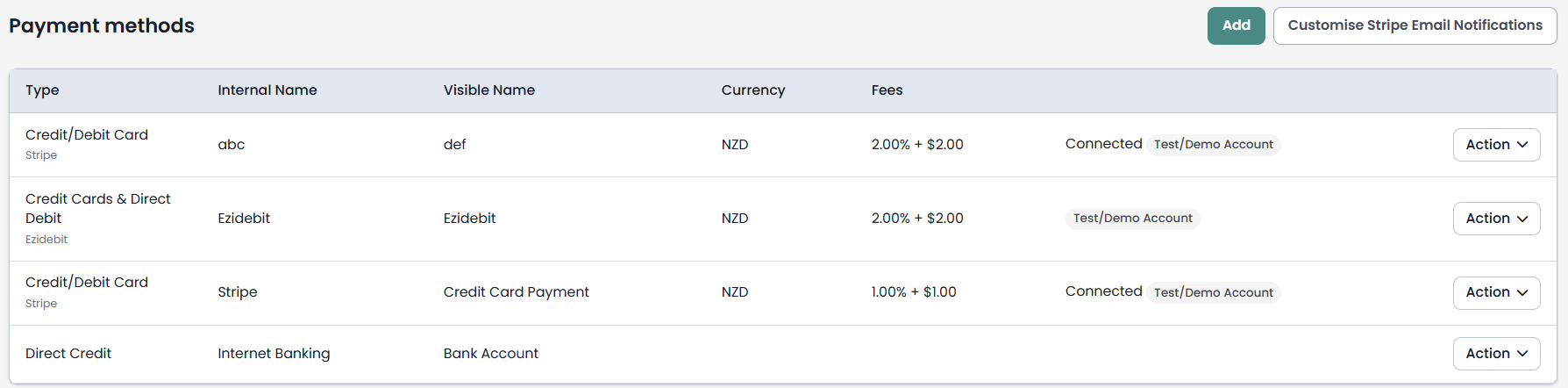
The Payment Methods screen displays the payment methods infoodle is set up to take payment with.
To view, navigate to Finance → Transaction Processing → Payment methods.
Before you start
You need the following permissions:
- Manage, Read and report on transactions or Read and Report on Transactions or Manage finance configurations - Opens the Payment methods screen
- Manage finance configurations and Update System information - See the Configure button on the Payment methods screen
- Update System information - Opens the Administration Payment Methods page and edit a payment method
Note: Editing a payment method is governed by Update System information. Manage finance configurations controls whether the Configure button appears on the screen — it does not by itself allow a method to be edited.
For an explanation of these permissions, see People permissions.
What the screen shows
Each row on the screen represents one payment method your site is configured to use. The columns are:
- Type — the payment type (for example: Stripe, Ezidebit, Direct Credit, Cheque).
- Name — the visible name of the payment method (the label donors and form users see, for example "Pay by Internet Banking" or "Donate by Card").
- Currency — the currency the method is configured to accept.
- Notification email — the email address that receives notifications for this method. This was set when the payment method was first created.
- Action or Form Usage button — one of these two buttons appears on each row (see below).
Form Usage
For most payment methods, the button on the right of each row reads Form Usage. Clicking it shows all form entries submitted using that payment method. For more information see Form Usage.
Action (Ezidebit only)
For Ezidebit payment methods, the button reads Action instead. Clicking it gives you the following options:
- Form Usage — as above
- Statement
- New Payments
- Payers
Additional options
Two further options appear below the list of payment methods:
-
Configure — takes you to the Administration → Payment Methods page, where you can add a new method (Cheque, Direct Credit, Integrate a payment gateway, or Free text information) or edit an existing one. For setup steps, see Payment Methods and Set Up.
-
Review Errors — available for Ezidebit only. Allows you to review errors associated with Ezidebit transactions and choose how to handle them. For more information, see Review Errors — Ezidebit.
Bank details to display on statements
A donor statement can print the bank details a donor needs to make a catch-up or manual payment against a pledge. Each payment method holds the wording used for that.
To fill in the bank details:
- Click Configure on the Payment methods screen.
- On the Administration Payment Methods page, click Action then Edit on the method you want.
- Fill in the Bank details to display on statements (optional) box at the bottom of the method's settings.
Each method is listed there under an Internal Name and a Visible Name. The Visible Name is what donors see on forms and statements.
The box is free text — type exactly what you want the donor to read, one item per line. Press Enter to start each new line. This box takes ordinary line breaks; the || separator used by the Direct Credit Bank account details field is not translated here. Your line breaks print on the statement exactly as you typed them.
Example — for a method donors see as "Pay via Internet Banking":
Account name: Demo Ltd
Bank: ANZ Bank New Zealand
Account number: 01-0123-0123456-00
Reference: Please quote your donor number
Example — for a method donors see as "Pay by Cheque":
Cheques payable to: Demo Ltd
Post to: PO Box 1234, Wellington 6011
Reference: Please quote your donor number
Which payment types offer this field
The field appears when the payment type is Cheque, Direct Credit, or Free text information — the methods where a donor pays by hand and needs bank details.
It does not appear for Integrate a payment gateway. For gateway methods, a statement covering a pledge prints "Payment is processed automatically" instead, because the donor has nothing to pay by hand.
How this field relates to the other detail fields
Direct Credit and Cheque methods also hold wording for use on forms: Bank account details for Direct Credit, and Who to make the Cheque payable to / Where to send the Cheque for Cheque. Those fields continue to work as normal on your forms.
Bank details to display on statements replaces those fields on a statement — it does not add to them. If you fill it in, a statement prints that text and nothing else from the method. If you leave it empty, a statement falls back to the form wording.
That makes it the right place for anything you want a donor to read on a statement but not on a form — for example, a donor reference line or a note about allowing time for a cheque to clear.
A statement prints these details wherever its template uses the {paymethodbankdetails} tag, which sits on the pledge detail page of a statement template. Placing the tag requires Manage, Read and report on transactions and a template of the statement type. See Pledge Detail Pages on Donor Statements for how to add it and what it prints for each method type.
Online payments
Payment methods are made available to donors through infoodle forms. You can offer different methods on different forms — for example, Stripe and Direct Credit on a donation form, and Direct Credit only on an event registration.
Note: Not all Stripe payment method types are compatible with infoodle. If you see an error such as "No valid payment method types for this Payment Intent", check that you have enabled at least one compatible payment method (at minimum, Cards) in your Stripe Dashboard for the correct currency and mode (live or test). See Payment Fields for further information on processing online payments.
For information on adding payment options to a form, and building a form in general, see Adding a Form.
Common questions
Where do I fill in the statement bank details?
Click Configure on the Payment methods screen, then Action → Edit on the method. The box is at the bottom of the method's settings, headed Bank details to display on statements (optional).
Why can I not see the field on my payment method?
The method's Payment type is Integrate a payment gateway. The field is offered for Cheque, Direct Credit, and Free text information only.
Do I have to fill it in?
No. It is optional. A statement falls back to the wording already held on the method. Fill it in when you want a statement to read differently from a form.
Will this change what my forms show?
No. A form keeps using Bank account details, or the cheque payable-to and send-to details. This field is read only on statements.
Can I put more than one line in it?
Yes. Press Enter and type each item on its own line — the statement preserves that layout.
Next steps
- To set up a new cheque, direct credit, or free text method, see Adding non-credit card methods.
- To set up an online payment gateway, see Payment Methods and Gateways.