Renewal settings decide whether a membership renews by itself or waits for the member to say 'yes', and how far ahead of the renewal date that happens. They live on the Renewal tab of a membership product, and they are read by the job that runs every night to move every membership through its lifecycle.
Before you start
Role Permissions
- Manage finance configurations: lets you open a membership product and save changes on the Renewal tab.
For what each role permission means and how to change them, see People Permissions.
You will need the Membership add-on package switched on. See Turning on the Membership and Portal packages.
You will need a membership product to work on. See Creating a membership product
You will need that product's Duration set to Fixed length on the Duration & Period tab. A Lifetime or Free product has no end date, so it has nothing to renew.
You will also need at least one rate row on the Rate Rules tab. The rate table says so itself when it is empty: "No rates yet". A product with no rates cannot be priced, so nobody can join it and no renewal can open for it.
You will need the Portal package as well if you want to use the Confirm required renewal mode, because the Portal is where a member answers a renewal. The section below sets out what each mode needs.
The Renewal tab
You can find this by going to Finance → Membership Products, opening a product by clicking edit from the three dots, and choosing Renewal in the list of settings down the left of the page.
The tab carries two settings, and nothing else on the page changes them.
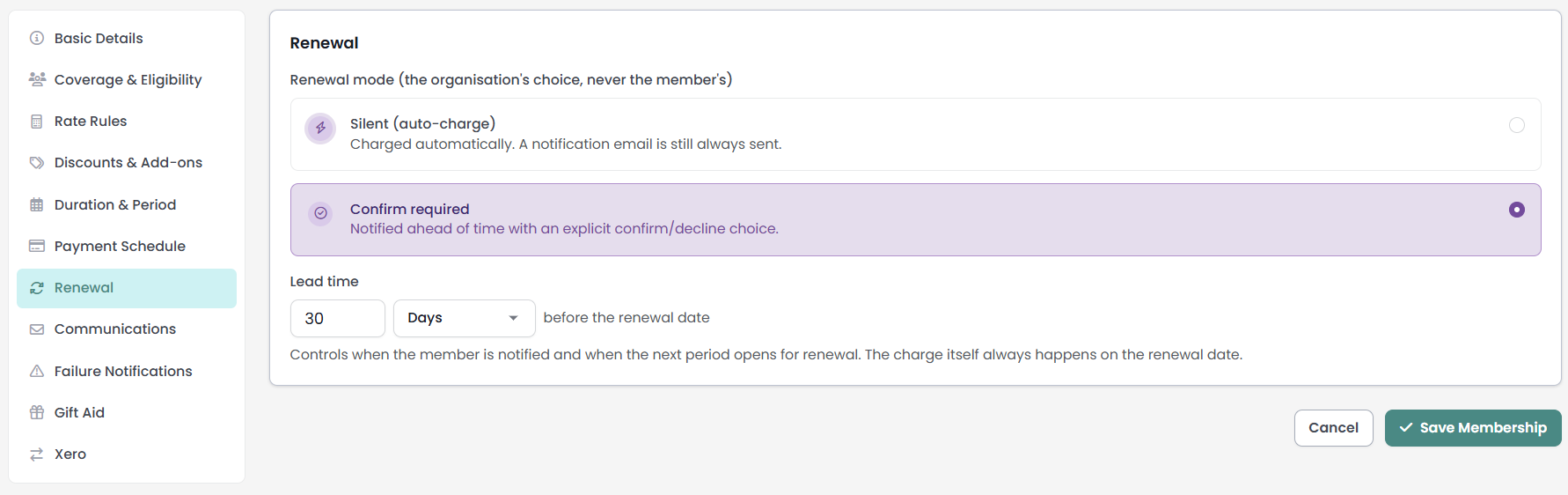
Renewal mode
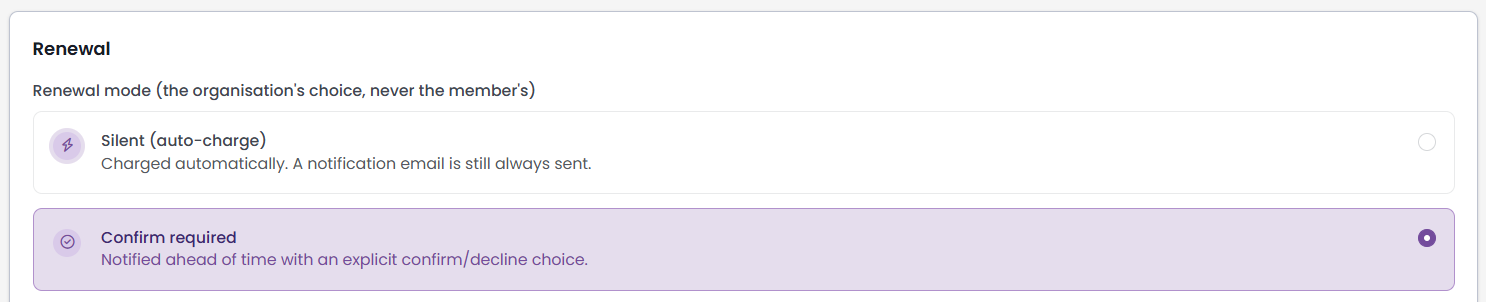
The heading on screen reads "Renewal mode (the organisation's choice, never the member's)". A member cannot switch a product between the two.
- Silent (auto-charge): "Charged automatically. A notification email is still always sent."
- Confirm required: "Notified ahead of time with an explicit confirm/decline choice."
A new product starts on Confirm required.
The difference shows up on the night the renewal opens.
Under Silent (auto-charge)
- the next period is created already confirmed,
- the member gets the Renewal Reminder email,
- and the charge goes ahead on the renewal date.
Under Confirm required
- the next period is created unconfirmed,
- the member gets the Confirmation Needed renewal email instead,
- and nothing is charged until the member answers.
Some of the email titles on the Communications tab come in two halves, a family name and the part that distinguishes it. This article names them by the second half, which is the half that tells one row from another.
What Silent (auto-charge) needs

A stored payment method on the member's record. A silent renewal is charged on the renewal date against the card or direct debit the member already has saved.
Before you move an existing product onto this mode, check that your current members have one.
A renewal that has no payment method to charge is marked Failed on the renewal date, the member gets the Payment Failed email, and the people listed on the Failure Notifications tab are told. That happens on the renewal date itself, for every member in that position at once.
Memberships collected by cheque or bank transfer are not charged this way. They are invoiced instead, and the member is emailed to ask for payment.
What Confirm required needs
The Portal add-on package, and the Portal access role permission on the member.
A renewal is confirmed by the member, on their own membership, in the Portal. Until that happens the next period sits unconfirmed and no money is taken, whatever the renewal date says.
It is the person who holds the membership who confirms.
Another member of their household can decline the renewal for them, because declining just lets the current period run out, but only the holder can confirm it, because the renewal is charged to the holder's saved payment method.
If your site does not have the Portal, or your members do not hold Portal access, choose Silent (auto-charge) so that renewals can complete.
If a member never answers, the membership runs to the end of its current period, plus any grace days set on the Duration & Period tab, and then lapses. The unanswered next period is cancelled at that moment, not before: a member is still a member while they are in grace, and they can still confirm right up to the lapse.
Lead time
Lead time is a number plus a unit, read as "before the renewal date". The unit list offers Days, Weeks and Months. A new product starts at 30 Days.
The help text under the setting says: "Controls when the member is notified and when the next period opens for renewal. The charge itself always happens on the renewal date."
- Weeks counts as 7 days and Months counts as 30 days, so a 2 Months lead time opens the renewal 60 days before the period ends.
- A lead time of 0 opens the renewal on the day the period ends.
- Lead time changes the notice the member gets, not the money. Whatever you set here, the charge is raised on the renewal date.

What the nightly job does
The renewal job runs once a night as part of the daily finance run, a few minutes ahead of the payment collection that follows it.
It works in five steps, in this order.
| Step | What it does |
|---|---|
| 1. Confirm charge outcomes | Reads the verdicts that came back on charges already sent. A paid charge is written up as a transaction and activates the membership. A refused one marks the membership Failed, tells the member, and tells the internal recipients on the Failure Notifications tab. A direct debit still settling is left in flight and the member still reads as Active. |
| 2. Open renewals | At the product's lead time, creates the next period, prices it, links it to the period it follows on from, and sends the renewal notice. Silent products open confirmed; Confirm required products wait for the member. |
| 3. Charge what is due | On and after the renewal date, confirmed next periods get a charge plan against the member's stored payment method. A renewal collected by hand gets an email asking for payment instead. |
| 4. Write grace and lapse | Periods that have ended are written as Grace or Lapsed, with the grace and lapse warning sent once. This runs after the renewals deliberately, so a period that ends tonight still gets its renewal opened tonight. |
| 5. Tidy up | Moves on the states that would otherwise stick: a Failed membership lapses once its period and grace have both run out, a join nobody ever paid for is cancelled after 30 days, and a membership waiting on the member is chased up to three times and then left alone. |
The six membership statuses
Every membership sits in one of six statuses, and the renewal settings decide how it moves between them.
| Status | What it means |
|---|---|
| Pending | Joined or renewed, payment due but not yet received. |
| Active | Paid and inside the current period. |
| Grace | The period has ended and the product's grace days have not run out yet. |
| Failed | A charge was attempted and did not go through. |
| Lapsed | Grace has run out, or there was none, and nothing renewed. |
| Cancelled | Ended on purpose, part way through a period or by declining a renewal. |
Only Active and Grace answer yes to "is this person currently a member?". Everything that asks that question, on a person's record, in reporting and in the Portal, uses the same two.
Grace and lapsed are worked out live from the period's end date plus the product's grace days, so a member reads correctly the moment their period ends, before the night job has written anything. Step 4 above simply records what is already true. The grace days themselves are set on the Duration & Period tab: see Duration & Period
A membership with no end date is always Active. It never enters grace and never lapses, whatever the grace days say.
When someone covered cannot be priced
A renewal is priced afresh on the night it opens, against the product's rates and the members' details as they stand that day. Ages recalculate, rate changes apply, and a rate you edited since the member joined is the rate they renew on.
If the rates no longer cover somebody the membership includes, the whole renewal is refused. Not that person's line: the whole thing. A price that quietly leaves a covered person out is a wrong price, not a cheaper one, and joining refuses it the same way.
What happens then:
- The current period is left exactly as it is. Nobody loses their membership because a renewal could not be priced.
- The renewal is tried again every night. As soon as the rates cover everyone, or the person's details change so that an existing rate matches them, the renewal opens by itself. There is nothing to re-trigger.
- The people listed on the Failure Notifications tab are emailed once. Once for that period, not once a night. The email names the membership, the people who could not be priced, and the date the current period ends.
That end date is the deadline. Nightly retries only reach memberships that are still Active or in Grace, so fix the rates before the current period and its grace days run out. After that the membership lapses and the renewal will not open.
To clear it, add or widen a rate on the Rate Rules tab so that everyone the membership covers matches a row, or correct the detail on the person's record that the rates match against. See Rate rules and pricing structures. The internal email also offers to let you "renew it by hand": that means adding the member's next period yourself from Add member on the product's Members list, rather than waiting for the nightly job. See The Members list for a membership product
Memberships that never renew
Four things stop a renewal from ever opening. Three of them you can undo from the screens. Deleting a product you cannot.
No rates on the product
A renewal is priced every time it opens, so a product with no rate rows cannot open one. If the last rate row is removed from a product people already hold, every renewal on it stops, the current periods run out, and those members lapse. Nothing is emailed to the office when this happens, so if renewals have gone quiet on a product, check the Rate Rules tab first.
Keep at least one rate row on any product you still want to renew. "You decide" pricing does not stand in for one.
Lifetime and Free duration
Both mean the membership has no end date, so there is no renewal date to lead up to. The Renewal tab stays fully editable on these products and what you set there is stored, but nothing reads it. The Duration & Period tab is where this is said on screen: "This membership never expires, so there is no period to anchor, no renewal to lead up to and no grace period after it. Those settings are kept but do nothing until the duration goes back to Fixed length."
Free (no expiry) does not mean free of charge. The rate rows still price the product. It describes the duration, not the price.
Offering ceased
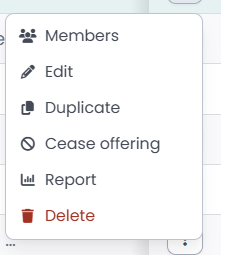
Ticking Offering ceased on the Basic Details tab, or choosing Cease offering from the product's row menu, stops the product being offered. The help text on the tick says: "Stops new joins and renewals; existing subscribers finish their current period naturally." That is what happens: current members keep their period to its end, and then nothing opens after it. Untick it, or reopen the product, and renewals resume.
Deleted products
Deleting a membership product does not check whether anyone holds it. The confirm dialog says only "Delete this membership? This cannot be undone." Members on a deleted product keep their current period and then never renew again, and no screen restores the product. If you want to stop offering a membership that people already hold, use Cease offering instead. It is the reversible one, and it lets current members finish properly.
Common questions
Does a silent renewal mean the member is never told?
No. A notification email always goes out at the lead time, whichever mode the product is on. Silent describes who decides, not whether anybody is told.
What if a member never answers a confirm request?
The membership runs to the end of its current period, plus any grace days set on the Duration & Period tab, and then lapses. The next period that was opened for them is cancelled at that point, so they cannot confirm it weeks later and be charged in full for a period that has mostly gone. Until the lapse they can still confirm, including while they are in grace.
Can I run the renewal job by hand?
No. There is no control for it on any screen. It runs every night as part of the daily finance run, and it catches up anything that was waiting.
Why does Upcoming renewals say "Not yet opened"?
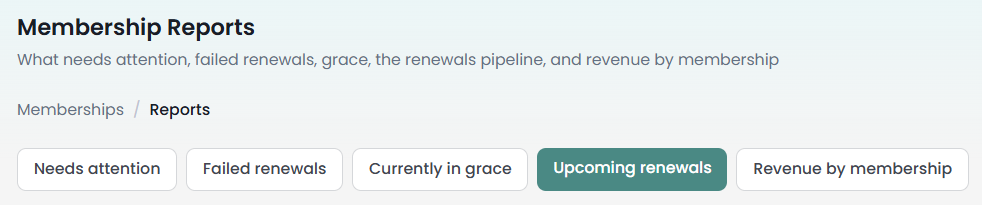
Usually because the report looks further ahead than the product does. The Upcoming renewals report on Finance > Membership Reports covers the next 60 days, whatever lead time each product is set to, and it says so in its own list of criteria above the table: "This window is the report’s own view, not each product’s renewal lead time". A renewal therefore appears in the report well before the night the job would open it. The Pipeline column is what tells you which ones have opened. See Membership Reports: failed renewals, grace, upcoming renewals and revenue
So a membership 45 days out on a 30 day lead time reads as Not yet opened and is behaving normally. It will open 30 days out.
There is one case where it never opens. The report does not exclude products that have been ceased or deleted, but the nightly job does, so a membership on a ceased or deleted product sits at Not yet opened until its end date drops out of the 60 day window. If a row is inside its lead time and still has not opened, check the product's status on Finance → Membership Products.
I changed the rates. Which price does a member renew at?
The price on the night the renewal opens, not the price they joined at. If a member set their own amount under "You decide" pricing, that amount carries over until they change it. The renewal email names the amount, so a member whose price has changed is told the new figure at the lead time rather than discovering it on the charge.
I unticked Auto-renew for a member. Does that stop their renewal?
No. The Auto-renew tickbox on a member's record does not decide whether the membership renews. The product's Renewal tab does. On a Silent (auto-charge) product the member is still renewed and still charged. To stop a single member renewing, cancel their membership; to stop a whole product renewing, tick Offering ceased on its Basic Details tab.
The renewal opened but nothing has been charged. Is that wrong?
No, and what happens next depends on the product's renewal mode.
- On Silent (auto-charge), opening the next period and collecting for it are two different steps. The period opens at the lead time and the charge is raised on the renewal date, so a 30 day lead time means a month between the two.
- On Confirm required, nothing is charged at all until the member confirms in the Portal. The renewal date passing changes nothing on its own. If the charge matters to you, check whether the member has answered.
Next steps
Set the wording of the renewal emails on the Communications tab, and decide who hears about a renewal that could not be priced or paid on the Failure Notifications tab. Both are on the same product, below Renewal in the list of settings.