Once a membership product is set to renew, infoodle opens the next period for its members overnight. Nobody in the office presses anything to make that happen. What the office does instead is watch renewals as they come up, and step in on the few that need a hand.
Renewals are watched from Membership Reports, where each one shows how far the nightly job has got with it, and acted on one at a time from the membership record itself. The settings that decide how a product renews are in Renewal settings.
Before you start
Role Permissions
- Read and Report on Transactions, Manage, Read and report on transactions, or Manage finance configurations: any one of these opens Membership Reports, where renewals are watched.
- Manage finance configurations: required for every action on a membership record. Reading a report and acting on it are two different permissions, so a person who can see a failed renewal may not be able to resolve it.
For what each role permission means and how to change one, see People Permissions.
You will also need the Membership package on your site. See Turning on the Membership and Portal packages.
Watching renewals as they come up
You can find this by going to Finance → Membership Reports, then opening the Upcoming renewals tab.
The report lists the memberships whose period is about to end, with a Pipeline column saying how far the nightly job has got with each one.
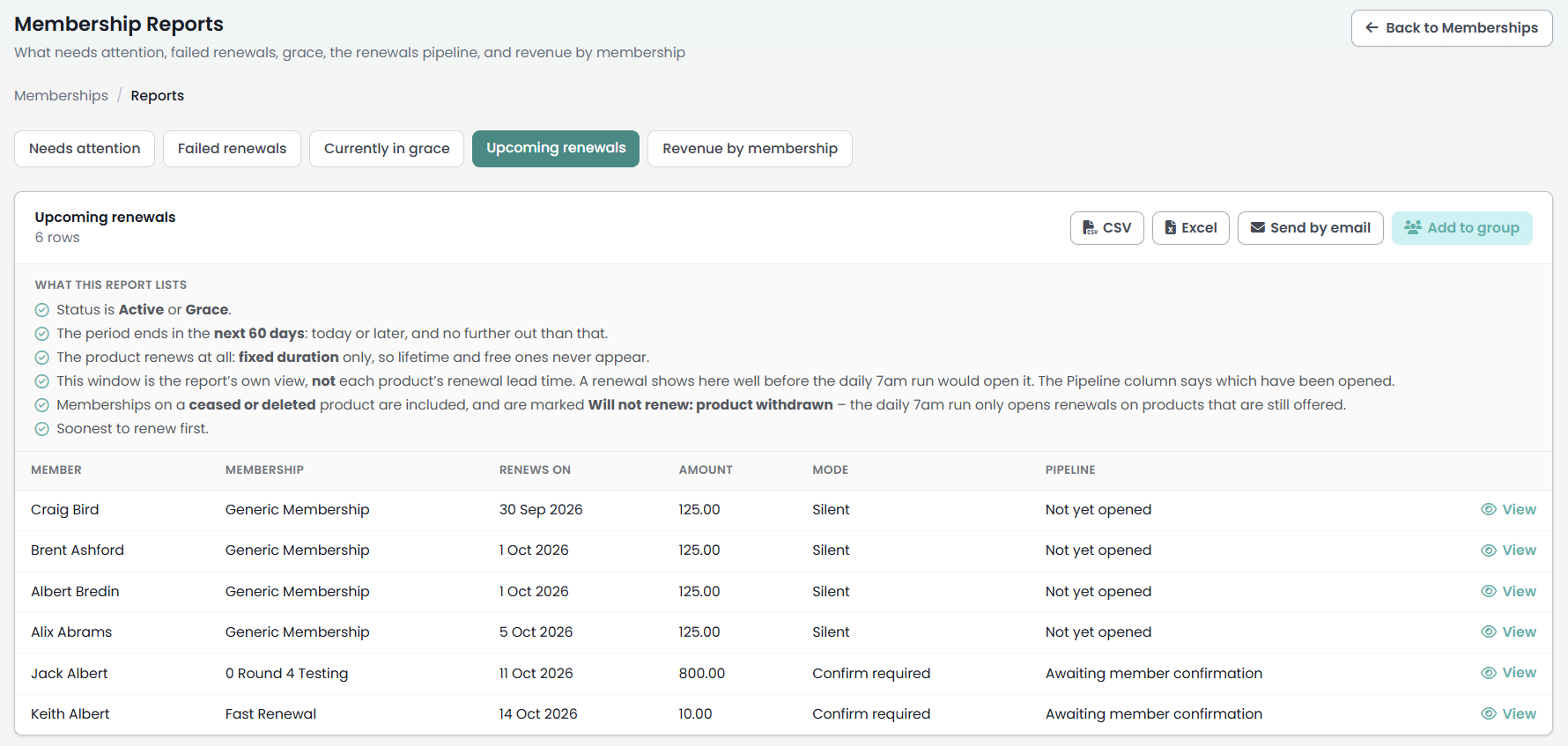
| Pipeline value | What it means |
|---|---|
| Not yet opened | The period is still running and the nightly job has not reached this one. Nothing is wrong. |
| Awaiting member confirmation | The next period exists and is waiting for the member to confirm it in the Portal. |
| Opened | The next period exists and is confirmed. It will be charged, or invoiced, on the renewal date. |
The report prints its own selection rules above the table.

- Status is Active or Grace
- The period ends in the next 60 days - meaning today or later, and no further out than that.
- The product renews at all: fixed duration only, so lifetime and free ones never appear
- This window is the report’s own view, not each product’s renewal lead time - so a renewal appears here well before the nightly job would open it. The Pipeline column is what tells you which have actually been opened.
- Soonest to renew first.
The 60-day window is the point most often missed. A membership can sit here for weeks reading Not yet opened and be perfectly healthy, because the product's renewal lead time is shorter than the report's window.
The five rules above do not mention the product. A membership on a product that has been ceased or deleted keeps appearing here with a Pipeline of Not yet opened until its end date drops out of the window, and the nightly job will never open it. The report will not tell you this has happened.
The View action beside each row opens the member's profile at their Memberships tab, not the membership record itself. Open the record from there when you need to act on it.
The other three tabs on this screen, and the export and email actions every tab carries, are covered in Membership reports.
The six statuses in practice
A membership record carries one of six statuses. The nightly job can put a membership into any of them on its own, and Cancelled is also reached by somebody pressing Cancel membership.
| Status | What it means | What the office usually does |
|---|---|---|
| Active | Paid, and inside the current period. | Nothing. |
| Pending | The period exists, and the money has not arrived. | Wait, or chase. A renewal collected by card settles itself. |
| Grace | The period has ended and the product's grace days have not run out. The member still counts as a member. | Find out why the renewal did not complete. |
| Failed | A payment was attempted and did not go through. The failure reason is shown on the record. | Resolve the failed payment once the member has fixed their payment method. |
| Lapsed | The period ended, grace ran out, nothing replaced it. | Reinstate if the member comes back. |
| Cancelled | Somebody ended it, or an unpaid membership expired. | Reinstate if it was ended in error. |
The status you see is worked out, not stored
Grace and Lapsed are derived from the end date and the product's grace days every time a screen is shown, rather than being read from the record.
One visible consequence: the status field on the edit screen stores what you choose, and the record then shows what the dates actually say. Where the two differ, the record prints both, as Active (stored: Grace).
Cancelled appears in the status picker and is always refused when you save it. The refusal says "Use the Cancel membership action rather than the status field", because cancelling has to stop the payment plan and email the member as well as change the status. Use the Cancel membership button below.
Acting on one membership
Open the membership record from the product's Members list, or from the Memberships tab on the member's profile.
Which buttons appear depends on the status, so the record only ever offers you the actions that make sense for it.
| Action | Appears when |
|---|---|
| Resolve failed payment | The status is Failed. |
| Reinstate | The status is Lapsed, Cancelled or Grace. |
| Cancel membership | The membership is not already cancelled or lapsed. |
| Cancel payment plan | There are instalments still to collect. It sits in the Payments card, under Still to collect. |
| Apply subsidy | Always. |
Most of these buttons are chosen from the status saved on the record rather than the one the screen shows you. That is why a record reading Active (stored: Grace) still offers Reinstate, and why a record whose dates say Lapsed but whose saved status is Active offers neither Reinstate nor Cancel membership. Where a button you expected is missing, read the bracketed stored status on the record first.
Resolve failed payment

Use this once the member has sorted out their payment method. It clears the failure, puts the membership back to Pending, and keeps everything already collected against it. The confirmation says "Clear the failure and put this membership back to Pending? Payments already collected are kept, and the member can pay the outstanding balance from the portal."
The outstanding balance is the agreed amount less what has already been collected, and it is shown on the record.
Read the reason on the red Payment failed banner at the top of the record before you resolve. It is the only thing on the screen that tells you which case you are in. Where the reason names a missing or unusable payment method, "No payment method on file" or "This membership cannot be collected on that payment method", no payment plan was ever set up, and resolving puts the membership straight back into the nightly charge queue. It is attempted again the following night, and if nothing has changed by then it fails again, emailing both the member and the product's failure-notification recipients a second time off the back of your own action. Check the member has a usable payment method before resolving one of these. Where the banner gives any other reason, such as a refusal from your payment provider, the retry is the member's to make from the Portal and resolving does not re-attempt the charge.
Reinstate

Brings a lapsed, cancelled or in-grace membership back to Active.
For a membership whose period has already run out, setting the status alone would not hold, because the status is worked out from the dates. So reinstating also rolls the period forward in whole product periods, counting on from the day after the old end date until the new end date covers today. The start date is left alone. The confirmation message tells you the new end date.
If money is still owed, reinstating rebuilds the payment plan for the outstanding amount only, and says so in the message. Where no plan can be built, the message says that too, and names the amount you will need to collect by hand.
Reinstate is refused on a product that has no fixed period to count in, such as a Lifetime or Free product with a stray end date. Correct the dates on the record instead.
Cancel membership

Ends a membership that is currently running. Three things happen together, which is why the status field will not do it:
- Every instalment infoodle has yet to hand over to your payment provider is cancelled, and the payment token is closed, so the member's card stops reporting itself as committed.
- The member is emailed a cancellation confirmation.
- If the next period has already been opened and nothing has been collected for it, that is cancelled too. Without this, somebody who cancels in December is still debited for a new period in January.
Cancel membership does not stop an instalment that has already gone to your payment provider. Read the Still to collect list in the Payments card before you cancel: anything marked With the payment provider can still be debited after the membership reads Cancelled. To clear those as well, use Cancel payment plan, which stays on the record for as long as anything is listed under Still to collect, and contact your payment provider to stop the payment at their end. Cancel payment plan is the only action that clears a whole plan.
Payments already collected are kept on the record, so the history stays readable. On a cancelled membership the Payments card explains why the outstanding figure reads zero.
No reason is recorded against a cancellation. The History card shows that the membership was cancelled and who did it, but not why, so note the reason wherever your office keeps that.
Cancelling is refused on a membership that has already lapsed, because there is nothing left to end and the member would get a cancellation email for something that ran out on its own.
Cancel payment plan
Stops the money without ending the membership. Use it when the amount is wrong, or when the member is paying another way, and you want the membership itself left alone.
The instalments it will stop are listed above the button under Still to collect, each marked either Due to be collected or With the payment provider.
An instalment marked With the payment provider has already been handed over. Cancelling the plan here does not cancel it there, and the confirmation says so: "Anything already with the payment provider must be stopped there too." Check with your payment provider that it has not been taken.
Seeing what happened to a membership
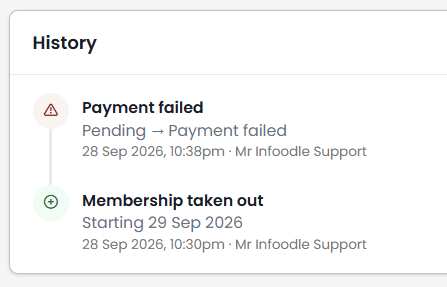
The History card at the foot of the record lists the status changes and subsidies made on the membership, with who made each one and when. It is where to look when nobody remembers who cancelled a membership or why its status changed. Payments are not repeated here, they have their own card above it.
When a renewal does not happen
Four things stop a renewal opening. Three of them tell nobody.
The product has no rates. A product needs at least one rate row before anything on it can renew. Deleting the last rate row from a live product stops every renewal on it, and nobody is told. This is the one to check first when renewals stop across a whole product at once. See Rate rules and pricing structures.
Somebody covered cannot be priced. If no rate matches one person a membership covers, the whole renewal is refused, not just that person's share. The current period is left exactly as it is, and the renewal is retried every night. This is the one cause that does produce a message: the product's failure-notification recipients are emailed about it once per period, so a second night produces no second email. Fix the rates in Rate rules and pricing, or fix the person's details on their record, and the next nightly run opens the renewal by itself.
The product has been ceased or deleted. Renewals only open for products that are still offered. Memberships on a ceased or deleted product never renew, and as noted above they keep appearing on the Upcoming renewals report as though they will.
The duration is Lifetime or Free. These have no end date, so there is nothing to renew, nothing to lapse, and no grace period. They never appear on the Upcoming renewals report. See Duration & period
A member whose renewal does not complete is told. The grace and lapse warning goes out once as the period ends, and a membership left Pending is chased. Which emails a product sends, and who its failure notifications go to, are set per product. See Communications and failure notifications.
Confirm-required renewals wait for the member
Confirm required is the default renewal mode for a new product. A renewal on a confirm-required product opens, sits at Awaiting member confirmation, and is charged only once the member confirms it.
That confirmation can only be given by the member, only in the Portal, and only by the person who holds the membership. A household member covered by somebody else's membership can decline it but cannot confirm it. There is no way for the office to confirm a renewal on a member's behalf.
This matters most on a site that has the Membership package without the Portal, or whose members do not have Portal access. On those sites a confirm-required renewal opens, is never confirmed, is never charged, and lapses at the end of the period. Check the renewal mode on your products against how your members actually pay.
Common questions
Can I run the renewal job by hand?
No. The renewals job runs nightly and there is no screen that triggers it. If a renewal has not opened, the reason is one of the four causes above, and fixing that lets the next run open it.
Does unticking Auto-renew stop somebody renewing?
No. The Auto-renew tickbox on a membership record does not affect whether a renewal opens or is charged. It only decides whether the membership appears in the member's own Upcoming Payments list in the Portal. To stop a membership renewing, use Cancel membership.
How do I stop one member's membership renewing?
Use Cancel membership on their record. It ends the membership and cancels the instalments infoodle has yet to hand over. Check the Still to collect list first: anything marked With the payment provider needs Cancel payment plan as well, and a call to your payment provider.
Do not use Remove on the Members list for this. Removing a member takes the record away without stopping its payment plan, and once the record is gone the page carrying Cancel payment plan cannot be reached. Cancel first if you also intend to remove it.
A member we generated in bulk is being chased for payment. Why?
Memberships created by a bulk generate are Pending whenever there is anything to pay, and they cannot be settled by the nightly job, whatever is recorded against the person in Finance. The member is chased on days 3, 7 and 14, and the membership is cancelled on day 30.
Two things stop that: the member pays it themselves in the Portal, or somebody opens the record and sets the status to Active by hand. If you collect by cheque or against invoices, plan for this before generating. See Generating memberships in bulk.
A renewal shows on the report for a product we no longer offer.
It will not open. Renewals only open for products that are still offered, but the Upcoming renewals report does not apply that rule, so the row stays listed until its end date leaves the 60-day window.
What does "Active (stored: Grace)" mean on a record?
The record has Grace saved on it, and the dates say the membership is still inside its period. The status you see is the one worked out from the dates, and it is the one that counts.
Next steps
Renewal modes, lead times and grace periods are set per product on the Renewal tab. See Renewal settings.