October 2026
Gift Aid
Recognised an error in your gift aid claim - after it's been filed to HMRC. You can now edit transactions and infoodle will assist with the adjustment in the next claim. All history is retained and clear what has happened in the process for acknowledgement as needed. See Removing Transactions from a Gift Aid Claim for more info.
Import - household notes
We have added the household ID to the import for notes to enable you to update and import household notes.
Pledge - frequency wording
There were some minor discrepancies in different areas of the system as to the term used for specific frequencies e.g. Weekly. These have now been standardised.
Click to Dial
infoodle phone numbers can be used in your phone system. If you have systems such as 3cx, webex, teams then you can click the link and it will dial the number for you - no re-typing the number.
See Phone numbers for more information on how to enable this feature
We have released a new package - Memberships. This is a comprehensive, flexible, automated approach to memberships. It's available as an Extension Package to the Finance package.
See more in the help docs under memberships.
We have also released another new package - Portal. This is a self service approach to managing memberships, pledges, events. It enables forms to be completed with users information and saved payment methods for users to more easily initiate donations, pledges and payments as well as catch-up payments. There is also a messaging function to connect with administrative staff.
See more in the help docs under Portal
September 2026
Move Pledge Date - change recurring dates
There are times when the donor wants to pay on a different date going forward e.g. they want to pay on the 15th in future rather than the 1st. You can now edit these dates in one go rather than having to pick each date individually. See Change Recurring Date for more information
Email Designer - Upgraded
We have upgraded the email designer which has given new features.
Count down Timer. Emails can now add the ‘timer’ e.g. for when an event will start which counts down on screen
Audit Tab. Shows potential errors and issues on the email
Social Icons. Prebuilt icons to add links to your socials
Built in Themes. You can now have light and dark mode when building emails
Payment method - now specific
The payment method used by the pledge or payout is now clear as to which one was used. Previously it was a summary field e.g. Credit Card or Direct Debit.
Bulk Reconcile - non-Xero transactions
We've improved the manual reconcile screen to assist with reconciling transactions that match ones previously reconciled. This has always worked with Xero transactions - we've now expanded this to non-Xero ones which should significantly speed up your reconciliation. Note that pledges and forms are still processed manually.
Form entries Export
We have improved the export process of entries. Previously each entry would create its own set of fields for that version - we have updated the export to combine fields into a single column where infoodle knows which field it came from. Therefore, the majority of your fields should now be in one column with only newly added columns needing new columns.
Transaction Detail - popup
When viewing a list of transactions there is now an 'eye' icon. Clicking this will review the detail of the transaction that is currently not available on the list. These extra fields include payment methods as well as other items - and a link to show the detail and its audit trail.
Move form entries when entered against wrong form
If you use inherited forms, there is the opportunity for a user to complete the wrong form depending on how you have notified them of the form to complete. In this scenario you need to re-allocate the form entry to use the correct form. To assist with this we have released the ability to re-direct a form entry.
List Views
Several screens show content as a list. This provides a standard approach to working with content including selecting columns to show, their order and filtering. We have improved the usage of these views so that filters are retained. You select a filter - click a row to work with that row - return to the screen and the filter remains active. The filter is retained on the current browser tab only, so a different browser tab works with its own filter. Closing the tab will remove the filter, or change and update the filter as you need.
We have introduced a duplicate check process. This checks your data on a schedule and each individual when shown on the profile screen to see if it's a possible match based on configurable criteria.
Merge allows you to merge all the details about contacts together, archiving one and merging/updating the other.
See Duplicate Checks for more details.
Stock Items
You can already delete (archive) a stock item, we've enabled the ability to restore (un-archive) an item also should you need to reinstate an item.
Form email response - now uses Designer emails and templates
The email sent when a person completed a form was limited in its formatting. This has now been upgraded to enable the use of emails made by the designer as well as the basic emails - and also correctly use email templates you have already prepared. See Email Response for more information
Statements - more layout options
We have added more template options - specifically around pledges. You have a new summary merge tag to give a list of the pledges in table form, and then ability to add a new page to describe the detail of each pledge. We have added a date to better control the transactions used in the statement also. See Pledge Detail page for information on the new page
August 2026
Form Versioning
We have made some adjustments to the form versioning approach we took in order to improve the usability when building forms. We have made available a number of the tabs when in published state to make edits where they don't impact the versioning of fields. See Form Versioning for what is not available when in edit mode.
Unpaid Pledge Report
A new finance report has been added to the list of pre-built reports - Aged Receivables. This shows you those people who are behind on their commitments, how much, and how many days they are behind. See Aged Receivables for more information.
Statements - select recipients
We have added the ability to more accurately identify who should be getting a statement by adding a tickbox to each person on the resulting list. This gives you greater control whilst keeping the existing filtering. See Generating Statements for more information.
Gift Aid claims - non claimable list
We have expanded the list of transactions that are shown which are not eligible to be claimed. We haven't changed the rules around these, just the display for your records.
July 2026
Zapier
Our Zapier is a tool to allow you to connect infoodle to thousands of other applications. Our integration is available for public use. See Zapier for more information on what it is and what it can do.
Webhooks
Webhooks are triggered on specific activities happening in infoodle and send out a notification to a registered URL. These are used in preference to polling where available. To find out more - see our webhook documents.
App Update
The infoodle mobile app has been updated. These updates include:
- Ability to Add and Edit To Dos
- Various bug and performance improvements
Make sure your app is running 7.0.20 to use these features.
Editor improvements
We have enhanced the editor when creating emails, statement and receipt templates so that the merge tags are highlighted. They are also clickable meaning you get to use a merge tag editor. This removes the need to manually type in merge tags and work out the combination of options available. Just type { and start to type the field names to start the process

For more information - see Working with Merge Tags in the editor
Editing Pledges
We have made some usability changes e.g. when removing initial or ending dates from a schedule the overall duration is reduced, deleting a single date from a one-off pledge will delete the pledge (after confirmation). There is also a 'calculate' button to calculate the expected fees based on your payment method setup.
June 2026
Login settings changes
We improved the management and your login. We have created a separate field specifically for the email address that is used when resetting your password. This field is restricted as to who can change it and when.
Report - New criteria
We have added a new criteria to filter by the Account Code for a pledge.
Statements/Receipts - Merge tag
We've added a new merge tag for finance users {active period}. This is the active period the donor has been giving as shown in the fundraiser summary.
Aged Receivables Report
We have added to the finance reporting in two ways:
- Aged Receivables. To give a breakdown of the state of pledge payments e.g. 31-60 days overdue, 61-90 etc.
- Profile page - finance tab - pledges tab now shows the same aged receivables as a quick view on the progress of payments.
See Aged Receivables for more information
Forms - Receipt Alias
This field is now available on forms as a field people can choose to complete.
May 2026
Pledge vs Actual Report
This report can now be configured to have 3 custom fields on the individual report, an increase from 1 previously. See Pledge vs Actual for more information.
More Design Updates
The Contact screen has been updated to the fresher design. As with the other design changes, all features and functions remain - its just the design thats been refreshed.
Edit Pledges
We have re-worked the screens that enable you to edit your pledges. This is to make the experience more consistent and bring all the features together. See Edit Pledges for more information along with cancel and delete pledges.
Design
infoodle is undergoing a design upgrade. We are working through all the screens you work with and bringing a fresh new design. As much as possible, the placement of the functions remain in the same or similar place with the same functionality. This process will take a couple of months but once complete will mean a consistent interface on all screens.
Report Schedule
We have made it easier for you to add reports to the schedule. Each report you have built, including Pledge vs Actual reports can now be added to the schedule by selecting it on the report schedule screen or clicking the icon beside it on its respective reports screen. See Scheduling reports for more info.
GASDS - invoice
If you have connected infoodle to Xero you can now generate an invoice in Xero for the claimed amount under GASDS once you have filed it. See Generating an Invoice for more info.
Forms - approve contact detail changes
To provide greater clarity of the changes being made to important contact fields we have introduced a check and confirm screen during the manual form approval process. If a change is going to be made - you are presented with a confirmation screen. See here for more information.
Inactive Logins
A new feature to assist you in managing your logins. You can select a time period after which a login is automatically disabled due to inactivity after a warning, for example after 3 months. See here for more information.
Pledge vs Actual Report
There are now options to sort this report in different ways. This helps you quickly find the pledge thats the most outstanding or least paid for example. See the Pledge vs Actual v2 Report
SA2 / GCH
We have extended this feature so that you can filter and report on people based on these codings. See here for more information.
April 2026
Statements - send based on report
Who to send a donor statement to was limited to either an individual or to a group. We have expanded this to now be able to generate a report - and then to use the output of that report to send statements to. See here for more information.
Reports - improving output
Fields can now be re-ordered
The order the fields were output on a report was fixed by infoodle - we have now improved this to give you the ability to re-order them as you wish, setting the new order as the default also. See here for more information.
Default fields, now configurable
The fixed lists of default fields are now something you can configure yourself either for your own settings, group specific or globally - depending on your permissions. They are managed on the 'select fields' tab under the new feature 'Presets'. See here for more information.
Printed receipts filters
We have updated the printed receipts screen to more clearly identify the search methods. In addition we have added an Export feature to export the currently viewed list (based on the filter). See here for the information on using this screen.
Showing Receipts on profile screen
For users who issue receipts, we have added a new Receipt tab on the persons profile screen. This gives you a quick view of the receipts. You can also quickly filter for deleted or receipts in process. See here for more information.
Receipt and Statement filenames
Some clients need to ensure the filenames comply with their own systems and provide clarity to their donors beyond the defaults. For this reason we have added the ability to configure the Receipt and Statement filenames.
Reconciling Pledges
We have made a small but noticeable improvement to reconciling transactions against pledges which shows you the current state of the pledge. This helps identify whether this transaction is appropriate for this pledge. See here for examples.
Stripe supports Direct Debits
Another significant development has just been released. We have updated our integration with Stripe to include Direct Debits, and all payment methods supported by Stripe. We have also included the ability to send custom emails to keep the donor informed of the progress of the setup and payment of their direct debit. Just enable the new features in infoodle and enable the payment methods you want in your Stripe account. See here for more info
Form Versioning
We introduced a significant improvement to the way forms are managed. You can now edit a form freely whether they have received form entries or not. This removes the restrictions and additional confirmation boxes. See here for more information on how this works.
Statements from profile page
The finance tab on the persons profile is able to generate a statement for the current contact. We have extended this to include filtering by Pledge Drive (as well as Account code and date ranges).
Gift Aid Small Donations Scheme
For UK Clients - we're pleased to announce that infoodle now supports the ability to collate and file claims under the GASDS. Its a comprehensive support which makes it easy to manage the process either fully or partially through infoodle and file directly with the HRMC. There are a number of help pages to take you through the process - click here for more information.
March 2026
Help!
We've moved the help to the top menu, from the round question mark. This is to be more inline with other systems and make it clearer to you.

Archive Templates
You can now keep your receipt and statement templates tidy. Often there are old templates you no longer need when creating new ones. You can now archive (and unarchive) as you need. See here for more information.
Reports - new field
We've added the Campaign Description as a field you can output against transactions.
Finance - New Role
We have added a new role permission. This enables you to control who can edit the templates for receipts, donor and income statements.
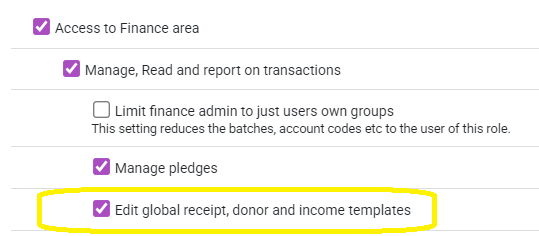
Bank Statement Import
We have now included the option to include the Unique ID in the import. This is the infoodle unique id of a contact and overrides any other matching to ensure that the contact infoodle uses is the one you want. Can be helpful when there are duplicate names or email addresses in your data.
Editing override fields warning
When editing a field on a form - and the form has child forms - and those forms have the same field overridden, you are now warned which forms will be affected that need to be checked by you before saving e.g. you could change the values in an amount field and the child form has its own values so you need to check to make sure its ok.
Reports - Field
You can now include the Campaign Description as a field to output on the reports.
February 2026
Emails that failed when sent can now be re-sent.
Reports
New Pledge vs Actual report now extended to allow up to 10 years
Forms
HTML is now allowed in the message shown to the user once the form entry has been completed.
Fixes including showing the calendar full height when embedded in a webpage; hide deleted fields from the form entry list; honouring date of birth mandatory status
January 2026
Finances - Reconcile
When matching transactions to pledges and forms, the pledge dates are now consistently shown regardless of whether the first pledge date has been processed. Previously the form would always be shown to ensure this was reconciled first - which is not always the way it works in the real-world.
Finances - Batches
We've renamed the column heading "Banked" to "Batch Total" to better reflect the different scenarios transactions appear in batches.
Security
We have applied a number of security updates to the code ensuring we continue to provide a robust and safe solution for your data.
Trial Site process
We have released a significant update which now provides an improved user experience for those trialling infoodle. We have created template sites for a variety of market segments which can optionally include sample data. This means new organisations will get a much more realistic view of infoodle compared with the previous default configuration which had no sample data and limited configurations.
API
We've added some new end points to our API which are available in our API tester once logged in. These are to list the group memberships an individual has, a specific group membership for a user, and all the members of a group.
App
A new version of the infoodle app is now available (7.0.14). Key improvements include:
Directory:
- With the Add Person permission in your role, you can now add new contacts (editing is coming in a future release)
- With the Directory permissions not set in your role, you can see groups on a persons profile to identify which groups they are a part of. You can click the group to go to the group page which shows other members and allows you to add and remove people from that group if you have the right access rights.
Groups:
- The list of My Groups is now loaded based on the logged in persons permissions
Login:
- The screens have been updated to step a user more clearly through the searching for their organisation and the login process
Bug fixes:
- In the attendance recording, initial loading and switching profiles