infoodle's finance area uses a set of specific words for the things it stores: transactions, batches, receipts, statements, giving numbers, account codes, campaigns and pledges. This page defines each one, and tells you which screen you will see it on, so you can match the word in a conversation to the word on the screen.
A few finance words also change depending on your site's country setting. Those are listed in Terms that change with your settings.
Find a term
Each term links to the section that defines it.
B Bank Account, Batch, Batch Code
C Campaign, Campaign Event, Campaign Type, Closed, Combined
D Deleted, Direct Credit, Don't import, Donor Statement
G Gateway, Giving Number, GST
I Imported, Income Statement, Inkind, Internal Name
L Location
O One-off, Open, Open ended, Organisation
P Payment method, Payout, Pledge, Pledge Drive, Printed Receipt
R Receipt, Receipt alias, Receipt Number, Receipt to, Reconcile, Recurring Income
T Tax rebatable, To Reconcile, Tracking Category, Tracking Tag, Transaction, Transaction List, Transaction processing, Transaction Type
Before you start
Role Permissions
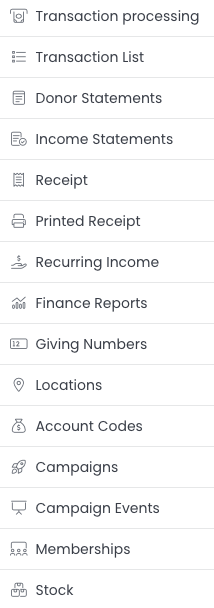
The Finance menu appears on the left of your screen if your role has at least one of these permissions:
- Manage, Read and report on transactions
- Read and Report on Transactions
- Manage finance configurations
The three are not interchangeable, and each item inside the menu has its own permission, so your Finance menu may be shorter than the list in this article. Donor Statements, Income Statements, Receipt, Printed Receipt and Recurring Income all need Manage, Read and report on transactions. Finance Reports accepts either Manage, Read and report on transactions or Read and Report on Transactions. Giving Numbers needs Edit Giving Numbers for people. Changing or cancelling a pledge needs Manage pledges.
For what each finance permission allows, see Finance Permissions. For the full permission list, see People Permissions.
You will also need the Finance package on your site. Without it, the Finance menu does not appear.
Transactions and batches
You can find these by going to Finance > Transaction processing, and on Finance > Transaction List.
| Term | What it means | Where you see it | More help |
|---|---|---|---|
| Transaction | One amount of money recorded against one person on one date. A transaction carries an amount, a date, an account code, a batch and a receipting setting. | Finance > Transaction List, and the Activity tab of a person's Finance tab | Transactions |
| Transaction processing | The screen where you build and work through batches, bank them, and reconcile bank lines imported from Xero. | Finance > Transaction processing | Transactions Xero |
| Transaction List | The searchable list of every transaction on your site. | Finance > Transaction List | Transactions List |
| Finance Reports | The finance reports built into infoodle. | Finance > Finance Reports | Finance Reports |
| Batch | A group of transactions you work on together. A batch can mean whatever is most useful to you: one Sunday's giving, one event, one bank deposit. Every transaction belongs to a batch. | Finance > Transaction processing > Transactions > Batches | Batches |
| Batch Code | The name you give a batch. Batch Code is the column heading in the batch list. The box that searches it is labelled Batch name (starts with) on the Batches tab, Batch code (starts with) on Transaction status, and Batch name on the Generate Receipts filters. | Batches list | Batches |
| Open | A batch you can still add transactions to. | Status column of the batch list | |
| Closed | A batch you have finished with. Closing is what makes a batch ready to bank and to report on. You can put it back to Open with the Re-open function. | Status column of the batch list | |
| Imported | A batch infoodle built from Xero, where every line has been dealt with. | Status column of the batch list | Statement Import |
| Reconcile | Matching a line on an imported bank statement to the person it came from, so the money is recorded against their record. | Finance > Transaction processing > Banking > Reconcile | |
| To Reconcile | The value in a batch that has been imported from the bank but not yet matched to anyone. | Batches list | Reconcile |
| Don't import | The choice you make for a bank line that should not become a transaction, for example a bank fee. It stays in the batch total but is not recorded against a person. | Reconcile screen, and the Dont Import column of the batch list | |
| Transaction Type | What the transaction is for. The five types are Account Code, Event, Membership, Stock and Inkind. | Type column of Finance > Transaction List | |
| Inkind | A gift of goods or services rather than money. It carries an Inkind Description instead of a payment. | Transaction Type list | |
| Bank Account | A bank account you have set up in infoodle for batches to be banked into. | Finance > Transaction processing > Banking > Bank accounts | Bank Accounts |
| Payout | A single lump sum a gateway pays into your bank account, covering many individual donations. The Payouts tab appears once your site has received a payout. | Finance > Transaction processing > Banking > Payouts | Payouts |
Receipts and statements
What is the difference?
A Receipt is a tax document. It gets a unique Receipt Number, and generating it marks the transactions on it as receipted so they are not receipted twice. See Receipts.
A Statement is a summary of activity over a period you choose. It does not get a unique number and it does not mark anything as receipted, so you can produce one as often as you like. A common pattern is statements during the year and a receipt at the end of it. Statements can be produced for a donor who is giving money (see donor statements), and also for those who receive money if your site is configured to capture this (see income statements).
| Term | What it means | Where you see it | More Help |
|---|---|---|---|
| Receipt Number | The unique number infoodle allocates when a receipt is generated. Numbers are never re-used, so a replacement receipt always carries a new one. | Finance > Printed Receipt, and Finance > Transaction List | Receipts |
| Receipt to | Whether a receipt is made out to the person or to their household. The two options are Individual and Household. | Finance defaults on a person's profile | |
| Receipt alias | An alternative name to print on receipts made out to the household. Use it when the household is known by one name day to day and gives under another, for example a household called The Smiths that gives as Smiths Trust. | Finance defaults on a person's profile | |
| When to receipt | Whether this person's transactions go onto one receipt each, or onto a single combined receipt. The options here are One-off, Combined and No receipt. | Finance defaults on a person's profile | |
| One-off | One receipt per transaction. | When to receipt | |
| Combined | All the transactions in the period you are receipting go onto one receipt. You choose the period when you generate the receipts, on Finance > Receipt. | When to receipt | |
| No receipt | No receipt is produced for this person's transactions. | When to receipt | |
| Donor Statement | A statement for people who have given to you. | Finance > Donor Statements | Donor Statements |
| Income Statement | A statement for people who receive income through you, such as a sponsored worker or a project lead. | Finance > Income Statements | Income Statements |
| Printed Receipt | A receipt that has already been generated. The page heading reads Printed Receipts. The Receipt status filter on that screen offers Printed, Deleted, Generated but not printed, and Email queued or Email failed. | Finance > Printed Receipt | Printed Receipts |
| Deleted | A receipt you have deleted. infoodle marks the receipt as Deleted rather than removing it, records who deleted it and when, and returns the transactions on it to the list waiting to be receipted. | Receipt status filter on Finance > Printed Receipt | |
| Tax rebatable | Whether a transaction counts towards a tax claim. It is set on the account code and can be changed on the transaction. See Terms that change with your settings for what this is called outside New Zealand. | Account Codes, and Finance > Transaction List |
Giving Numbers
A Giving Number is a number you assign to a person so you can find and record their giving without using their name. Envelope systems are the usual reason for one.
Two people who share a Giving Number in the same household/organisation will have their transactions merged together at receipting time whether or not they are archived. The Giving Numbers screen asks How to generate receipts? and offers two choices:
- A receipt is issued combining the names of the other people sharing this Giving Number.
- The donation is split equally between the other people sharing this Giving Number.
You can find these by going to Finance > Giving Numbers, or on the Giving Number tab inside a person's Finance tab.
Coding your income
These are the labels you attach to a transaction so it can be reported on.
| Term | What it means | Where you see it | More Help |
|---|---|---|---|
| Account Code | Your chart of accounts inside infoodle. Each code has a Type of Income or Expense, and carries the defaults for Tax rebatable, GST Applicable and Default Receipt Setting. | Finance > Account Codes | Account Codes |
| Campaign | A fundraising effort you want to report on as a whole, such as a building fund or an appeal. Transactions and pledges can be tagged to one. | Finance > Campaigns | Campaigns |
| Campaign Type | A grouping for campaigns, so several related campaigns report together. | Finance > Campaigns > Campaign types | Campaign Types |
| Pledge Drive | The round of asking within a campaign. One campaign can run several pledge drives over the years, and each pledge belongs to one of them. | Finance > Campaigns > Pledge drives | Pledge Drives |
| Campaign Event | An event linked to a campaign, so ticket sales and donations at the event count towards the campaign total. | Finance > Campaign Events | |
| Tracking Tag | The short code that identifies a campaign when a transaction arrives from outside infoodle. | Campaigns list | |
| Membership code | A membership you sell, with its own renewal period. Recording it against a transaction sets the person's membership and its renewal date. | Finance > Memberships | Memberships |
| Stock item | Something you sell where you want to track how many are left. | Finance > Stock | Stock |
| Location | A place you record income against, so you can report by site. | Finance > Locations | Locations |
| Tracking Category | Xero's own way of splitting income. When you connect to Xero, infoodle reads the tracking categories from Xero rather than defining its own. | Finance > Transaction processing > Xero imports | Tracking Categories |
Pledges and payments
| Term | What it means | Where you see it | More Help |
|---|---|---|---|
| Pledge | A promise to give a set amount on a set rhythm. A pledge records what was promised. The transactions that arrive later record what was actually given. | Pledges tab inside a person's Finance tab | Pledges |
| Frequency | How often a pledge is expected. The choices are One off, Weekly, Fortnightly, Once per month, Every 2 months, 4 Weekly, 3 Monthly, 6 Monthly and Annually. The Pledge Details window calls the same field Frequency Type, and shows Every 2 weeks in place of Fortnightly. | Add a new pledge | |
| Open ended | A pledge with no end date, as opposed to one with a Specified end date. | Add a new pledge | |
| Recurring Income | The screen that lists every scheduled payment infoodle is holding, what is due next, and what has already run. | Finance > Recurring Income | |
| Payment method | A way for money to reach you, set up once and then offered on forms. Each one has a Type, an Internal Name, a Visible Name, a Currency and any Fees. | Administration > Payment Methods | Payment Methods |
| Internal Name | What your team calls a payment method inside infoodle. | Payment methods list | |
| Visible Name | What the person paying sees on the form. | Payment methods list | |
| Gateway | The outside company that actually takes a card or direct debit payment. infoodle connects to Stripe, Stripe with Plaid, Ezidebit, Windcave, Flo2cash, Braintree, GoCardless, Poli and eWay. | Payment methods list, under the Type | |
| Direct Credit | A payment method type for money that arrives straight into your bank account, with no gateway involved. | Type column of the payment methods list |
Terms that change with your settings
Some finance words are not fixed. infoodle swaps them to suit the country you operate in, which is why two sites can describe the same field differently.
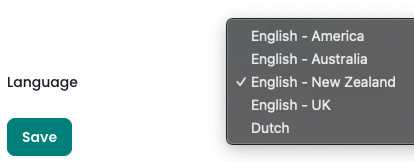
The country is set at Administration > System > Language. Click the administration cog in the top right hand corner to get there. The choices are English - America, English - Australia, English - New Zealand, English - UK and Dutch.
| infoodle's word | Australia | UK | America |
|---|---|---|---|
| Tax rebatable | Tax deductible | Tax reclaimable | Tax deductible |
| GST | GST | VAT | Sales tax |
| Text | Text | Text | SMS |
One more word changes with a setting rather than a country. If Organisation View is switched on in Administration > Modules, everywhere infoodle says Household it says Organisation instead, including the Household option on Receipt to.
A household is the people who live or work at one address. A group is people who belong to something together. A person is in one household and can be in many groups.
One idea, several labels
The setting that decides one-off or combined receipting is named differently on each screen it appears on. It is the same setting throughout, but the choices offered are not identical everywhere.
infoodle decides how a transaction is receipted in this order. The setting on the person's profile is used first. If the profile has no setting, the account code's Default Receipt Setting is used. If neither is set, the site default on Administration > System applies. Once the transaction exists it carries its own When To Receipt value, and that is what receipting reads. The Finance defaults block on a person's profile is the place to check or change what a household is set to.
Common questions
Is a receipt the same as a statement?
No. A receipt carries a unique number and marks its transactions as receipted. A statement is a summary you can reprint as often as you like. Generate statements through the year and a receipt at the end of it.
I generated a receipt with the wrong details. Can I undo it?
Yes. Open the receipt from Finance > Printed Receipt and click Delete (Printed Receipts). infoodle marks the receipt as Deleted (or Voided) rather than removing it, records who deleted it and when, and returns the transactions on it to the list waiting to be receipted - they can also be edited whilst in this state, so you can generate a fresh receipt. The original Receipt Number is not re-used, so the new receipt carries a new number.
Where is the "Receipt To" setting, on the person or the household?
It is a household setting, edited from any person in that household. Open the person, find Finance defaults in their household details, and click Edit. Changing it changes it for everyone in the household. A person can also change these three settings on their own record even when their role has no finance permission, and that change reaches the rest of their household too.
What is the difference between a campaign and a pledge drive?
A campaign is the thing you are raising money for. A pledge drive is one round of asking for it. A pledge drive can cover multiple campaigns.
What is the difference between a payment method and a gateway?
A payment method is the option your donor picks. A gateway is the company that processes it. A cheque payment method has no gateway. A card or direct debit payment method has one.
Why does another infoodle site call it something different?
Check Administration > System > Language. Terms like Tax rebatable and GST are swapped for the wording used in that country.
Next steps
Once the vocabulary makes sense, Steps to Entering Data shows the order to work through a batch, from creating it to generating receipts.
Related articles
- About Finance
- Getting Started with Finance
- Steps to Entering Data
- When to Receipt?
- What Needs Receipting?
- Who Needs Statements?
- Combining Giving Numbers
- Setting up Codes for Finance
- Definitions, a short summary of the household and receipt terms
- Glossary of Technical Terms, the general technology glossary covering terms such as 2FA, DNS and CSV