Some organisations renew every member at the same time each period with one payment request. In infoodle that is a product set to No automatic renewal (bulk invite only), renewed with a bulk run each period. It suits products whose periods start on a set day, for example 1 February.
Step 1: Set the product to be renewed by bulk run
- Go to Finance > Membership Products and open the product.
- Open the Renewal tab.
- Under Renewal mode, choose No automatic renewal (bulk invite only).
- Save the product.
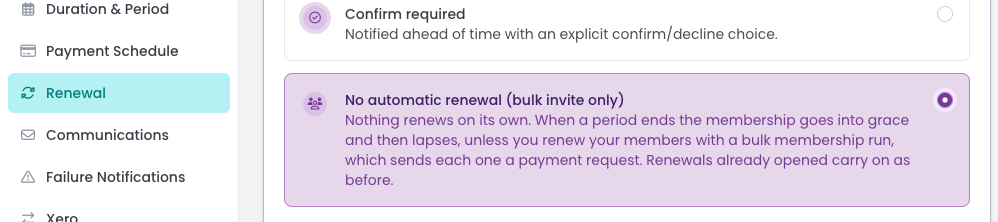
The daily run now opens no renewals for this product, so Lead time is hidden. Renewals already opened carry on. For the other modes, see Renewal settings.
Every member of this product now needs a bulk run to renew. If no run is done, their memberships go into grace and then lapse.
What members see when a period ends
When a period ends and nothing has renewed it, the membership goes into grace and then lapses. Members are sent Grace / Lapse Warning (Renewed By Bulk Run) instead of the usual Grace / Lapse Warning if enabled. It says you will be in touch about renewing, with no "Please renew" link. A member whose renewal is already invoiced isn't sent the first notice.
In the Portal, the membership says "Your organisation will send you a payment request at renewal time."
Step 2: Run the renewals each period
Run it in the weeks before the new period starts. A member who pays early stays Pending until the period's first day.
- Start a new bulk run for the product. See Choose who a bulk run includes.
- Use the condition Existing member of with this product. Members in grace are included already. Tick Including lapsed only to bring lapsed members back too: it has no time limit.
- Leave Period starts on at the start of the next period.
- Preview, then confirm. See Preview a bulk run.
A household whose last membership ended within one period of the run's start is a Renewal, following on from the old one. Anyone whose last membership ended longer ago is New, and is invoiced as a new member. Renewals are always invoiced, never invited, and members keep their payment day.
A member whose current membership is still unpaid is skipped by the run. An unpaid renewal is not cancelled when the old period lapses. It follows the usual reminders. See Reminders and cancellation for unpaid bulk run memberships.
Common questions
Can I renew a Silent or Confirm required product with a bulk run?
Only members whose membership has lapsed, and they are added as New. Members with a current membership are skipped because it renews by itself.
Next steps
For products that renew by themselves, see Running renewals.